
Quick start setup
First, go to /admin/config/services/wayfinding and scroll down to the entity types for destinations and sources - all other settings can be ignored in this example.
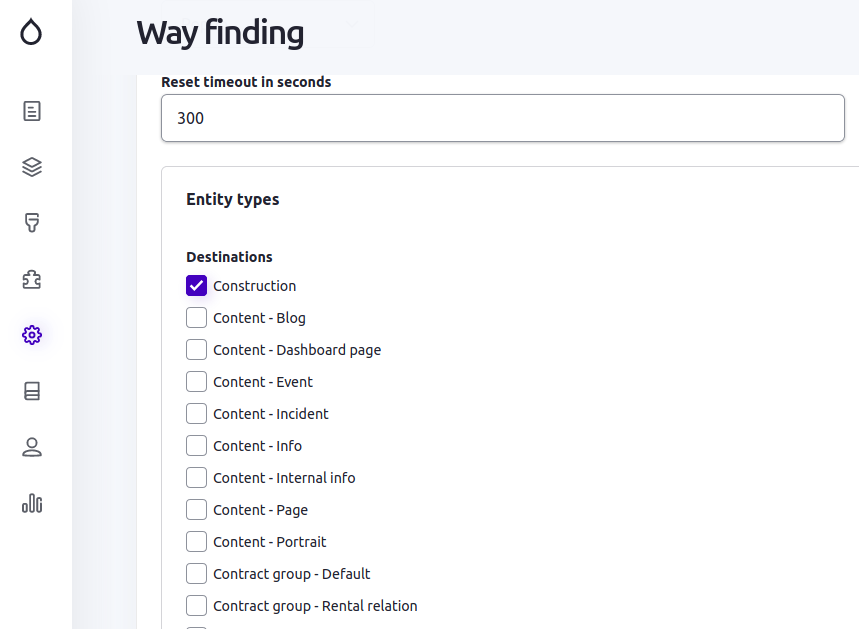
The destination section shows you a list of content entity types and bundles, that are available on your website. Select those, that are potential destinations, i.e. items on a map to which somebody may want to navigate:
Further down in the same settings form, you'll get to the sources section, which lists content entity types available on your site and you should select those, that may contain entities that will be listed in the legend of the way finding:

Save your changes and then go to your destination entities, to edit them to define, which of those should be included in you way finding widget:

Edit each of your entities that should be included as a destination. In the entity edit form, you'll find a new section Way finding - enable the first checkbox and enter the SVG ID of that destination into the last field of that section (more about SVG IDs can be found here):

When all your destination entities have been edited, go to /admin/content/wayfinding and you'll find a list of all the prepared destinations. At the top of the page you find the section to setup your background image for the way finding widget. If not already uploaded, click the respective link and upload your SVG background image, which should have been prepared following these instructions:

Now is the time to move on to create and/or edit your source entities, those which will be shown in the legend of the way finding widget. The visitors of your website will then be able to select one of those sources, and the destination(s) associated with that source will then be highlighted on the map.
For all your source entity types, you need to add one or more entity reference fields to allow your editors to then link the source entities to the destinations they belong to. Once you've added that field, it's time to edit the sources:

The entity edit form for entity types you configured as potential sources, contain a new way finding section (shown in the right sidebar in the following screenshot). In that section, enable the Publish checkbox. In our example, we added an entity reference called Way finding construction and in that field, we have to select the destination for each of your sources. - Note: you can also allow multiple values in those entity references if your sources may belong to one or many destinations:

And that's already all you need to do, check it out, flush the cache and go to /wayfinding on your site and you'll see the result. By default, in landscape mode the background image is on the left and the legend is on the right.

Click on one of the sources there and the associated destination(s) will be highlighted on the left:

To watch this sample on the real site, go to our Salles Demo Site, which was built to create these samples.
Help improve this page
You can:
- Log in, click Edit, and edit this page
- Log in, click Discuss, update the Page status value, and suggest an improvement
- Log in and create a Documentation issue with your suggestion

