
 Come together with the global Drupal community in Rotterdam, 28 Sept – 1 Oct 2026. Sessions, contribution, connection, and Early Bird savings until 8 June.
Solution Solutions
Introduction
This guide will discuss three techniques for displaying or distributing the solution to a Crossword file. If none of these techniques work, remember that there's a button on the playable puzzle to reveal the solution. Maybe you don't need to put the solution anywhere special!
Crossword Solution Field Formatter
When you enable the Crossword module, the Crossword Solution field formatter is available as part of its core functionality. (That is, you don't need to enable any submodules.) When configuring the field formatter, you can choose html tags for the title, author, and notepad, or you can choose not to render any of those fields.
One specific way to use this formatter would be to configure a new view mode for your Crossword Puzzle content type called "Solution." Then select the Crossword Solution formatter for the Crossword field.

But then how does one actually view the Solution view mode? The Crossword modules does not provide any special functionality surrounding this question, but Drupal provides many options. One elegant option would be to use the contrib module View Mode Page. In this guide, however, we will consider a core solution by leveraging Views. You could create a page view of Crossword Puzzle content displayed in the Solution view mode. A contextual filter could be used to load the desired puzzle. The content ID would be the easiest parameter to use.

Now we can navigate to a path like /crossword-solution/1 and see the solution to the corresponding Crossword Puzzle node. Creating a link to this View page can be done in any number of ways, none of which will be discussed in detail here. For one option, see the path() twig extension.

The output is html, so you can theme it any way you'd like.
Crossword Solution Thumbnail
The sub-module Crossword Image adds functionality related to creating an image from a Crossword file. You must enable this sub-module to use its functionality.
drush en crossword_imageOnce this sub-module is enabled, a new field formatter for Crossword fields becomes available: Crossword Image. Let's choose that for the Solution view mode of the Crossword Puzzle content type. We can select Solution Thumbnail as the Crossword Image Type. We probably don't need to link to anything.

Now when we view the Crossword Puzzle in its Solution view mode we see an image.
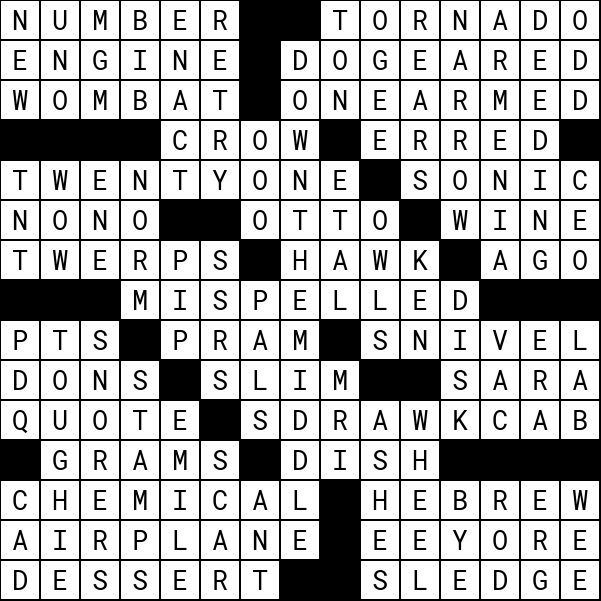
This is a true image, not html, so you can't theme it. You can use image styles on it, but there's no other easy customization. If you want to change the font, for example, you would have to create a new crossword_image plugin. See the guide to the Crossword Image submodule for details.
Crossword Solution Download Link
This third option may be the simplest since we will not need to configure a Solution view mode for the Crossword Puzzle content type. This technique involves using the Crossword Download submodule, which has numerous dependencies including two contrib modules that are not part of the Crossword project: Token and File Download Link. You should include those in your project using composer before enabling the Crossword Download module.
composer require drupal/token
composer require drupal/file_download_link
drush en crossword_download
The Crossword Download will provide a new field formatter for Crossword fields called "Crossword Image (download link)." If we select that field formatter we can configure it to create a link directly to the solution thumbnail.

The generated link in this case might look like this:  Clicking that opens the solution image in a new tab.
Now how would that link be placed on the page? If you're using Layout Builder, it could easily be placed on the full view mode since you can render the same field as many times as you want with different field formatters. If you're not using Layout Builder, maybe you created a View block that renders the Crossword field of the node being viewed using the Crossword Image (download link) formatter. For a solution outside the UI, you could use this field formatter inside a preprocess function as described in this excellent blog post on rendering fields programmatically.
Help improve this page
You can:
- Log in, click Edit, and edit this page
- Log in, click Discuss, update the Page status value, and suggest an improvement
- Log in and create a Documentation issue with your suggestion
