

 Come together with the global Drupal community in Rotterdam, 28 Sept – 1 Oct 2026. Sessions, contribution, connection, and Early Bird savings until 8 June.
Problem/Motivation
Discovered in #3066006: Convert Views UI to new design system.
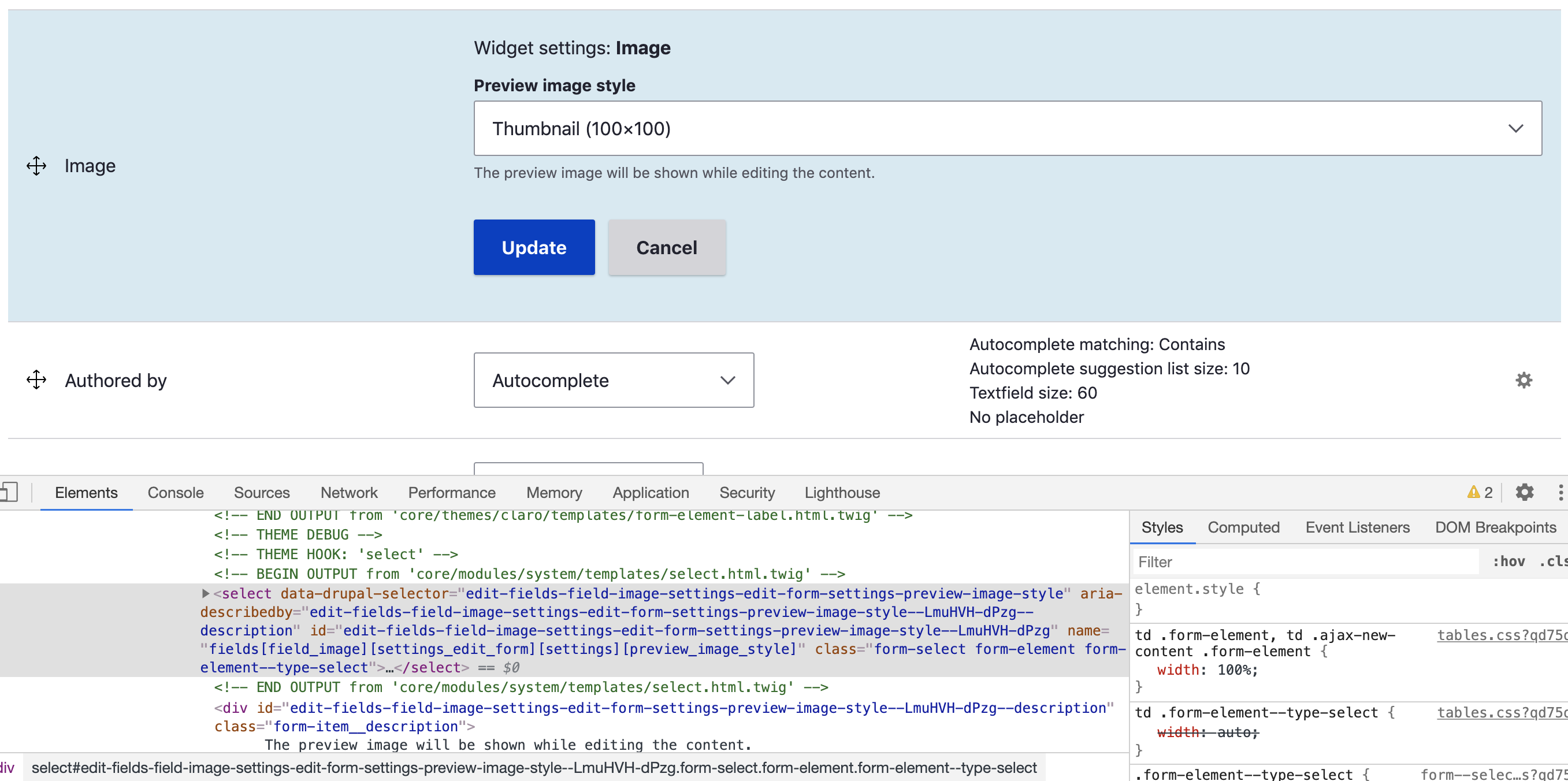
If there is a select input in a table, its width is not factored into determining column width and can result in what is seen in the lower right of this group of screenshots.

Note that this is not a problem in views as a recent redesign addressed it there.
Proposed resolution
Probably change the style in tables.pcss.css that is causing this
td > .form-item > .form-element,
td > .ajax-new-content > .form-item > .form-element {
  width: 100%;
}
Steps to reproduce
Go to en/admin/structure/types/manage/page/display
Click "show row weights" if they're not already being shown.
Narrow the viewport until you see this thing:

User interface changes
API changes
Data model changes
Release notes snippet
| Comment | File | Size | Author |
|---|---|---|---|
| #29 | Screen Shot 2021-06-11 at 6.30.57 AM.png | 70.91 KB | bnjmnm |
| #27 | 3135457 Android 1.png | 156.1 KB | chetanbharambe |
| #27 | 3135457 Android.png | 160.29 KB | chetanbharambe |
| #27 | 3135457 iPhone.png | 177.28 KB | chetanbharambe |
| #27 | 3135457 one.png | 352.86 KB | chetanbharambe |
Issue fork drupal-3135457
 Show commands
Start within a Git clone of the project using the version control instructions.
Or, if you do not have SSH keys set up on git.drupalcode.org:
 changes




Comments
Comment #2
bnjmnmComment #3
pradeepjha commentedComment #4
pradeepjha commentedWe can change width as auto for form-element of Claro theme table component. That will help select field to stretch based on it's select options.
Testing Steps:
Comment #5
pradeepjha commentedComment #6
bnjmnmThanks for the patch! I think this is close but noticed something:
While this fixes the issue with select elements, it also leads to a regression.

Without the patch, width 100%
With the patch, width auto

I imagine this can be addressed by creating a style more targeted to select elements since
td > .form-item > .form-elementimpacts many elements that aren't part of the reported issue.Comment #7
pradeepjha commentedComment #8
pradeepjha commentedThanks. Updated patch. Made change more specific to select element.
Comment #9
KondratievaS commentedTested patch from #8. Select width are ok now, but buttons are too big now, which was not the case before - probably regression
Comment #10
KondratievaS commentedComment #11
pradeepjha commentedThanks for your feedback @KondratievaS. We have also faced same issue but not in incognito window of browser. It's might be your browser cache. Please clear your browser cache and then test it again.
Comment #12
KondratievaS commentedThanks for your comment @pradeepjha. You are right - can not reproduce this bug anymore
Comment #13
KondratievaS commentedComment #14
xjmThanks for working on this issue!
Tagging for frontend committer review.
Comment #15
lauriiiIs there a particular reason the select element has to be strictly at the root of the cell? Could we just target
td .form-element--type-select?Comment #16
bnjmnmSetting to Needs Work for #15This can get either for a patch update or a comment explaining why a change isn't needed.
Comment #17
kiran.kadam911Comment #18
kiran.kadam911@lauriii @bnjmnm For #15 targeted select element using child selector I think @pradeepjha used same implementation as per previous for select like below from existing code which is good to go,
And If we directly target form elements inside TD like below,
It will target all form elements (input, select, etc.) inside TD & break other form elements that are nested. See the below-attached screenshot. Example from /admin/structure/types/manage/article/form-display widget and it's settings from icon.

In my opinion, we should go head with the child selector approach(
td > .form-item > .form-element--type-select), Feel free to add your opinion.Minor update in the patch related to select element, Kindly review.
Thanks!
Comment #20
kiran.kadam911Comment #21
tanubansal commentedAfter adding a latest patch, select list width is appearing as expected on all the browsers and devices.
This can be moved to RTBC
Comment #23
ckrinaRe #15:
I think the key point is having 100% set on all form elements. It does look better on a visual perspective, but it’s overriding a feature that gives clues to the user about how much content is expected to be filled. So UI is breaking UX. I'd say setting
width: auto(or removing it entirely, not sure about the code) gives this control back to whoever is defining the form.A clear example is with smaller fields inside a multiple field: (thanks @slv_ for the screenshot and rising the issue!)
Comment #25
sakthivel m commented#25 Just Re-roll the patch
Comment #26
chetanbharambe commentedComment #27
chetanbharambe commentedThis issue I am not able to reporoduciable on 9.3.x version
Working as Expected.
Testing Steps:
# Goto: admin/appearance -> Apply Claro theme
# Goto: http://drupal9-3.dd:8083/en/admin/structure/views/view/comment
# Click on Settings under Format
# Check the width in table
Looks good to me.
Please find attached screenshots.
Comment #28
chetanbharambe commentedComment #29
bnjmnmRe not being able to reproduce in #27
This is fixed in views, but it is still a problem elsewhere. Using the inspector to search for
td > .form-item > .form-elementwill show the style documented as causing the issue is now overridden in views.Forms such as the node display UI still show the issue. Steps to reproduce have been added to the issue summary.
Comment #30
sakthivel m commented#30 Please review the patch
Comment #32
sakthivel m commentedComment #33
bnjmnmThe most recent patch added a file from an unrelated issue. There aren't any changes related to this issue, so I opened a merge request based on the prior patch you provided, and this issue can continue working with the merge request instead of patches.
Comment #35
bnjmnmIssue #3205412: Form element in tables is not readable on mobile was created as a duplicate of this, and it has essentially the same solution, but it may be worth crediting the contributors on that issue since they were not aware they were duplicating the work here.
Comment #37
kristen polSeems to be a duplicate of #3159896: Select form field values are hidden at narrow screen widths in Claro theme but I haven't compared the patches.
Comment #40
lauriiiClosing as a duplicate of #3159896: Select form field values are hidden at narrow screen widths in Claro theme.