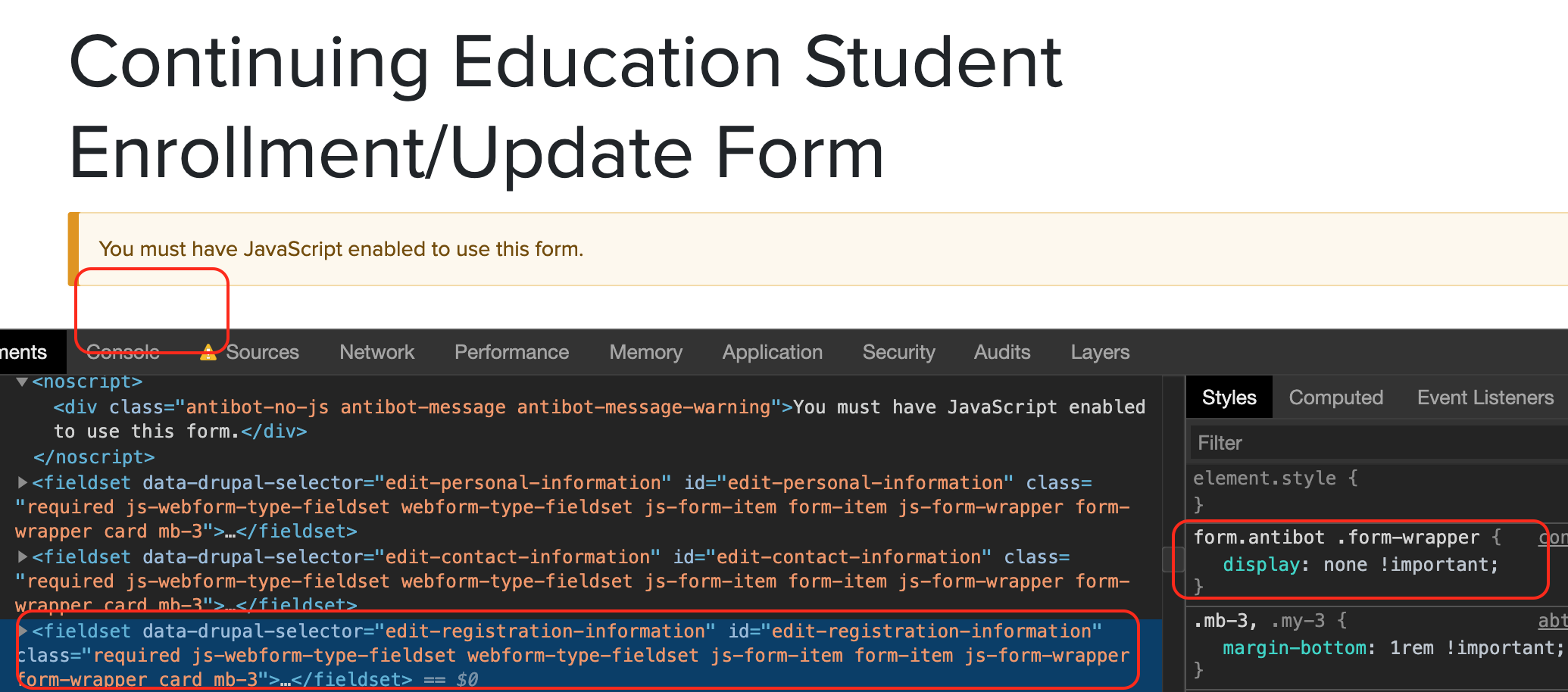
I'm seeing an issue when using a Bootstrap-based theme, where the form's top-level elements are not properly hidden when Javascript is disabled.
See before / after screenshots in first comment below.
Basically, the problem is:
1) Bootstrap overrides default Drupal form templates, removing the <div class="form-wrapper"> that is usually there.
2) A Webform places a <fieldset class="form-wrapper"> at the top level child inside the <form> element. The fieldset is styled in CSS to have a border.
2) The contents of the fieldset are hidden by way of the NOSCRIPT CSS rule that is supposed to hide all elements from antibot module, but the fieldset itself is not hidden due to it being at the top-level of the form, but the display: none only hides elements 2 levels down or below.
form.antibot * :not(.antibot-message) {
  display: none !important;
}
The fix I've found for my own theme is to add the following:
/**
 * Implements hook_page_attachments_alter().
 */
function mytheme_page_attachments_alter(array &$page) {

  // Alters the noscript style in HEAD added by antibot, to support bootstrap
  // form styles.
  foreach ($page['#attached']['html_head'] as $key => $value) {
    if (!empty($page['#attached']['html_head'][$key][1]) && $page['#attached']['html_head'][$key][1] == 'antibot_style') {
      $noscript_style = [
        '#tag' => 'style',
        '#value' => 'form.antibot .form-wrapper { display: none !important; }',
        '#noscript' => TRUE,
      ];
      $page['#attached']['html_head'][$key] = [$noscript_style, 'mytheme_antibot_style'];
    }
  }
}
I don't know offhand if this would work more widely to be adopted into the project, it needs to be tested on more standard Drupal themes like Bartik I guess.


 Show commands
 changes


Comments
Comment #2
jwilson3Before:
After:
Comment #3
jwilson3Comment #4
jwilson3Here are two additional ways that might work for a wider audience:
Option A)
Hide everything, then unhide the nodscript:
Option B)
Add the 'antibot-message' class to the tag inside the form, then remove the '*' selector from the CSS rule:
Option C)
Hide *everything* in the antibot form, and move the noscript outside the form html, so it is not affected by the display: none.
I personally like this option 3 the best, but I don't know how easy it is to alter the form to put the noscript tag warning either before or after the form tag, eg using #prefix or #suffix.
Comment #5
tim-dielsI'm having the same issue with markup elements in webforms.
Comment #6
mstef commentedThere's two issues that we've dealt with in the past that need to be taken in to account: 1) You cannot put CSS within a noscript tag (it works but it's invalid), 2) We need to avoid the "flash" that occurs if we hide the form, then use JS to reveal it.
Comment #7
jwilson3Thanks for the feedback @mstef.
My understanding is that a style tag inside a noscript tag is valid when the noscript is inside the head element. If you're looking at comment #4 item C, then that is pseudo-code. I just forgot the script tag.
A clearer example for comment #4's Item C would be:
If we're hiding the form with CSS inside a noscript tag, I don't think this could happen. But if one were to hide the form in another way that did cause a flash, one could avoid the flash by putting the javascript inline with the form element, and not requiring any dependencies (like jQuery).
Eg.
Comment #8
gaurav.kapoor commentedClosing this for now as there hasn't been much activity for a long time. Please reopen in case if anyone thinks we should work on this further.
Comment #9
jwilson3This fell off my radar because — as I wrote in the issue summary — I made a custom theme-specific workaround). But I guess I don't understand... you're closing this issue issue which causes out-of-the-box integration issues with webform and (ever popular) bootstrap-based themes just because there wasn't a patch? I guess you're free to maintain how you like, but typically contrib modules would leave open issue open so other people can find them and work on them.
The solution I proposed seems like it would be a clear simplification of the front-end code, as it would remove the asterisk selector which is screwing up things as it makes faulty assumptions that there will always be an unstyled container div between the form element and the drupal form fields.
I had another closer look at how to implement this. I really dislike the JS approach, but given the limitations of the Drupal form & render apis, it's not going to be as easy as some pseudo-code above made it seem. In order to get the "noscript" message outside the form, we'd need to implement a template suggestion form__antibot and a twig template implementation to place the noscript message outside of the form.
So I thought about another approach:
1.- ensure the antibot message is always the first element. Module already does this by setting the #weight to -500 which seems reasonable.
2.- Use the sibling selector
~to hide all other sibling elements and their children.@gaurav.kapoor do you have any thoughts about this as a valid approach?
Comment #10
gaurav.kapoor commentedComment #11
gaurav.kapoor commentedComment #12
gaurav.kapoor commented@jwilson3 I read all the comments a I agree we should do some modifications here if Antibot is breaking things when using Bootstrap or Webform. But this issue only happen when JavaScript is disabled? Under what scenario could JS be disabled?
Comment #13
gaurav.kapoor commentedThe usage of sibling selector looks like a good solution if that helps.
Comment #14
jwilson3Three cases I can think of:
Comment #15
gaurav.kapoor commentedComment #16
franckylfs commentedHere's my fix based on option A) of @jwilson3 but simplified. From my point of view, only first level elements should be hidden. It's easier then to target items to display. Applied CSS looks like this :
form.antibot > * { display: none !important; } form.antibot noscript { display: block !important; }Edit: The character > is displayed as
>in the tag... Forget it for now. Sorry.Comment #17
franckylfs commentedHere's a new functional patch.
Comment #19
danrodI tested the patch below and works as expected (screenshot attached):
Tested form too. I'll move this to RTBC and merge it shortly. If anyone has question or concern with this issue, please let me know and I'll re-open the task.
Comment #21
danrodComment #22
danrodMerging it to 2.0.x for now, if anyone has any questions or concerns, please let me know and I'll re-open the task.
Comment #23
danrod