

Closed (fixed)
Project:
Domain
Version:
6.x-1.0-rc5
Component:
Miscellaneous
Priority:
Normal
Category:
Support request
Assigned:
Unassigned
Reporter:
Created:
16 Aug 2008 at 14:16 UTC
Updated:
25 Oct 2015 at 19:57 UTC
Jump to comment: Most recent, Most recent file

Comments
Comment #1
nirvanajyothi commentedupdated title...
Comment #2
agentrickardOne way to do it is to tell your local 'hosts' file where to direct the 127.0.0.1 local address.
I run a testing server on OS X, and have the following in my etc/hosts file:
Which lets me do testing on the local machine. You can also set up Virtual Hosts through Apache, I believe. But editing hosts works fine for me.
Comment #3
nirvanajyothi commentedany clue...where i can find the 'hosts' file ?
I am using wampserver (http://www.wampserver.com)to run local host in my windows Xp.
The main folders and files inside the WAMP folder are...
folders
alias
apps (inside which is phpmyadmin and sqlitemanager main folders)
bin
del
help
lang
log
scrips
tmp
www
files
wampmanager.ini
wampmanager.tpl
Thank you
Comment #4
agentrickardNo idea.
Comment #5
nirvanajyothi commentedk.will wait till i get lucky.may be some users will be using wampserver and domain access.
Thank you.
Comment #6
agentrickardThis should be something you can find out in the WAMP server documentation or with a quick Google search. I just do not use Windows, so cannot answer the question.
Comment #7
nirvanajyothi commentedok.
Thank you.
Comment #8
Ibn al-Hazardous commentedIt should be the file "lmhosts" file. More info here:
http://en.wikipedia.org/wiki/LMHOSTS
Comment #9
nirvanajyothi commentedthis link seems to be informative.will report after trying it out tomorrow.
Thank you Ibn.
Comment #10
nirvanajyothi commentedthe lmhosts for windows is at C:\WINDOWS\system32\drivers\etc\ as per the wikipedia article.
I have added the lines to it
127.0.0.1 localhost
127.0.0.1 localhost/lab
127.0.0.1 localhost/lab2
to it....
Still have not found out whether its functioning...
My test site is http://localhost/lab
Installed Domain Access and now i need to ad the primary domain name...It went all wrong and couldnt access the test site after i added http://localhost/lab as primary domain name...because i was being redirected to http://http://localhost/localhost/lab/ or similar after that....
Can you tell me what i need to add as primary domain name if the domain is http://localhost/lab/
-thank you
Comment #11
nirvanajyothi commentedAlso i 'think' one needs to be careful to avoid mistakes(though very rare) while typing in the primary domain name on a live site...because when i got it wrong, even after i typed in the correct url i was redirected to the wrongly entered primary domain....which made it hard to get back to the correct site.
- thank you
Comment #12
Ibn al-Hazardous commentedIn response to #10, I'd suggest you don't include slashes in domain names (but dots are ok). This will likely work better:
As for mistyping when you enter primary domain name (#11) - that is a problem. Though you really don't need to delete and start over. You can add the typo to lmhosts too (that way the form updating the primary will have effect - afterwards you can delete the typo from lmhosts), or you can change the "domain_root" entry in the {variable} table. Both are less work than reinstalling.
Comment #13
nirvanajyothi commentedk.Thank you Ibn al-Hazardous .will try doing that.
Comment #14
agentrickardIf you change 'domain_root' in the {variable} table, you will also need to empty the {cache} table -- or at least drop the 'variables' row from that table.
Comment #15
nirvanajyothi commentedDone.
Thanks to Ibn al-Hazardous and agentrickard.
How was it done?
1)Installed Drupal on local host
2)Added the lines for subdomians to 'hosts' file in windows (C:\WINDOWS\system32\drivers\etc\hosts )
Eg.
Any name (Eg.one.local.test ) can be used for the subdomains and any number can be added. Make sure to leave atleast one space between 127.0.0.1 and the name in all lines added.
3)Installed and enabled Domain Access module (as per instructions for DA)
4)The new DA module (6x-2.0) automatically detected the primary domain as 'localhost' .
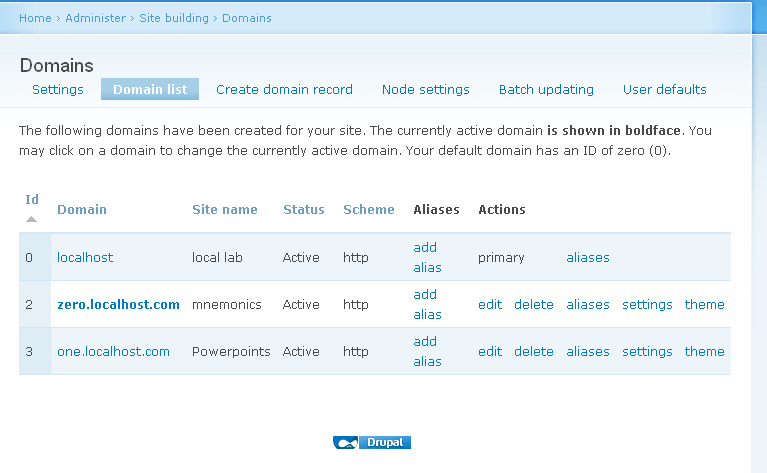
Then, created 'new domain records' corresponding to the subdomains added to the 'hosts' file from admin/build/domain .
Eg.
The new site and subdomians are working fine on localhost.Spend some time on this.
Hope this proves useful to those who would want to to try DA locally .
-thank you
Comment #16
mspsyron commentedTip:
And to call your live domain you just type http://www.mydomain.com
And for your local domain you type http://mydomain.com
works good for me :-)
Comment #17
nirvanajyothi commentedThis message is being shown when i try to login into the local drupal installation.
Started happening after i recreated a settings.php file after accidentaly deleting the old one. The local site (http://localhost/domain/) was functioning well with that settings.php. Cant figure out where the trouble is, now. Missing something in settings.php? Please help.
-thank you
Comment #18
mnp commentedhi nirvana jyothi
iam trying to install domain access
in mylocalhost etc/hosts
127.0.0.1 localhost
127.0.0.1 newone.localhost
127.0.0.1 web.localhost
creating domain record i gave newone.localhost if i click on domain view link iam getting page not found
can u help me before creating sub domain any folders to create in main domain folder or any settings
where to place my settings.php for sub domain
please tell me
iam searching for this since 15 days
Comment #19
nirvanajyothi commentedSettings.php is in the sites/default folder as usual and you only need this settings.php for all subdomains.
Hope you have added the lines for DA in settings.php
Comment #20
mnp commentedthanks for ur reply
i created domain record but if i click one.localhost.com it is redirected to blankpage
http://one.localhost.com/newproject/admin/build/domain/view
no view created with my domain access module
if i edit domain record this meessage displayed
http://one.localhost.com/newproject/ is not responding and may not be configured correctly at the server level. Server code 404 was returned.
Comment #21
nirvanajyothi commentedThe Domain list link for one.localhost.com takes me to http://one.localhost.com/drupal-6.10/admin/build/domain/view
I hope you get help. Me not an expert .
Comment #22
nirvanajyothi commentedCan you check the 'Domain' database table and see whether they are correct?
Comment #23
mefisto75 commentedConfigured and it worked, thanks to everyone in this thread. But I get Access denied when I enter Admin pages for that subdomain. Do I have to assign user 1 for every subdomain?
P.S. Fixed. Just logged in as user1 in that sub. Can't believe it's working)
P.P.S Edited settings.php to add dot before example.com at cookie domain.
Comment #24
fehin commentedWampserver has my local site url as localhost/site-name, example localhost/estates
If I want something like Newyork.estates.com and Lasvegas.estates.com, how do I configure the subdomains?
Thanks.
Comment #25
lzimmerman commentedUsing Acquia's Dev Desktop for local Windows development, I was also able to set up Domain Access successfully on localhost by editing the hosts file at C:\WINDOWS\system32\drivers\etc\ as described above.
One additional step was necessary in my case in order to prevent a new database setup for the additional subdomain: editing the vhosts.conf file.
Here's the procedure:
<VirtualHost *>through</VirtualHost>), and paste it at the bottom of the file.Once Dev Desktop's Acquia Drupal stack had been stopped and restarted, the new subdomain functioned normally.
(Note: I am using a Drupal/DA 7.x, but basic setup appears to be the same.)
Comment #26
drupalok commented@Izimmerman
Can you post the code you added in the hosts file? as Acquia uses localhost:(portnumber) i am still struggeling to find the correct configuration...
Comment #27
lzimmerman commented@drupalok
Absolutely. Here's the updated hosts file:
127.0.0.1 localhost
127.0.0.1 site.localhost
127.0.0.1 site2.site.localhost
The second entry is actually the primary domain, since Acquia Dev Desktop already uses subdomains to distinguish sites. The third entry is a new Domain Access domain, with an extra subdomain as a prefix.
I didn't need to add the Acquia port in the hosts list, but added it to the domains in Drupal:
site.localhost:8082 (Default Domain)
site2.site.localhost:8082 (Second domain)
I also added a new entry to vhosts.conf, copying the last in the file but changing the server name to the new domain (e.g. site2.site.localhost) and restarted the Acquia stack. This step prevented Acquia from trying to create a brand-new Drupal installation at the new subdomain.
I haven't done complex work with this setup, but I have verified it for the purposes of testing themes and publishing content to different domains.
Comment #28
nerdoc commentedThe much better way to do local testing IMHO is creating an alias domain. The /etc/hosts file (& similar hosts file on different OSes) have a problem: you have to hack with the domains and can never be sure if you are on the local site or the live one.
I solved the problem this way: enable the "domain alias" module, and create for your domain "example.com" an alias named "example.local". Then all you have to do is add "127.0.0.1 example.local" to your hosts file, enable the (LAMP/WAMPP/XAMPP) web server config and you're done.
Additionally I add some code into my custom modules to check if the current IP address is "127.0.0.1", and if yes, drupal_add_css a testing.css file, which contains a
body {background: red;}tag. So I know instantly that I am on my local site if my background is red.And the domain alias way is much cleaner and doesn't need to make me change my hosts file each time.
Just my 2 cents.