This project is not covered by Drupal’s security advisory policy.
Introduction
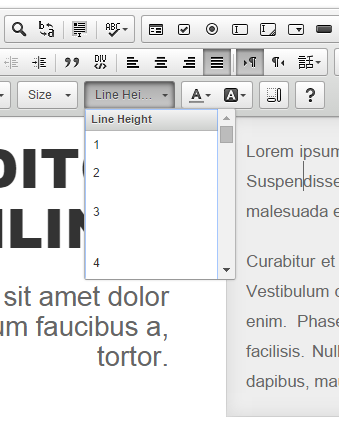
Integrates CKEditor's Line Height plugin to Drupal's CKEditor implementation adding a new dropdown button to modify the line height of your content using inline style.
Requirements
CKEditor Module (Core)
Installation
- Download the CKEditor plugin from here and place it in
<Drupal root>/libraries/ckeditor/plugins - Download the module
- Enable it
- Configure the CKEditor toolbar to include the dropdown button
The line heights are predefined, however, you can easily change that setting by implementing hook_editor_js_settings_alter for each format like so:
/**
 * Implements hook_editor_js_settings_alter().
 */
function HOOK_editor_js_settings_alter(array &$settings) {
  $settings['editor']['formats']['full_html']['editorSettings']['line_height'] = '10px;22px';
}
Above I'm setting the 'full_html' format to have only the 10px and 22px line height options.
Please note that you can change the measuring unit from px to em for example.
Supporting organizations:
Maintenance Support
Project information
- Project categories: Content editing experience, Content display, Integrations
- Ecosystem: CKEditor Libraries Group
 380 sites report using this module
- Created by mihai7221 on , updated
 This project is not covered by the security advisory policy.
Use at your own risk! It may have publicly disclosed vulnerabilities.