
On this page
How to add custom validation to a Webform element?
The documentation described here shows two ways to define a custom validation using a hook or a Webform handler.
Method 1 - Old way
The below code snippet shows how to add a custom validation callback to a Webform element.
First, add a hook_webform_element_alter()
use Drupal\Core\Form\FormStateInterface;

/**
 * Implements hook_webform_element_alter().
 *
 * @param array              $element
 * @param FormStateInterface $form_state
 * @param array              $context
 */
function CUSTOM_MODULE_webform_element_alter(array &$element, FormStateInterface $form_state, array $context) {
    // check for desired element
    if (isset($element['#webform_id']) && $element['#webform_id'] === 'my_form_name--field_name') {
        $element['#element_validate'][] = [
            'Drupal\custom_module\Validate\MyValidateConstraint',
            'validate'
        ];
    }
}
As you can see, the custom validation callback is added by using a fully-qualified classname. But it is also possible to use other forms for the callback. See https://www.drupal.org/node/1734540.
Now we have to implement the callback method validate().
File path: custom_module/src/Validate/MyValidateConstraint
namespace Drupal\custom_module\Validate;

use Drupal\Core\Field\FieldException;
use Drupal\Core\Form\FormStateInterface;

/**
 * Form API callback. Validate element value.
 */
class MyValidateConstraint {
    /**
     * Validates given element.
     *
     * @param array              $element      The form element to process.
     * @param FormStateInterface $formState    The form state.
     * @param array              $form The complete form structure.
     */
    public static function validate(array &$element, FormStateInterface $formState, array &$form) {
        $webformKey = $element['#webform_key'];
        $value = $formState->getValue($webformKey);

        // Skip empty unique fields or arrays (aka #multiple).
        if ($value === '' || is_array($value)) {
            return;
        }

        // do some validation here...
        // and set some error variable, e.g. $error

        if ($error) {
            if (isset($element['#title'])) {
                $tArgs = [
                    '%name' => empty($element['#title']) ? $element['#parents'][0] : $element['#title'],
                    '%value' => $value,
                ];
                $formState->setError(
                    $element,
                    t('The value %value is not allowed for element %name. Please use a different value.', $tArgs)
                );
            } else {
                $formState->setError($element);
            }
        }
    }
}
Method 2 - Using Webform Handlers
Webform allows to add handlers to modify the Webform. Using handlers you can add new form elements, validate the form, add an action on form submission and other actions.
So in this case we will create a Webform handler to validate it.
An example of it is the Email handler webform/src/Plugin/WebformHandler/EmailWebformHandler.php.
You can see it in the following link.
The Handler must be defined as a plugin in the folder my_module/src/Plugin/WebformHandler/MyWebformHandler.php.
First we must to define the namespace and the annotations.
<?php

namespace Drupal\my_module\Plugin\WebformHandler;

use Drupal\Core\Form\FormStateInterface;
use Drupal\webform\Plugin\WebformHandlerBase;
use Drupal\Component\Utility\Html;
use Drupal\webform\WebformSubmissionInterface;
use Drupal\Core\StringTranslation\StringTranslationTrait;

/**
 * Webform validate handler.
 *
 * @WebformHandler(
 *   id = "my_module_custom_validator",
 *   label = @Translation("Alter form to validate it"),
 *   category = @Translation("Settings"),
 *   description = @Translation("Form alter to validate it."),
 *   cardinality = \Drupal\webform\Plugin\WebformHandlerInterface::CARDINALITY_SINGLE,
 *   results = \Drupal\webform\Plugin\WebformHandlerInterface::RESULTS_PROCESSED,
 *   submission = \Drupal\webform\Plugin\WebformHandlerInterface::SUBMISSION_OPTIONAL,
 * )
 */
class MyWebformHandler extends WebformHandlerBase {

  use StringTranslationTrait;
Then we will overwrite the method validateForm, inherit from WebformHandlerBase.
  /**
   * {@inheritdoc}
   */
  public function validateForm(array &$form, FormStateInterface $form_state, WebformSubmissionInterface $webform_submission) {
    $this->validatePhone($form_state);
  }
And we will define a new method to validate for example the phone.
  /**
   * Validate phone.
   */
  private function validatePhone(FormStateInterface $formState) {
    $value = !empty($formState->getValue('phone')) ? Html::escape($formState->getValue('phone')) : NULL;

    // Skip empty unique fields or arrays (aka #multiple).
    if (empty($value) || is_array($value)) {
      return;
    }
    if ($value > 9) {
      $formState->setErrorByName('phone', $this->t('Phone not valid.'));
    }
    else {
      $formState->setValue('phone', $value);
    }
  }
The last step is to use it in our Webform handlers section. The route to administer the handlers of a Webform is /admin/structure/webform/manage/[your_webform_name]/handlers.
1. To add the new validation handler click on '+ Add Handler' as shown below.
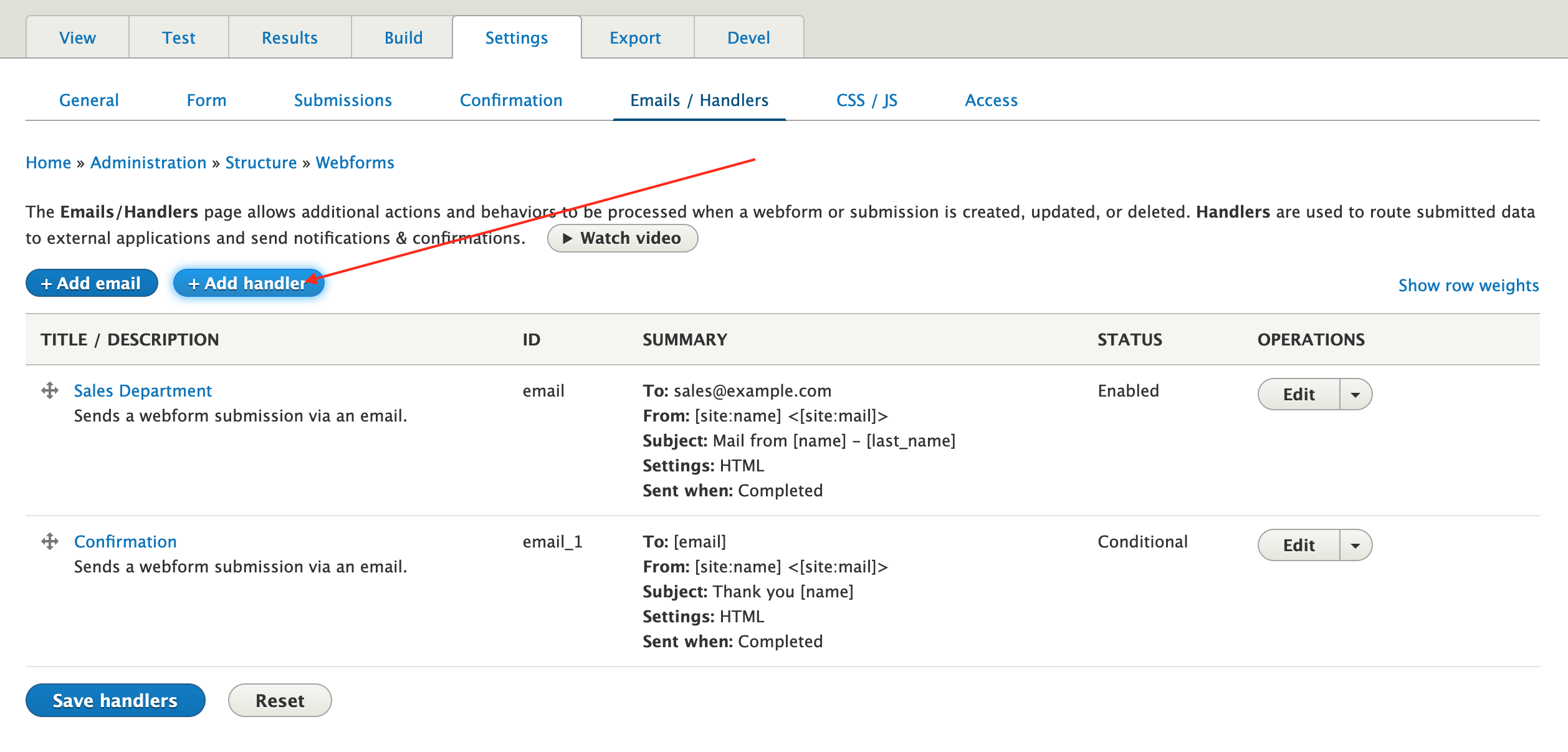
2. A window should pop up with all the available custom handlers. There, select the custom handler 'Alter form to validate it' we just made and click on the 'Add handler' corresponding button.

3. Choose an administrative name for this handler and create a condition if needed. After making these changes, click Save.

4. Now our new handler has been added to the handlers of our webform.

Congrats! You just added a new validation handler to your webform.
Help improve this page
You can:
- Log in, click Edit, and edit this page
- Log in, click Discuss, update the Page status value, and suggest an improvement
- Log in and create a Documentation issue with your suggestion

