
 Come together with the global Drupal community in Rotterdam, 28 Sept – 1 Oct 2026. Sessions, contribution, connection, and Early Bird savings until 8 June.
Integrating the Responsive FileManager with Drupal 7 and CKEditor
Responsive FileManager (RFM) is a free, open-source file manager that works with CKEditor. It's modern, beautiful, responsive, highly usable and harmonises well with CKEditor's minimalist "moono" skin. As well as nice features like drag and drop multi-file upload, file and folder management, RFM also allows sophisticated image editing via the Adobe Aviary photo editor.
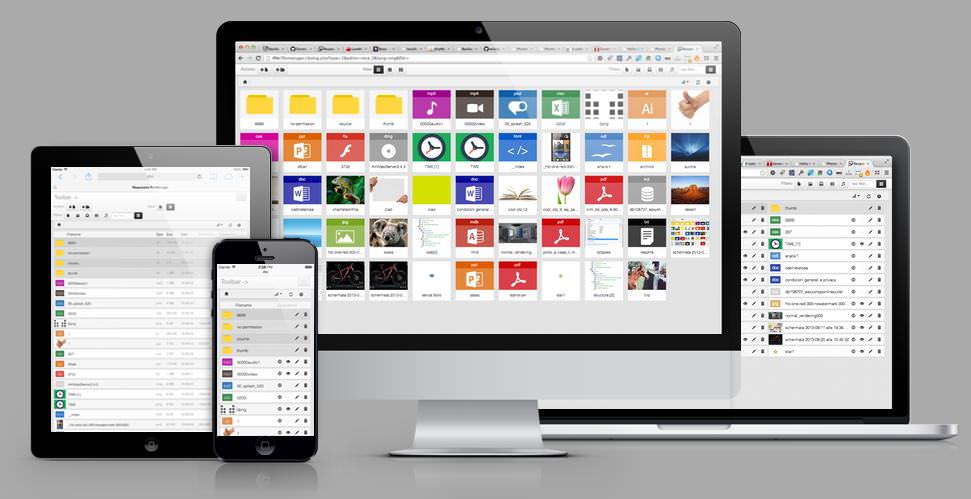
At the time of writing there's no Drupal integration module for this great file manager, but it's relatively easy to set it up to work with a single Drupal 7 site (not multisites) using the CKEditor module. Although untried at present, the same steps could be adapted for Drupal 8.
Download RFM
Download the latest version of Responsive FileManager from the official website.
Extract RFM
Extract the RFM zip archive to your Drupal 7 libraries folder, usually /sites/all/libraries/ so that you end up with the filemanager script entry point as /sites/all/libraries/responsive_filemanager/filemanager/dialog.php
Modify RFM Configuration
Edit the RFM configuration file at filemanager/config/config.php to reflect your Drupal site's file structure. So for a site installed in the default folder it would be as follows:
'upload_dir' => '/sites/default/files/uploads/',
'current_path' => '../../../../default/files/uploads/',
'thumbs_base_path' => '../../../../default/files/thumbs/',
Create Folders
In your files folder e.g. /sites/default/files/ create two new folders named "uploads" and "thumbs" and ensure they're writable.
Modify CKEditor Configuration
Assuming you have CKEditor already configured and working correctly, modify its configuration by adding the following code to either your CKEditor profile Advanced options > Custom Javascript configuration or your theme's ckeditor.config.js override.
var fmPath = '/sites/all/libraries/responsive_filemanager/filemanager/dialog.php?type=2&editor=ckeditor&relative_url=1&fldr=';
config.filebrowserImageBrowseUrl = fmPath;
config.filebrowserImageBrowseLinkUrl = fmPath;
config.filebrowserBrowseUrl = fmPath;
config.filebrowserUploadUrl = fmPath;
You'll also need to ensure in your CKEditor profile that no other file manager, like IMCE or CKFinder, is selected.
That's it!
Congratulations! You should now have a beautiful and highly usable file manager for your site that's fully integrated with CKEditor. There's further configuration options available in RFM's config.php that you can explore.
Note: At the time of writing, RFM version 9.11.0 and earlier has an unresolved issue inserting relative URLs in CKEditor. This issue is documented on Github with a suggested fix that works but hasn't yet made it into the RFM codebase. Make that suggested change in the source and you're good to go with relative URLs.
Help improve this page
You can:
- Log in, click Edit, and edit this page
- Log in, click Discuss, update the Page status value, and suggest an improvement
- Log in and create a Documentation issue with your suggestion
