

Active
Project:
Group
Version:
8.x-1.x-dev
Component:
Code
Priority:
Normal
Category:
Support request
Assigned:
Unassigned
Reporter:
Created:
23 Oct 2016 at 18:38 UTC
Updated:
9 Sep 2025 at 12:06 UTC
Jump to comment: Most recent, Most recent file




Comments
Comment #2
jpoesen commentedLooking into the same thing. Logically I don't think you can.
Since nodes can be referenced to from multiple groups, just visiting a "naked" node at node/x will give you no group context at all. You could retrieve all the groups the node is referenced from, but that won't help either.
I think you have to build a mechanism to "set" the context somehow, either through a user journey, or by having aliases for your node like group/x/node/y, or by doing something funky like keeping track of the current group in a session var (though that would be very flakey).
Alternatively you could use something like panels and load the node as a panel pane within a "group" panel page that captures and passes on the group context to the node panel pane or view panel pane as a view filter... something along those lines. #2669396: Create Panels Relationship for loading group context from group content Is a somewhat related issue.
Let us know how it goes?
Comment #3
ikit-claw commentedThis video might help you out.
https://www.youtube.com/watch?v=GkiCLJk5n0s
Comment #4
jpoesen commentedThanks ikit-claw. That's a great intro video and explains the group <-> group_node <-> node setup very well, but the views scenario is one where they show all group content on the group homepage, so the group context is present and usable there.
If I understood Rachel's issue correctly, she's asking about displaying a node page, and then alongside showing a list of other content for the same group the node is in. That's a different use case since you don't have the group context (group homepage) as a starting point.
J.
Comment #5
rachel_norfolkI'm afraid jpoeson is correct - I'm trying to get info about the group when looking at a piece of content within a group. That video is somewhat different.
Here's what I'm trying to do - a nice little obvious example very close to home...
There *must* be a way to do this!
Comment #6
rachel_norfolkThere's probably a need to somehow add a new views filter. Then it would be easy. Currently trying to track down how to create such a filter...
Comment #7
kristiaanvandeneyndeInstead of trying to get the parent group from a node, you should indeed try to get the group context some other way. A node can have multiple parents and as jpoesen explained in #2, it may be hard to find the parent your end user expects.
You/we/I should perhaps look into allowing people to view the node at any of the following:
group/X/content/Y/entityWhere Y is the GroupContent IDgroup/X/node/YWhere Y is the Node IDI'd prefer the first option as it aligns nicely with what we already have and would allow us to show the tabs for the node relationship in that group. I've not thought it through, so there may be some UX disaster I'm overlooking :)
The latter option would mean multiple node-serving plugins could end up fighting over the /node/Y path, so we may want to avoid that.
Comment #8
rachel_norfolkMakes sense.
In a real-life scenario, we would never have group/X/content/Y/entity as the actual path, though. We *might* have something like /site-section/group-name/content-name though.
I presume what you are saying is that the node should be accessible using path 1. even though the user is not actually looking at it via that url?
Comment #9
kristiaanvandeneyndeYeah, you can always use aliases (or Pathauto) to make the path prettier :)
Comment #10
rachel_norfolkJust a quick update on where I have been heading with this...
I had great difficulty getting a context that would give me the group for a view but did manage to create a custom block that got the group, to then use
$group_content_entities = GroupContent::loadByEntity($node);and iterate through the list.Along with also getting group memberships using
$group_maintainers = $this->group_membership_loader->loadByGroup($group, 'maintained_section-maintainer');I've got a block looking something like...It's not exactly where I think I want to be but might be useful to others until we can do this with views.
Comment #11
lias commentedHi @rachel_norfolk , would you be willing to share the code for your block? Just not able to wrap my head around this and would like to accomplish what you've done here with Group. Thank you.
Comment #12
rachel_norfolkI started off by getting the group, through something like
Looks a bit dumb but I know we only ever want one
$groupso happy to lose some if multiple groups returned. (I know they won’t be in this context)Then, I need to get the content items related to that group:
And then just render those how you like! :-)
A couple of things to remember, though:
Hope that is useful!
Comment #13
maxilein commenteddid you use a block inside of a custom module?
Comment #14
rachel_norfolkYes, I just created a module using the Drupal console, then again used the Drupal console to make a block plugin and then added the above.
Comment #15
maxilein commentedthank you.
Comment #16
maxilein commentedComment #17
franco-facondini commentedHi ! I create a new block-view from content table (article, basic page,..) then i set Relation = Content.Parent Group and a Contextual filter = Content Nid.
I "set default value = Content ID from URL"
then i set Block view configuration to show on /content/* pages.
So every time I view a content, I see the block that tells me which group it belongs to.
Comment #18
kclarkson commentedWow! I am just not making any progress with groups.
Similar to Rachel. I have a node that I am using as Group Landing Pages. I want to create a view of all the content that is in the same group that is in the landing page.
The process to accomplish this should be the same as any other entity. Add a relationship to a parent group. In contextual filter use the content id from url and use the parent group relationships.
The concept of groups seems pretty straightforward but the related content is far from it. Am I missing something?
Comment #19
freelockI don't know if there's something I'm missing, too, with groups... but because I couldn't find anything, I've been using Purl and Group Purl for this -- https://drupal.org/project/group_purl is something I created that's working nicely on a few sites.
However, Purl seems to be largely abandoned these days, no work on drupal.org for D8, and the Activelamp github copy does not look changed in nearly 2 years -- I posted a bunch of PRs there that have not been merged (or really anything done on that project).
Best to use the Purl on my github -- https://github.com/freelock/purl-d8 .
... With the code posted there, you get a contextual filter for views, and a block context, which allows you to show different blocks for different groups as well as create views that pass the current group context in as a contextual filter.
The code on my github and drupal.org supports patterns that use a field on the group as a subdirectory. We recently finished a project that uses subdomains for group context, I'll try to get our updates posted in the next few days to support subdirectory URL patterns instead.
One thing of note -- I haven't found a good way to set the context for both the main group entity view page, and group content at the same time, so there are two different contexts here. And some of the labels are confusing (and redundant -- both Purl and Group Purl are providing context plugins). But overall it just works, as expected, and pretty much as you would expect.
Comment #20
willabby commentedIn case this work around solution helps anyone, I am posting it here (for feedback as well), which may not be ideal for all scenarios, but at the moment I can't figure out another easy way to show a list of content on nodes related to same group (I have not tried #19).
Using pathauto and the patch: https://www.drupal.org/files/issues/group_add-node-group-tokens-2774827-22.patch (which adds group level tokens to nodes), I add the GroupID to the path of the content type I was working with, for example: [node:group:id]/[node:title].
Then in views, I started with a view of content, added relationship "Relates to the group content entities that represent the Content"(Content group content) and then using that relationship, added another relationship "The group containing the entity." (Group). Then for my contextual filter, I am using GroupID, with the relationship to Group, and then choosing "Provide Default Value", and "Raw Value from the URL". For testing purposes i put the groupID first, so i left the path component at 1. And, then make sure you check the "Use path alias instead of internal path." box.
I would be interested in any feedback on the merits/pitfalls of this solution. At the moment, we are planning that content will only be related to a single group, and, access to url alias will be strictly limited, so as not to mess up the GroupID in the alias (if we go ahead with this solution).
Comment #21
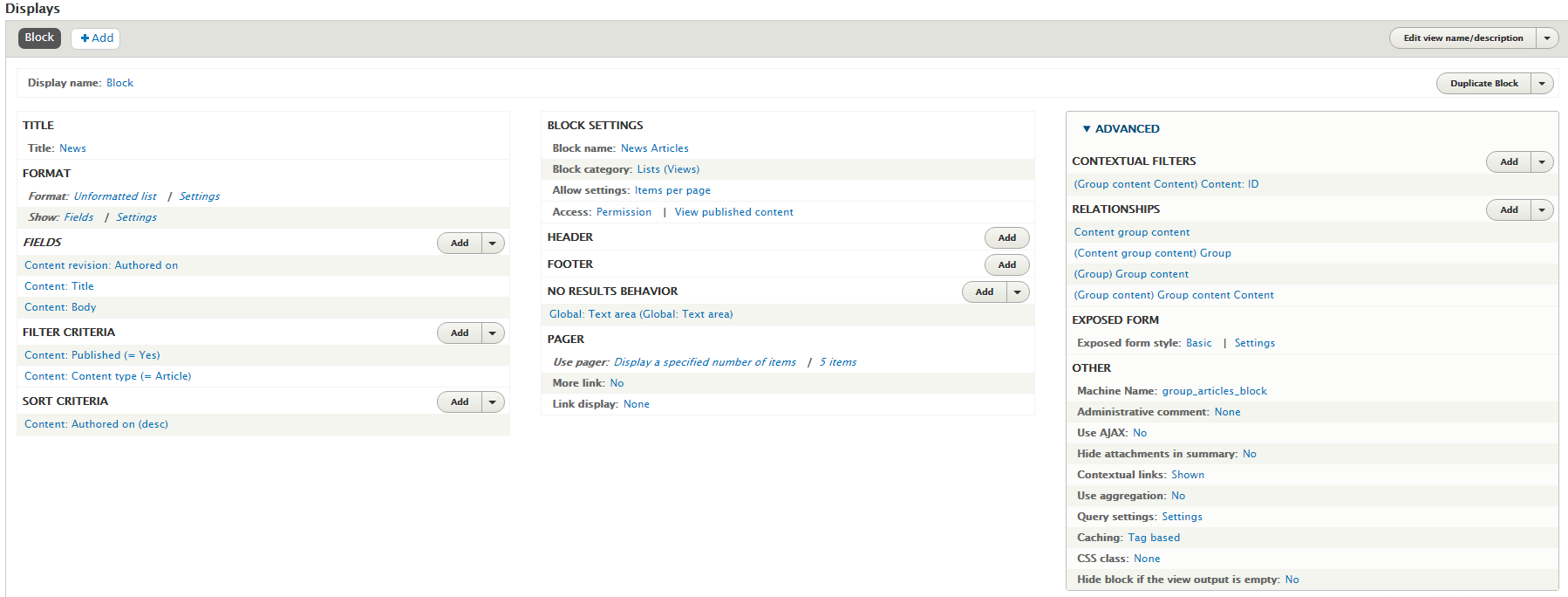
willabby commentedI continued to work on a Views only solution to showing related group content on group pages, and I have gotten a working view, using the content:id from URL as the contextual filter.
I created a view of content, and then added the following relationships:
1. Content group content
2. Group (using Content group content relationship)
3. Group content (using Group relationship)
4. Group content Content (using Group content relationship) -- this is in Category "Content"
For contextual filter i used the relationship "Group content Content" (as mentioned above, on the content:id, provide default value content ID from URL).
Really, this made my head hurt. If anyone would like screen shots, let me know.
Comment #22
jdearie commented@willabby - I would love to see your screenshots. I've gotten a view working in that at least it's showing the block, but it's still not filtering correctly (I don't think).
I have groups
I have Articles associated with a group
I would like a block that contains Articles assigned to that group to be able to placed on a landing page that is associated with the same group the Articles are.
I can add the block to a Landing Page that belongs to a group
BUT it's not showing me the articles that are also associated with that group. It's a least appearing, but with the global text I put in for no results.
See the screenshot of my view. Any help you can give would be greatly appreciated!
I originally had a URL pattern of [node:group:name]/[node:title].
but I changed it to [node:group:title]/[node:title] but i still have the same issue
Comment #23
willabby commented@jdearie when you say you want your block "placed on a landing page that is associated with the same group the Articles are" - what do you mean by "landing page" ... is it another content type? or it is the group landing page?
The view I described places a block in the sidebar of all nodes associated with a group, and shows titles/dates of all event nodes also associated with the group. My view is identical to yours from what I can tell (see attached).
If you just want a block of related articles to place on your group landing page, that would be a different set up. I attached a separate view that shows all events associated with a group on the group landing page.
Let me know if you need anything else, if this isn't quite what you are trying to achieve.
Comment #24
jdearie commentedThx for the support @willabby. Groups makes my head hurt! :)
I figured it out! I was selecting the Group node (Article) plugin with my relationships. Once I unchecked the plugins, it worked!
Comment #25
scott.whittaker commentedIf anyone is interested I've made a Group Context module which keeps track of the last group you visited. I've added a Views contextual filter plugin which allows you to join on the current group context, you can use it in breadcrumbs, or as a persistent menu link etc. It has several fallbacks for determining the group context and persists even if you log out and in again.
I've considered making it a public module but I'm not sure how much demand there is for it, and maintaining a public module sounds like a lot of work in itself. But I'm happy to share the code and could be persuaded to make it official.
Comment #26
markconroy commentedI had to create this type feature yesterday. The exact feature was:
Here's what I did:
Create a listing of all group content articles across the whole website.
Set up contextual filters to only show articles that are in the current group
Create relationship to allow you to access the fields on the node
Remove the currently being viewed article from the listing
Done!
Comment #27
jdearie commentedI came back to this very issue to figure this out on a newer project - but the words have changed just enough in the newer versions of Group that I struggled to recreate the exact combo of relationships and contextual filters.
Thankfully - it's spelled out very clearly in another issue https://www.drupal.org/project/group/issues/3064949#comment-14867495
Hope this helps anyone else trying to do the same.
core: 11.2.2
group: 3.3.5