Active
Project:
Entity Gallery
Version:
8.x-1.x-dev
Component:
Code
Priority:
Normal
Category:
Bug report
Assigned:
Unassigned
Reporter:
Created:
28 Sep 2016 at 19:37 UTC
Updated:
28 Sep 2016 at 19:37 UTC
Jump to comment: Most recent


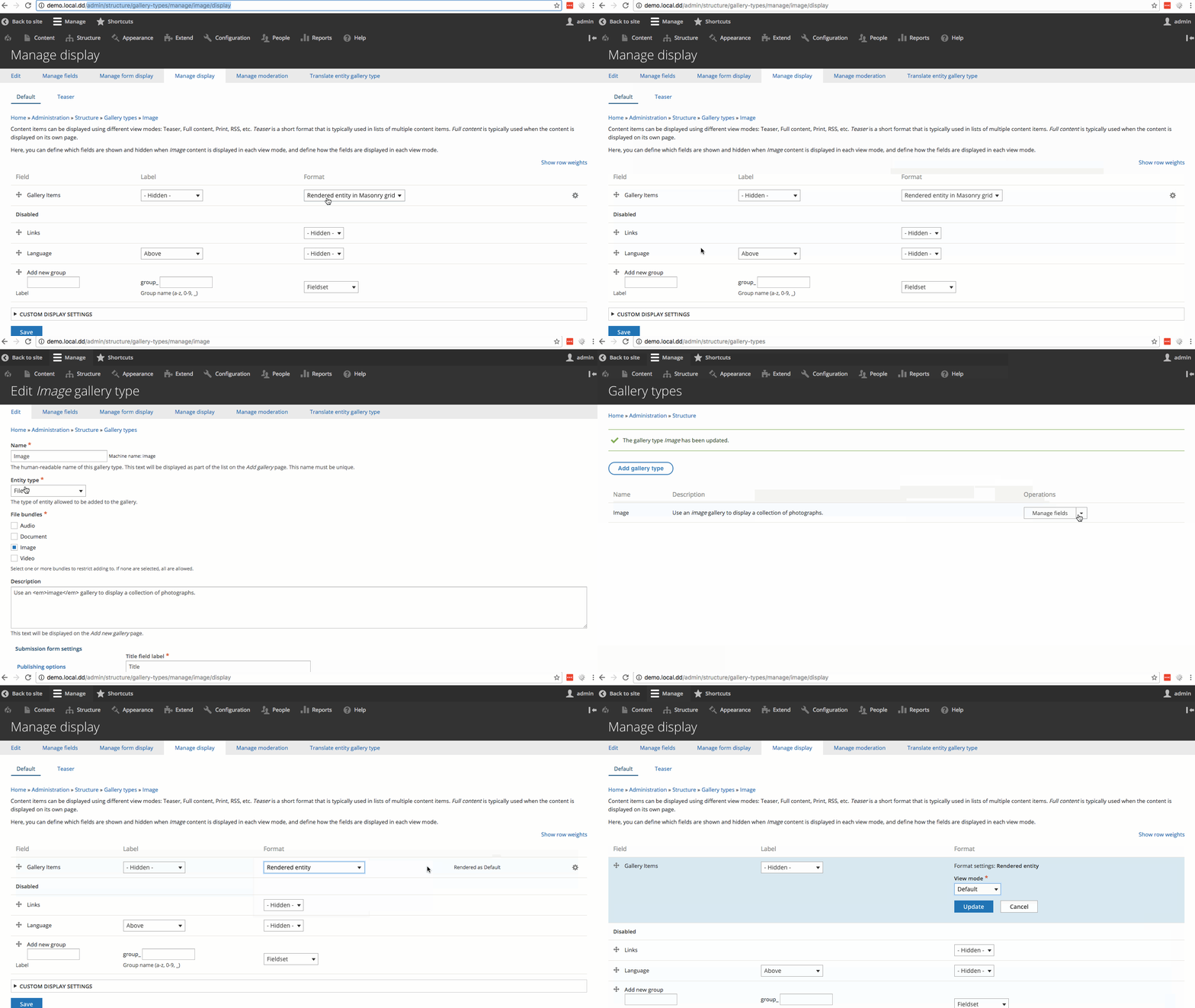
Steps to reproduce.
1. Deploy a module with config setup for an entity gallery (or just use demo framework's df_tools_gallery)
2. Note the settings under 'Manage display' are set to the config settings - ie: using a field formatter that's not just 'Rendered entity' with a config'd view mode
3. Visit admin/structure/gallery-types/manage/[type] and save the form
4. Note the settings under 'Manage display' are reset to defaults -ie: using the 'Rendered entity' field formatter with a default view mode
Attached is a gif of this in action.
| Comment | File | Size | Author |
|---|---|---|---|
| gallery-error.gif | 1.09 MB | saltednut |

Comments