
Field Permissions
You are browsing documentation for an older version of Drupal, which is not supported any longer, and the information may not be correct. See current documentation for Contributed modules
Overview
The Field Permissions module allows site admins to set field-base-level permissions to edit or view fields on any fieldable entity.
How to use
Out of the box, the Field Permission module gives you 5 new field-level permissions:
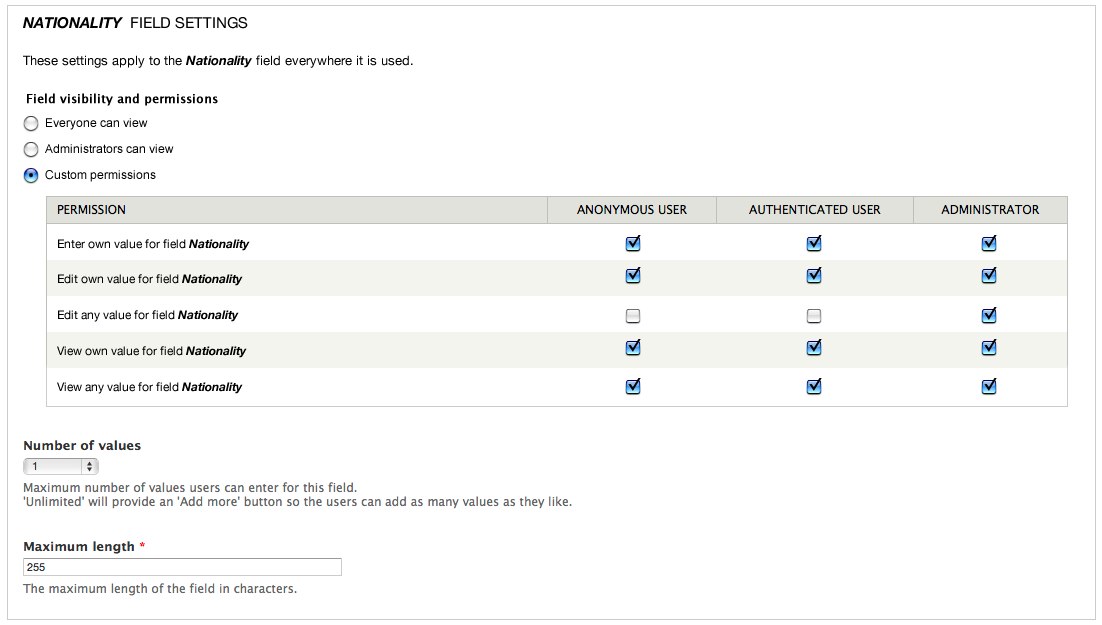
- Create own value for the field: Only user role(s) you select can enter a value for a specific field. For example, only authenticated users can see the Body field of a blog post.
- Edit own value for the field: Only the selected user role(s) you select can edit the value they entered for a specific field. For example, only authenticated users can edit the Body field text they submitted. They cannot edit each other's text.
- Edit anyone's value for the field: Only the user role(s) you select can edit any user's value for a specific field. For example, only the Administrator can edit the Body field text for any user role.
- View own value for the field: Only the user role(s) you select can view their own value for a specific field. For example, authenticated users can only view their own text. They cannot view Body field text submitted by other authenticated users.
- View anyone's value for the field: Only the user role(s) you select can view any user's value for a specific field. For example, all authenticated users can Body field text, but anonymous users cannot.
These permissions can be edited at the usual place, under Administration » People » Permissions (admin/people/permissions), but they must be created for the first time on the field definition level. For example, if you wanted to restrict the permission levels for the Body field on an Article, the place to do this would be Administration » Structure » Content types » Article » Manage fields » Body (admin/structure/types/manage/article/fields/body)
The module also provides an overview of the values of all fields at Administration » Reports » List Permissions (admin/reports/fields/permissions) -- where you can quickly see whether a field has Public, Private, or a custom mix of permissions available.
Hide fields for some roles in User edit form
If you need to allow some roles (for example "Staff") to edit a field for other users (like "Clients"), yet don't want to show this field on the Staff user profiles, you can use the code below in a custom module. It checks the user roles of the user profile currently being edited, and removes relevant fields.
<?php
function my_module_form_alter(&$form, &$form_state, $form_id) {
  // Don't load a field when editing users with a certain role
  // Check if on a user edit form, matching user/11/edit format
  if (preg_match("|user/\d+/edit|i", $_SERVER['REQUEST_URI'])) {
    // Get the user id part
    $current_path_parts = explode('/', $_SERVER['REQUEST_URI']);
    $edited_id = $current_path_parts[2];
    // Load user roles of currently edited user
    $user = \Drupal\user\Entity\User::load($edited_id);
    $roles = $user->getRoles();
    // Don't show this field if the user has the staff role
    if (in_array("staff", $roles)) {
      $form['field_yearly_budget']['#access'] = FALSE;
    }
  }
}
External resources
- Daily Dose: https://www.youtube.com/watch?v=GmqlBBSoRWU
Help improve this page
You can:
- Log in, click Edit, and edit this page
- Log in, click Discuss, update the Page status value, and suggest an improvement
- Log in and create a Documentation issue with your suggestion
