

Closed (fixed)
Project:
Editor Notes
Version:
7.x-1.4
Component:
User interface
Priority:
Normal
Category:
Support request
Assigned:
Reporter:
Created:
26 Jul 2016 at 22:23 UTC
Updated:
24 Jul 2017 at 13:25 UTC
Jump to comment: Most recent, Most recent file

Comments
Comment #2
Rostislav Sergeenkov commentedHi @loparr,
Could you provide some more information or couple of screenshots illustrating the problem?
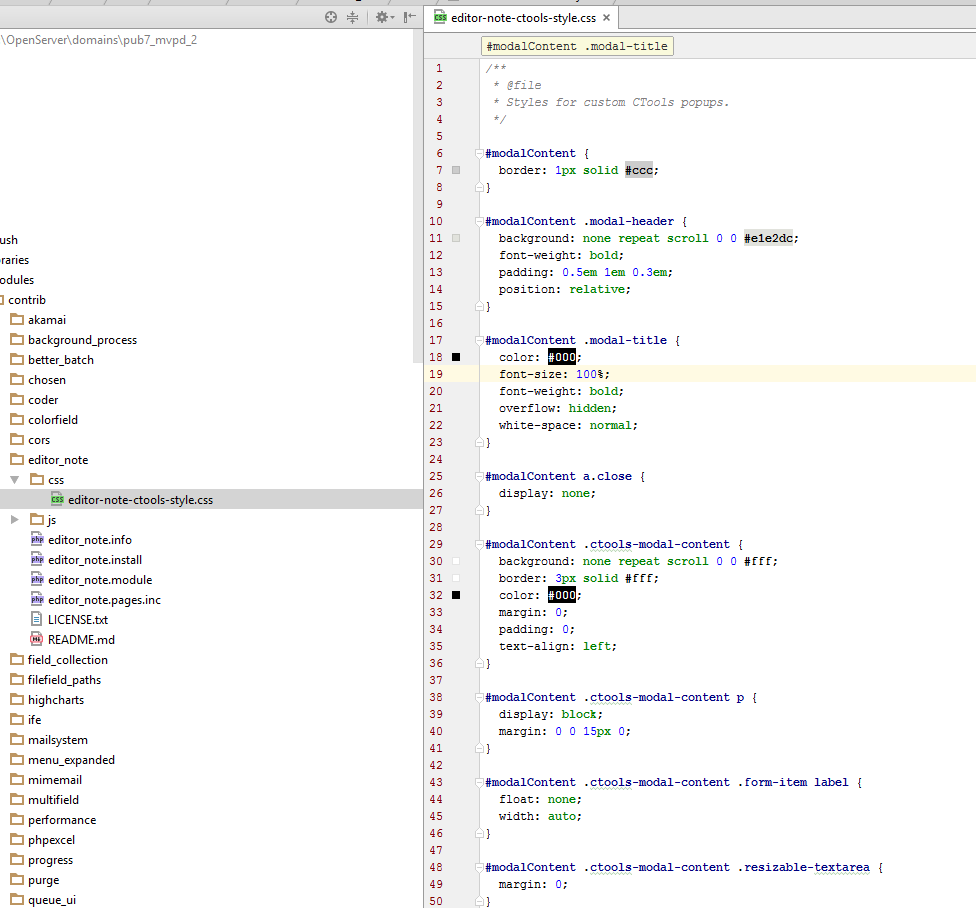
Editor Note module uses editor-note-ctools-style.css file to customize modal popup. All CSS styles are written using #modalContent prefix - see screenshot.
In theory if your theme HTML uses id="modalContent" somewhere else apart from Ctools popup used by Editor Notes it may cause a problem.
First of all I would recommend to open the source code of the page where you are using Editor Note field and search for id="modalContent". If this id is present somewhere else - this is a problem and it has to be replaced.
If not - I need more information to figure out the root cause of the issue.
Best regards,
Rostislav Sergeenkov
Comment #3
loparr commentedHi,
I tried to remove modules' css, however the style changes after loading modal too.
It seems that the way the css is changed depends on what front theme I use. Now I use bootstrap , however the style of various elements is changed with bartik or garland as front theme as well.
Looking at the html code - the node edit page does not contain modalContent.
Please try this: use seven as admin theme, use bartik as front theme. Look at the notes table header - it has
background: #e1e2dc;coming from seven theme css. However after editing a note and closing modal - the table header background color of notes is darker. Looking at css - the style comes from bartik.Comment #4
Rostislav Sergeenkov commented@loparr, thank you for your investigation! It was very helpful.
ajax_render() called in editor_note_confirm_edit_page loads on action link click a bunch of CSS files from the default theme (bartik in your case) even in admin theme is different.
That's why admin UI changes.
I need to figure out how to prevent such behavior.
Comment #5
Rostislav Sergeenkov commentedSolved by adding
$_POST['ajax_page_state']['css'] = array();before print ajax_render($output);
I've just added new 7.x-1.4 project release containing fix. Release will be available tomorrow when Drupal generates it from the release queue.
Comment #6
loparr commentedHI,
Works great. Thank you for quick solution.
Comment #7
Rostislav Sergeenkov commentedComment #8
Rostislav Sergeenkov commentedComment #9
loparr commentedHi,
sorry to reopen. I came across same problem under different circumstances - open existing note on node, close modal, add new note. After saving, styles are changed again. Saving whole node after gives white screen - error log says - PHP message: PHP Fatal error: Call to undefined function bootstrap_form_process() in .../html/includes/form.inc on line 1870.
It seems that the modal is still messing with current theme (I use bootstrap)
Comment #10
konst_8 commentedTo fix the issue we should define a theme callback for ajax menu paths.
Check ajax_base_page_theme for more info.
The patch is attached.
Comment #11
Rostislav Sergeenkov commentedComment #12
Rostislav Sergeenkov commentedComment #13
Rostislav Sergeenkov commented