
Reaction field & Module configurations
Last updated on
30 April 2025
You are browsing documentation for an older version of Drupal, which is not supported any longer, and the information may not be correct. See current documentation for Contributed modules
Overview
Reaction module provides ability to react on content. Inspired by facebook reactions.
Technically the module will provide the field reaction field type, where this field can be added to any entity type(like Content type, Comment type etc).
How to install the module?
- Download the module similar to other drupal module
drush dl reaction -y - Go to the module folder directory from terminal and do a composer installation(run the following command)
composer install - Then install the module
drush en reaction -y
How to configure the module?
- Add the field to any entity type(lets consider case of Content type).
- Create the Reaction field to the article content type.
- In the default settings, select the reactions icons which you needed to have to be rendered.
- Save the field type.
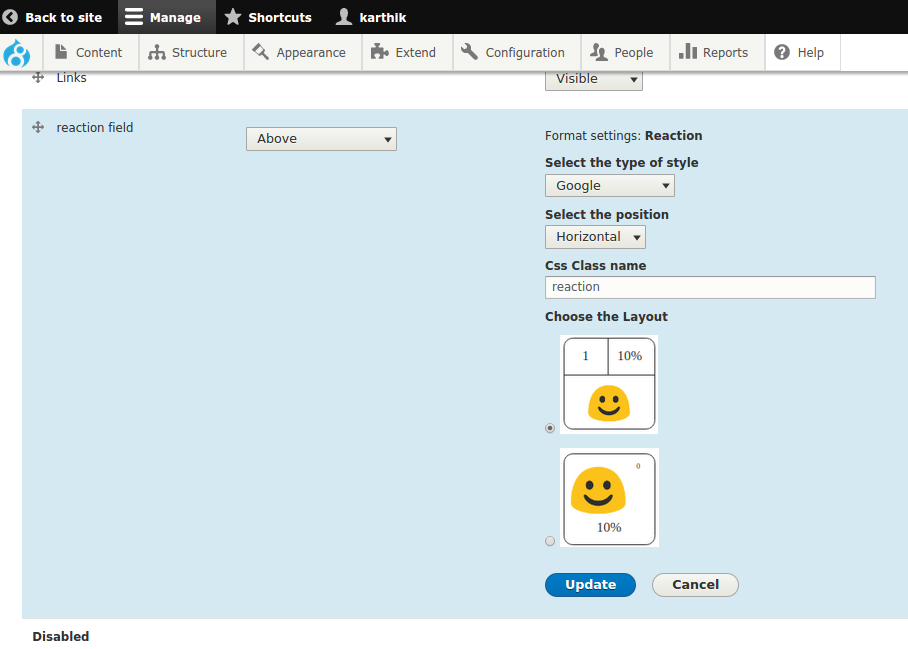
- One can also change the field formatter settings, for this you visit the formatter settings of the field.
- Select the layout type to be rendered, and can select type of reaction icons to be rendered.
- Save the field formatter settings.
- Create the node/content of the type, and save the content.
- On visiting the created node, you can see the reactions specified, and on can give the reaction on the specific node.



Help improve this page
Page status: Not set
You can:
You can:
- Log in, click Edit, and edit this page
- Log in, click Discuss, update the Page status value, and suggest an improvement
- Log in and create a Documentation issue with your suggestion
