

 Come together with the global Drupal community in Rotterdam, 28 Sept – 1 Oct 2026. Sessions, contribution, connection, and Early Bird savings until 8 June.
Problem/Motivation
Most areas where we are configuring and then creating structure, like menus and taxonomy vocabularies, have action buttons where we can both make edits to the configuration and list the entries that apply. This doesn’t currently happen with content itself.
Proposed resolution
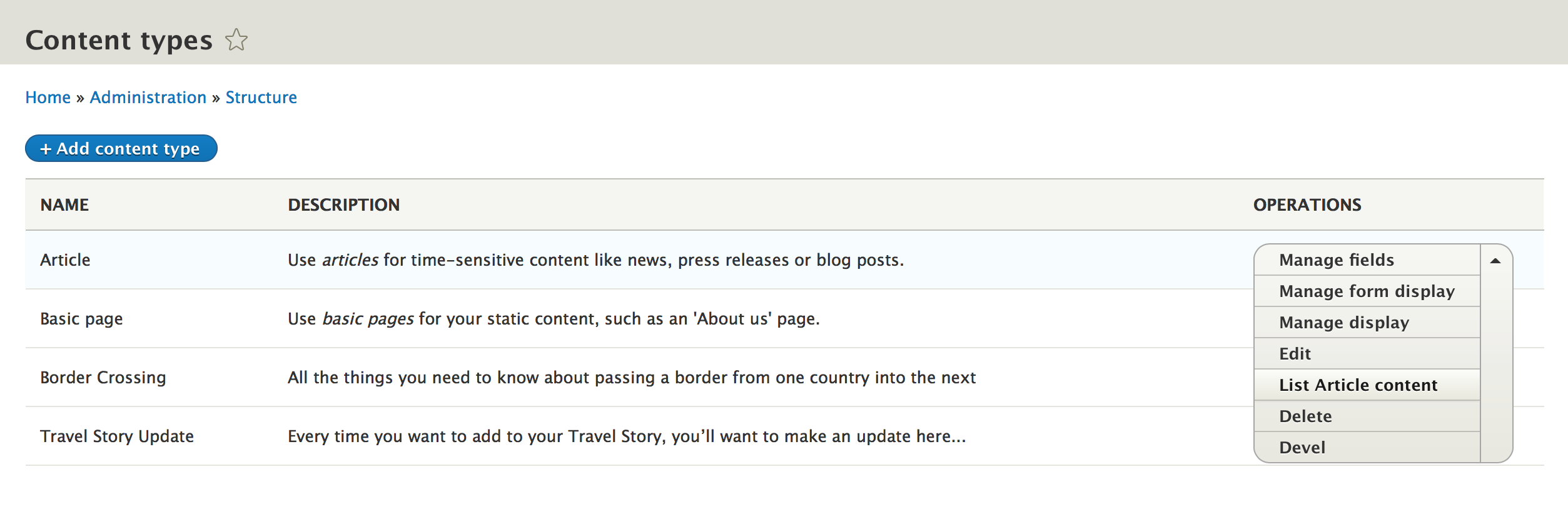
To place a further secondary action in the action button on each content type, named “List content” which directs the user to admin/content with a filter for the content type already applied. See screenshot as example

Remaining tasks
Create Patch
User interface changes
Adding a further action to the action button as described above.
API changes
none
Data model changes
none
| Comment | File | Size | Author |
|---|---|---|---|
| #47 | After patch.png | 63.05 KB | Bushra Shaikh |
| #47 | Before patch.png | 61.69 KB | Bushra Shaikh |
| #45 | After-Patch-2753451-43.png | 130.64 KB | Manibharathi E R |
| #45 | Before-Patch-2753451-43.png | 129.69 KB | Manibharathi E R |
| #44 | afterPatach-#43.png | 11.05 KB | asha nair |


Comments
Comment #2
rachel_norfolkComment #3
pguillard commentedComment #4
pguillard commentedHere is a first patch.
A few remarks :
instead of
, like the labels we have elsewhere ('List terms'), otherwise we can not guarantee the buttons width. As an example :

Comment #5
rachel_norfolkOh I like this!
Code looks good to me and it is achieving the intended goal.
As the user must have this permission already to see the button anyway, maybe it would be better to check for the permission "Access the Content overview page” instead as that is the target page we are looking to display?
Comment #6
pguillard commented@rachel_norfolk, update with suggested permission
Comment #7
rachel_norfolkerm - I’m sorry - I sent you the “human name” of the permission, not the machine name - I think I is meant to be "access content overview”
This has the effect that, for a user without the "
access content overview” permission, they still get the entry in the action button but they see an access denied area when following it.Comment #8
pguillard commentedI'm sorry, my fault, my shame.
Here is a new patch
Comment #9
rachel_norfolkI *think*
$entity->access('access content overview')and not giving us something that checks the user’s permission. We can do that more simply withUpdated patch attached, including that change and does add/remove the action correctly.
Also - a bit of pair programming on this with balagan - who should be credited.
Comment #10
balagan commentedThanks for mentioning me, happy to help!
Comment #11
pguillard commentedIn the train for Firenze, I let you the remaining work! See you next time !
Comment #12
pguillard commentedI would say RTBC +1, but I guess I should not make it.
Comment #13
Anonymous (not verified) commentedTested OK using the magic simplytest.me link.
Not sure what the process for UI advancements is on the semantic releases of core but my initial instinct is this should be the first option on the list to keep it consistent with the other area mentioned, taxonomy, instead of half way down the list. 'View' is generally the first option - just because it wasn't before doesn't mean that should necessarily set a precedent.
my 2p
Comment #14
Anonymous (not verified) commentedDrat, now I'm thinking all sorts about this consistency thing!
I guess there's a few issues that could be split out from that list - I like the idea of adding this 'List content' option, and if we're going to focus on consistency then let's not just add more options but raise to "let's make the admin UI as consistent as possible", at the moment it seems a little jumbled.
Comment #15
Anonymous (not verified) commentedAh, I forgot there's a "referencing issue", it's been a while since I used the issue queues ;)
Two points for this specific issue still apply:
Comment #16
pguillard commentedAs I agree with @stevepurkiss suggestions at #15, I applied them here.
Comment #17
Anonymous (not verified) commentedThanks - patch applies well, works fine, looks good to go!
Comment #19
pguillard commented@stevepurkiss, thanks for this review
Comment #22
pguillard commentedComment #23
pguillard commentedSeems this is a bot failure ?
Comment #24
rachel_norfolkComment #25
rachel_norfolkUpdate issue summary screenshot to one that reflects final patch and mark RTBC
Comment #26
rachel_norfolkall very well changing the screenshot but you have to remember to change the text, too, Rachel!! :blush:
Comment #27
xjmComment #28
xjmThis is an adding an additional option in a difficult UI. While I think it probably will help people who are trying to view their content for the content types and end up on this page, we should have a usability maintainer verify the change, since there is a tradeoff whenever we add new options. So tagging for usability review.
Also, it's best to include before and after screenshots (not just the after screenshot) so that reviewers can compare them side by side.
Thanks everyone!
Comment #29
Bojhan commentedI am not convinced this is a good idea. We want to clearly separate listing UI's from editing UI's. We don't have this pattern elsewhere, and if we do we make the Name link to the relevant object. I am therefore unsure, if we should continue with this path of duplication. I like the connecting the dots, but we need to evaluate a consistent approach to it - not a one off.
Comment #30
rachel_norfolkActually, the reason we raised the issue in the first place was because other, similar things DO have their content listings linked in the same way. Taxonomy terms can be listed from the vocabulary structure pages. Menu items can be listed from the menu structure pages. Really, what we are trying to do here is being more consistent, not less.
Comment #40
vikashsoni commentedApplied patch working fine sharing screenshot ...
Comment #43
ranjith_kumar_k_u commentedComment #44
asha nair commentedApplied patch #43 , and it works fine in Drupal 9.5.x. Adding screenshots for reference
Comment #45
Manibharathi E R commentedPatch #43 tested and Applied successfully on Drupal 9.5.x.
Comment #46
Bushra Shaikh commentedComment #47
Bushra Shaikh commentedVerified and tested patch#43 on drupal 9.5.x-dev. Patch applied successfully.
Testing Steps:
Test Result:
After applying the patch Manage fields label has been changed to "List content".
Can be moved to RTBC
Comment #48
alexpottWe should add test coverage that the link works and only lists content of the expected type.
Also #29 @Bojhan of the usability team said that they were not convinced this was a good idea. This was challenged by @rachel_norfolk in #30 but I'm not sure that there has been an resolution. Going to tag for the usability team to reconsider this one.
Comment #50
aaronmchaleWe reviewed this issue at #3314117: Drupal Usability Meeting 2022-10-14, that issue will have a link to the recording.
For the record the participants were: myself, @benjifisher, @rkoller, and @simohell.
We agreed with the overall idea that providing a way to easily access the relevant list of content is a positive change, however we felt that adding this link under the operations was not appropriate, mainly because:
To address the point about precedent: What we are doing here is different to the previously mentioned examples of Menu and Taxonomy, where in those cases the "List" operation does not take you to a completely different part of the admin UI, the user remains within that part of the admin UI and still has access to the same Local Tasks and Breadcrumb when on the "List" page. If we were doing a like for like implementation, then we could use that existing precedent, however that is not the case here.
We also noted that Menu is not a good example because the List is presented on the Edit form, which results in the one form trying to do too many things and creates a poorer user experience than if the List and Edit form were on two separate tabs/pages; But that's for a different issue.
Instead, what we are proposing is to add a new column, to the left of the Operations column, which contains the proposed link. We also felt that it would be useful to have the link text indicate how many content items each content type has. This approach has the added advantages of:
We did not have an opportunity to make any specific text/wording recommendations during this meeting, however general guidance would be:
I'm removing the Usability Review tag, but feel free to add it back when these recommendations have been implemented, the group can then review the proposed solution/text. At that point, please ensure there are up to date screenshots in the issue summary.
Comment #52
acbramley commentedI'm not actually sure if there's a good way to achieve this. For example, what happens if a user changes the key of the type filter in the Content view? Those links would now be broken.
As per #50 it doesn't look like we should go with the operation so I'm removing the Needs tests tag since we'd need a new solution.
Comment #53
acbramley commentedClosing this as won't fix based on #50 and #52
If anyone feels strongly that this should be implemented and has a way around the limitations mentioned, feel free to reopen this.
Comment #57
xjmFor #52, how this works with other types is that there is an entity list handler that provides the link, which is then overridden by the view. If the view is altered to no longer provide the operation, then it would fall back to the basic handler (I think).
That said, I'm also a bit skeptical of the proposed alternate approach, and of introducing a new pattern just for this; a separate column seems equally problematic to an operation link for me. So (committer hat on) I also agree with the wontfix here, given that there isn't a clear UX win. If we want to close the loop for site administrators on this somehow, we should probably start from scratch with design.
Adding credits from the usability meeting and for various reviewers and maintainers.
Thanks everyone!