

Closed (fixed)
Project:
Responsive and off-canvas menu
Version:
8.x-2.x-dev
Component:
Code
Priority:
Normal
Category:
Bug report
Assigned:
Unassigned
Reporter:
Created:
27 Mar 2016 at 23:18 UTC
Updated:
15 Apr 2016 at 17:24 UTC
Jump to comment: Most recent, Most recent file



Comments
Comment #2
tancHi there, I tried to replicate your issue with the MAYO theme but its working fine with a fresh install. Did you place the blocks in a region? Can you detail your steps so I can replicate the issue?
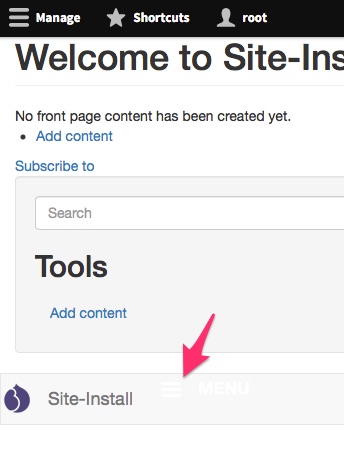
The image below is a screenshot of my local with the admin menu and the mayo theme and shows the toggle icon placed in the header area.

Comment #3
tancComment #4
Anonymous (not verified) commentedWorks with Adaptive theme but not Bootstrap 3 for me.
Comment #5
dzinelabs commented@tanc could you post your settings for me?
I placed in the navbar region, header region...
Comment #6
tanc@dzinelabs I did a fresh install with drush si and then enabled the responsive menu module. I already had the libraries downloaded using bower and moved to [web_root]/libraries
I then enabled the MAYO theme and then placed the 'Horizontal menu' block and the 'Responsive menu mobile icon' block in the header region.
Navigating to the home page I could see the toggle icon and clicking it revealed the mobile menu.
I didn't need to configure any settings on the responsive menu form as the defaults were sufficient.
Comment #7
tanc@maxmannen I can get this module half working with Bootstrap 3. There is some quirky behaviour with Bootstrap 3 in that the navigation region doesn't get wrapped in the mmenu page wrapper. The other issue is that the mobile toggle can be really hard to see as it defaults to white and when placed on bootstrap's light grew its almost invisible. See screenshot below.
Comment #8
tanc@maxmannen I was able to get it working perfectly with Bootstrap 3 (dev) by adding a wrapping div around all the elements in the page.html.twig file. So this appears to be a requirement for the mmenu plugin which I'll need to explain to themers in the instructions.
Comment #9
dzinelabs commented@tanc... I will try your solution... If a default install works the problem must be some kind of setting... Keep you posted
Comment #10
tanc@dzinelabs also check that you've definitely added both blocks as the 'Horizontal menu' block is the one that adds much of the javascript to the page.
Comment #11
dzinelabs commented@tanc: just did some testing ...
First, indeed both blocks are added.
1) Screenshot before installing module:
http://www.dzinelabs.com/projects/scr/no%20module.jpg
As you can see, page background is colored
2) Screenshot after installing module:
http://www.dzinelabs.com/projects/scr/module%20installed.jpg
Background turns white (theme setting not being applied it seems)
Default settings used
3) resized desktop, hamburger appears and menu is working:
http://www.dzinelabs.com/projects/scr/resized.jpg
Still no background color as defined in theme
4) setting changed to min 769 - max 1024 px:
http://www.dzinelabs.com/projects/scr/769-1024.jpg
Still no background color
All these tests were done on desktop.
On my tablet (10 inch screen) I encounter more problems:
1) using default settings of the menu, I only have the normal horizontal menu and still no background color.
I can also not use the pinch technique to enlarge the screen (only able to use it once to zoom out and then screens hangs)
2) disable superfish and mmenu still no background but pinch to zoom works.
3) change setting to min 769 - max 1024 px: instead of horizontal, hamburger shows (what i need). responsive menu appears but menu with close button disappears from the header. And unable to use the pinch technique to enlarge the screen (only able to use it once to zoom out and then screens hangs)
4) same as 3) but disabled all plugins ... pinch works fine and still hamburger. No close button as in 3)
Have not begun testing yet on my iphone ...
Oh my ... some more testing ... moving both blocks from header region to menu bar region in the mayo theme ... no nav what so ever shows up ... desktop and tablet ...
Comment #12
userspan commentedHi, I after install module the admin toolbar error
http://progra.d8.swproyectos.com/jdiaz/tradiciones/error.png
Comment #13
dzinelabs commented@userspan i had that problem also ...disable and completely uninstall the module (but not the libraries)...clear cache ...download and install again. Do not mess with the settings of the module yet ... try again to see if the admin toolbar works ... after that mess with the settings
Comment #14
dzinelabs commented@tanc another update
1) on desktop logged in as admin:
http://www.dzinelabs.com/projects/scr/admin_desktop.jpg
Seems the admin toolbar does not play nice with the module
2) on desktop logged out as admin:
http://www.dzinelabs.com/projects/scr/log_out_desktop.jpg
screen normal as opposed to 1)
On tablet:
1) logged in as admin the space above admin toolbar completely empty, i.o.w. no menu X
2) logged out: same as issue 2) for desktop so all good
Hope all my input helps
Sorry for being a PITA lol
Comment #15
userspan commented@dzinelabs i try you answer but the problem exist.
When i unistall the module admin toolbar is ok, and later clear full cache and all ok, when i try install again the module responsive_menu, the install is ok, but when i try clear full cache again, the admin toolbar is broken.
Comment #16
userspan commentedComment #17
userspan commentedComment #18
tanc@dzinelabs no problem at all! Really good bug report, helps me understand the issues. The white background is an easy one to resolve. That's because of the default css that comes with the module, it adds a white background to the element with an mm-page class. The idea is that you should customise the css in your theme and disable the css that comes with the module (a checkbox in the settings) but on a default install the css is included so there is at least some basic styling.
The admin menu seems to be harder for me to debug but I'll continue looking.
Comment #19
tanc@dzinelabs I've been able to replicate your issue to some degree but only in Firefox and only when the admin menu is in vertical mode. Whilst in horizontal mode it is positioned fine but switching to vertical and opening the responsive menu panel causes the admin menu to move down. Could you please test on Chrome and let me know if the admin menu positioning problem is still there?
Comment #20
tanc@userspan which browser are you using? Could you try with other browsers and report back?
Comment #21
tancI've just pushed a fix for the one Firefox rendering quirk I can replicate which was pushing the vertical oriented toolbar down whilst the responsive menu panel was open. Could you both test to see whether it resolves your toolbar positioning issues?
Comment #22
userspan commented@tanc, @dzinelabs this is my error with the install module
http://progra.d8.swproyectos.com/jdiaz/sothys/menu_responsive.mov
The browser is firefox 45.0.1 and chrome the last update
And end the video this error in debuggin
Warning: file_get_contents(/modules/responsive_menu/js/views/BodyVisualView.js): failed to open stream: No such file or directory en Drupal\Core\Asset\JsOptimizer->optimize() (linea 30 de /var/www/vhosts/core/lib/Drupal/Core/Asset/JsOptimizer.php).
And page not found /libraries/hammerjs/hammer.min.map
Tanks
Comment #23
tanc@userspan, thanks for the video, that is very helpful. So it looks like the module isn't loading its js/views/BodyVisualView.js file after a cache rebuild. Unfortunately I can't replicate this locally. Can you double check you definitely have that file in the responsive_menu module? Looking at your error it looks like it should be in /modules/responsive_menu/js/views/BodyVisualView.js
Otherwise I'm not sure what else can be causing this issue. Maybe a list of 3rd party modules you have installed may help? I've tried to replicate your set up by installing admin_toolbar module but it wasn't a conflict with that. Any other hints would be useful. Thanks!
Comment #24
userspan commented@tanc in fact the error is line 67 in www.sitename/core/modules/toolbar/js/toolbar.js Drupal.toolbar.views.bodyVisualView = new Drupal.toolbar.BodyVisualView({
In your module when install replace the js of core by your module, but when i clear all cache dont replace again the file and when try load the js show the error.
The patch or error is in localhost/sitename or www.yoursite.com/sitename.
Apply this patch in responsive_menu.module line 230 funtion name
function responsive_menu_library_info_alter(&$libraries, $extension) {
change to this code
function responsive_menu_library_info_alter(&$libraries, $extension) {
if ($extension == 'toolbar' && isset($libraries['toolbar']['js']['js/views/BodyVisualView.js'])) {
//unset the core BoyVisualView.js
global $base_root; //New line
unset($libraries['toolbar']['js']['js/views/BodyVisualView.js']);
$new_path = $base_root . base_path() . drupal_get_path('module', 'responsive_menu') . '/js/views/BodyVisualView.js'; //New line
if (isset($new_path)) { //New line
$libraries['toolbar']['js'][$new_path] = array();
} //New line
}
}
Comment #25
userspan commentedComment #26
tanc@userspan that's interesting, so by making the script load from an absolute url it works for you?
Adding the $base_root global will change the script from a relative path like:
<script src="/modules/responsive_menu/js/views/BodyVisualView.js"></script>to:
<script src="http://mytestsite.com/modules/responsive_menu/js/views/BodyVisualView.js"></script>If you don't add $base_root so you have a relative path, what does your page source show for that script tag? It seems odd to me that a relative path wouldn't work, especially as all the other modules and core javascript use relative paths.
Comment #27
dzinelabs commented@tanc, i am a bit swamped with work at the moment to test everything but indeed the css setting was causing the background color problem. But unchecking that setting revealed another problem: i now have a normal, unstyled and vertical menu instead of the responsive menu (not horizontal and no hamburger):
1) css setting enabled: http://www.dzinelabs.com/projects/scr/769-1024.jpg
2) css setting disabled: http://www.dzinelabs.com/projects/scr/css_unchecked.jpg
Did a clear cache thinking this would solve it and that gave me the admin toolbar problem again: it is all over the place again...
Also installed the 8.x-2.0 +6-dev version but nothing changed ...
Comment #28
tanc@dzinelabs no problem about testing and time. Regarding the css, the idea is that the module provides some css which covers the basics but as a themer you should really provide your own css. There is no way for the module to know what colours your theme would implement, what kind of layout your menu would take etc. So you should be copying the module's css into your theme, disable the module's css using the checkbox and then modify your theme until you get the result you want.
Comment #29
tanc@dzinelabs and @userspan how are you hosting your development site? Are you using a custom local set up or something like Acquia's dev desktop? I really need to replicate your set up so I can see what is causing this toolbar issue.
Comment #30
dzinelabs commented@tanc, no local development... Server sandbox...
The css I understand and that is no problem but the main problem at the moment is that there seems to be a conflict with the admin toolbbar module...
Comment #32
tancRight! I've finally managed to replicate the issue. I realised that you are both probably running your sites in a sub directory and setting your RewriteBase in your htaccess (at least thats how I did it).
This then showed me the issue which is the
base_path()that I was using to make the replacement js relative was returning the RewriteBase which in turn caused the file not to be found. So I've replaced it with a basic slash which then allows the relative path to work properly, no matter whether using a top level domain or a sub directory.I've pushed a fix so please test it and report back, but I'm pretty confident that is the issue resolved.
Comment #33
dzinelabs commented@tanc, that is correct .. my project is in a subdirectory (sorry, should have mentioned that much earlier) but I did a default drupal install, i.o.w. I have not messed with the htaccess but I´ll give the fix a try.
Can you confirm that the fix is to be applied at the 8.x-2.0 version?
At the moment I am using the dev version
Comment #34
tanc@dzinelabs just grab the latest development version. Once you confirm its fixed the issue I'll release 8.x-2.1
Comment #35
dzinelabs commented@tanc, awesome. Works like a charm. Only thing left to do is come up with a custom css file so I do keep the menu as intended (hamburger) and don´t loose the background color and don´t have the unstyled vertical menu: if i tick the css from the module I get the exact menu I´m looking for but loose the background color. If I disable the module css, I keep the background color but the menu looses all styling.
Could we keep this thread open because I still need to do some testing on tablet and smartphone ...?
Comment #36
dzinelabs commented@tanc, did some testing on tablet and smartphone:
Zoom (pinch) problem:
1) My old Iphone 4 with Safari: all good
2) Samsung tab 4, 10 inch: no go ...using the pinch technique to zoom out ...zooms out but hangs ... no way to pinch to normal lay out ...disable the module and all is well.
Comment #37
tanc@dzinelabs thanks for testing. Which OS and browser are you using on the Samsung Tab 4?
Does the mmenu plugin work fine for you here: http://mmenu.frebsite.nl ?
Comment #38
dzinelabs commented@tanc, OS android, browsers: maxton, chrome, Firefox
Mmenu.frebsite.nl: nope
Comment #39
tanc@dzinelabs it sounds like the admin toolbar issue is working fine for you now so I'm going to make this as fixed. Regarding the zoom issue, I've opened this other issue for that: #2698657: Zoom disabled by hammerjs on Android
Could you re-open that case and continue the conversation there if you're still having issues?
Comment #40
tancMarking this one as fixed