I have a calendar node with three "BAT Calender Unit Reference" fields ordered like this:
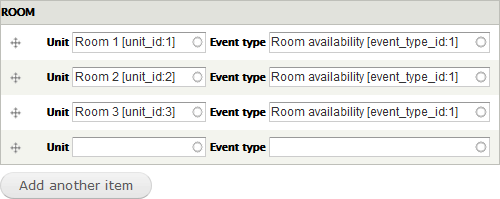
I would expect that this would result in the bars showing availability would be stacked like this:
- Room 1
- Room 2
- Room 3
However the ordering the bars in the calendar node seems to have no effect and on my site, they show up ordered like this:
- Room 2
- Room 3
- Room 1
The problem is illustrated in the two screenshots below. The top screenshots shows the room when I as an administrator visit the "Manage Rooms Availability" page. It shows the rooms stacked in the correct order from top to bottom.
However, the view presented to the end user, when I am displaying availability to end users by having all three rooms included as fields in a single calendar node, the order appear as random (Room 2 is on top, Room 1 is at the bottom, with Room 3 in the middle).

How do I control the stacking order of the rooms when they appear in Month View of the calendar?



Comments
Comment #2
acrollet commentedI'm afraid I need a bit more information, what is a calendar node? Can you provide any other details about your setup?
Comment #3
gisleA "calendar node" is a node of a custom content type that I've created in order to display a monthly view of the calendar to users. In addition to Drupal's two default fields (i.e. "Title" and "Body") I've added the "BAT Calendar Unit Reference" field provided by BAT and indicated that this field can hold an unlimited number of values.
I then set the display ("manage display") of the "BAT Calendar Unit Reference" field to "Month View".
In order to create a calendar node, I click on "Add content", fill in "Title" and "Body" with some text, and then create 3 instances of the "BAT Calendar Unit Reference" field with contents as shown in the screen shot in the issue summary.
I then view the node just created. As noted, I expected to see the fullcalendar bars in the same order as they were ordered on node edit page, but they were not.
I am following your instructions at "docs.roomify.us" to the letter, and I am able to get things working up to this point: Displaying availability, where I am not able to get the results I expect. Any help to get the monthly view of the calendar working will be appreciated.
Comment #4
gisleAdded screenshots to illustrate problem.
Comment #5
gisleReplaced image.
Comment #6
gisleThree months has passed since I supplied the information requested by the maintainer.
There has been no response from the maintainer.
Setting back to "Active".
If the maintainer still don't understand what the problem is - please be more specific about what information is required.
Comment #7
acrollet commentedHi there,
can you confirm that you are using the latest versions of bat, bat_api and the bat library?
Comment #8
gisleacrollet wrote
Yes. Below are the versions I use. I am able to reproduce this problem at will with the latest version.
Versions:
BAT - Version: 7.x-1.8
BAT API - Version: 7.x-2.3
BAT library - roomify/bat dev-master fcb0348
fullcalendar v3.0.0
fullcalendar-scheduler v1.4.0
After going through the source code, I am starting to believe that there is no way to control the order of the rooms when you want to display more than one room in an availability overview. If you can confirm that there is currently no way to do so with BAT, I'll change that into a "feature request"?
Comment #9
acrollet commentedComment #10
ugintl commented@gisle I want to allow users to see availability and book appointment with doctors. Doctors will be a content type. What modules do you suggest for this?
There is Availability calendar module but does not support booking and payment.
Comment #11
acrollet commented@ugintl you may want to look at the BEE module - it makes it easy to set up BAT and make content types bookable, and integrates with Drupal Commerce.
Comment #12
xax@gisle: dear Gisle, I've been struggling like mad to get my BAT (and BEE) calendars to work. Despite various error messages that (still) pop up at some of the bat config pages, I have managed to get the backend working (I can now create events, edit them, and they show up in the maintenance calendar (like your first image, in a long view that runs off the page, horizontal scroll).
Thanks to your post I now have a working calendar (in Drupal 8.8) on the front end too!
- I tried BEE first, made a content type and made it bookable. Got all the units sorted, availability could be set, but on the BEE page it only ever wanted to show the timeline view. But in no way could I get anything else than a timeline view showing on the front end..
- Then I tried your way as described above: create a (non-BEE) node, added the 'Calendar Unit Reference' field, and bingo..! I can now show the calendar
- I'm now trying to replicate this using my preferred route: views. I'll let you know how that goes :)
Eternally grateful!
Xander
Comment #13
afagioliNo more support for BAT on Drupal 7.
Latest BAT for Drupal 10 has full support from the Community and most of the bugs fixed.
Consider upgrading.