Closed (fixed)
Project:
Drupal core
Version:
6.2
Component:
page.module
Priority:
Normal
Category:
Support request
Assigned:
Reporter:
Created:
23 May 2008 at 20:12 UTC
Updated:
29 May 2008 at 20:58 UTC


I have created a text field (Text area - multiple rows) with the name of More. It is available for Book Pages. I set
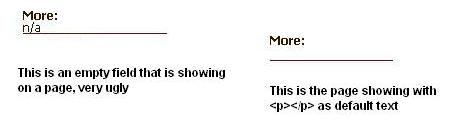
as default text and that eliminated the "n/a" entry that was automatically showing up on an empty field.
So now instead of seeing on an empty field on pages that looks like this: More: n/a - I only have More: showing on my pages.
I understand that by putting the
as default text is saying the field is NOT EMPTY. The problem is that if I do not put anything I get a default - n/a, which is very ugly.
I can live with the problem if I have to or just do not use fields. To me, showing empty fields with a heading and a default n/a on a page is not professional savy.
My question: Is there a way to NOT SHOW the label or anything if the field on a page is empty??
Any suggestions and help would be deeply appreciated
| Comment | File | Size | Author |
|---|---|---|---|
| example.jpg | 8.29 KB | abcbook |

Comments
Comment #1
abcbook commentedSorry for bothering you. I did not realize that you could Configure how the content type's fields and field labels should be displayed. Consider this problem fixed.
Thanks
Comment #2
abcbook commented