Problem/Motivation

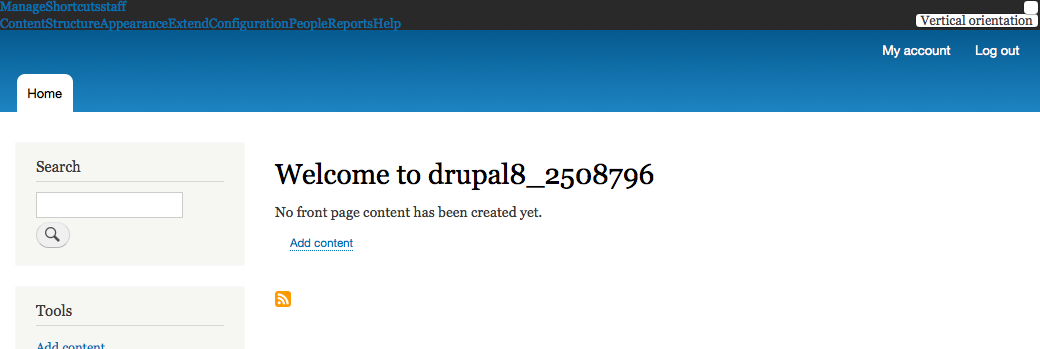
After the changes in #2539992: Move theme toolbar CSS to the Seven theme it became apparent that Contextual hides the Administrative toolbar edit button text by default.

Steps to reproduce the issue

  • Disable the loading of toolbar.icons.theme.css from Toolbar module or
  • Apply latest patch from #2539992 and make Stark the default admin theme.

Proposed resolution

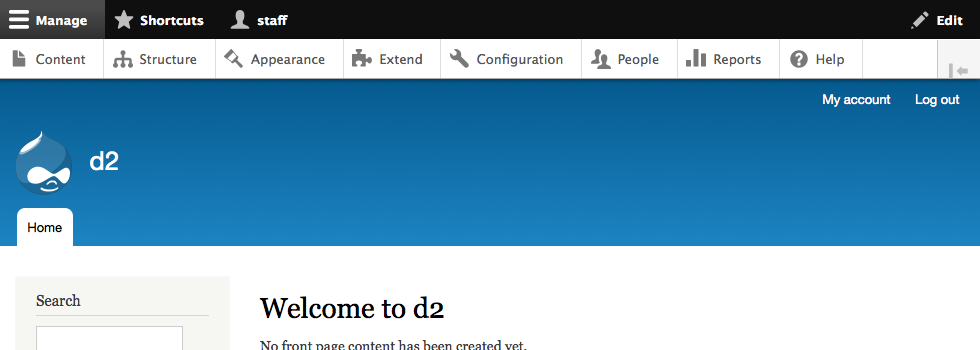
The text "Edit" should be visible. Remove styles that hide the toolbar edit button text.

User interface changes

Edit button text is not hidden.

API changes

None.

Data model changes

None.

Comments

bruvers created an issue. See original summary.

bruvers’s picture

Assigned: bruvers » Unassigned
Status: Needs work » Needs review
StatusFileSize
new715 bytes
new33.08 KB
new33.55 KB
new35.76 KB
new35.76 KB

The patch removes padding and text-indent CSS rules from contextual.toolbar.css. Without these styles the button text becomes visible again. These styles are not needed by Seven anymore because Seven overrides them.

bruvers’s picture

Issue summary: View changes
irina.rozite’s picture

Nice, patch resolves the issue. After applying it and using Stark as default admin theme, toolbar edit button text "Edit" is visible.

irina.rozite’s picture

Status: Needs review » Reviewed & tested by the community

Status: Reviewed & tested by the community » Needs work

The last submitted patch, 2: core-toolbar_edit_button_visible-2568743-2.patch, failed testing.

irina.rozite’s picture

Status: Needs work » Reviewed & tested by the community
alexpott’s picture

Status: Reviewed & tested by the community » Fixed

Committed c2563f6 and pushed to 8.0.x. Thanks!

  • alexpott committed c2563f6 on
    Issue #2568743 by bruvers: Administrative toolbar edit button text not...

Status: Fixed » Closed (fixed)

Automatically closed - issue fixed for 2 weeks with no activity.