

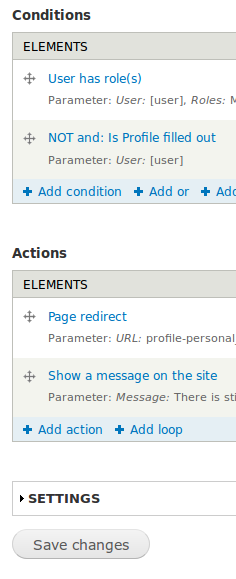
Closed (cannot reproduce)
Project:
Rules
Version:
7.x-2.9
Component:
User Interface
Priority:
Normal
Category:
Support request
Assigned:
Unassigned
Reporter:
Created:
10 Jul 2015 at 03:34 UTC
Updated:
24 Sep 2019 at 12:59 UTC
Jump to comment: Most recent

Comments
Comment #1
magnestyuk commentedThis is still an issue for me as well.
Comment #2
paul_simmons commentedSame.
(I investigated whether this could have been related to JQuery update, ie. disabled it, tried default version etc = No luck)
Comment #3
Anonymous (not verified) commentedFor a dirty but fast solution:
open firebug and go to
<fieldset id="edit-settings" class="collapsible collapsed form-wrapper">change collapsed -> open:
<fieldset id="edit-settings" class="collapsible open form-wrapper">Comment #4
tr commentedI really doubt this is a problem with Rules. Evidently the core Drupal JavaScript that's responsible for opening and collapsing that fieldset (/misc/collapse.js) is failing for some reason. You could look in the JavaScript console in your browser to see what the error is. JQuery update, as mentioned in #2, is a likely culprit, but there could be others.
Comment #5
tr commentedNo further information provided.
Comment #6
Anonymous (not verified) commentedPatching logintoboggan https://www.drupal.org/project/logintoboggan/issues/1365764#comment-1327... solved this issue for me