I'm experiencing something odd and I can't seem to find a similar issue reported. I've stripped my Drupal install to the bare minimums to figure it out and I can now re-create the issue, although I don't understand why it's happening but hopefully someone can help/explain.
I have the following installed:
* Drupal core 7.35
* Ctools 1.7
* Views 3.10
After doing a fresh install with only the items listed above I create a new Page view to display fields of a basic page.
The view has the title field already added, so I simply add the field Content: Post date
When open the drop down for Date Format on this field I see the following options:

Notice the Short Format and Medium Format display. They are showing up with slashes between month/day/year
Now here's the odd part. If I go to Configuration-> Date and Time on that screen both my Short and Medium date types are showing with dashes, not slashes, in the format of year-month-day.
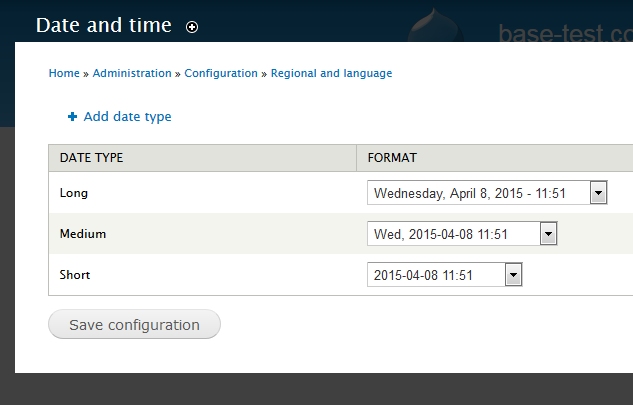
If I DON'T make any modifications to this screen and simply click the "Save configuration" button my view suddenly changes!
Now when I go back to my view if I click on the field Content: Post Date and look in my Date format drop down, the format I was seeing on my Date Time are showing up.
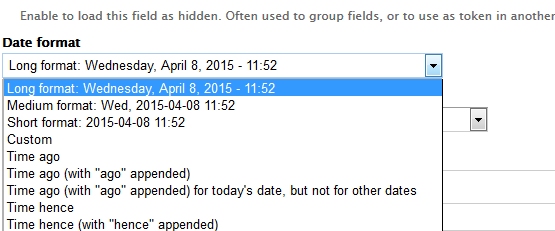
Notice the Short Format and Medium Format display now. It is showing up with dashes as year-month-day
I'm assuming there is some sort of weird thing going on either with Views or Drupal Core. Why does views initially show a format of month/day/year (slashes) even though my Drupal Core system is showing it to be configured as year-month-day (dashes)????
Can someone point me in the right direction as to what is going on? This seems abnormal and risky. On one of our servers we've never clicked the "Save configuration" button on the Date Time screen so all our dates in views show differently than the servers where we HAVE clicked "Save configuration". This caused a bit of confusion between team members working on different server.
At the very least can someone confirm this behavior for me? Are you seeing it too? What am I missing here????
NOTE: This same issue has been posted in the views issue section too: https://www.drupal.org/node/2467739 minus the update details below.
UPDATE:
I've also found that adding the Date Module and creating a new field of type Date has the same sort of problems. This situation can be recreated by looking at the "Manage Display" section of a content type that has a date field. When you click the gear icon to alter the date format, the Long, Medium, and Short formats all display EXACTLY the same. Once I go to the Date Time config page and click "save configuration" (again, without making any changes, just clicking save) things go back to normal.


Comments
Comment #1
ladybug_3777 commentedComment #2
ladybug_3777 commentedThis issue still exists in 7.36
Comment #3
ladybug_3777 commentedMore detail on this issue....
I noticed while using drush that the date format variables do not exist until I click "save configuration"
This is the output of drush vget before I click the "Save Configuration" button on the Date Time screen:
And this is what it looks like after I save:
Comment #4
dcam commentedI have confirmed the behavior for you.
The issue here is that prior to saving the Date and Time configuration page, you didn't actually have the date types configured on your site. The Date and Time page is just displaying the select list of formats in order. It's relatively easy to see. Just inspect the HTML for the select lists on a clean install. You'll see that none of the options has the selected attribute. After saving the page, then an option will have it. If you have Drush, you can also inspect the variables with
drush vget variable_name. The variable names are date_format_short, date_format_medium, and date_format_long. They won't exist in the database until after the config form has been saved.My guess is that Views is just doing its best to display a format for the date type in the absence of the config variable. I don't know why it pulls out a different one by default. I didn't feel like hunting for its field formatter code.
Anyway, since this confused you it's probably a sign of bad UX even though there's nothing really wrong with the code. I don't know whether Views should be changed to display the same default formatter, we should have the standard install profile explicitly set default formats, or we should do something that I haven't even thought of. I'll leave that up to someone else. The important thing now is that Drupal 8 needs to be checked for this issue, which regrettably I can't do right now. If someone could check on it, that would be great.
Comment #5
ladybug_3777 commentedThank you for confirming! I think the idea of having the install profile(s) set the default formats is a good first step. I'll make sure that I am setting them in my own custom install profiles from now on too. I haven't played around with Drupal 8 at all yet so I won't have a chance to check if it is doing the same thing, but I'm glad I raised the issue so that hopefully someone will have time to take a peek. Thanks again!
Comment #6
ladybug_3777 commented2 years later and I noticed an additional issue related to this. When using an exposed filter with the granularity of Month with the "select" option, if I do not click save on my configuration page my exposed filter shows 2 select boxes, first one is Month second is Year.
Example:
Select a date
Month> Year>
However, after clicking the Save button on the Date Formats page (with the default of yyyy-mm-dd tt:hh as shown in my first screen shot), my exposed filters change and suddenly start displaying year and then month
Example:
Select a date
Year> Month>
This caught me up recently when I had a production server and development server where I had clicked "save Configuration" on one but not the other. I could not figure out why the exposed filter was shown in different orders.
In order to get it to display the month drop down first, and then the year drop down, I had to change the short format to display similarly such as mm/dd/yyyy time.
Since the variables were never set properly until the save button is clicked, some users may see the exposed filters drop down option order change and not understand why. I'm adding this comment as a reminder that the exposed date filters format is controlled by the short format setting and you want to be sure that you have clicked SAVE to apply that setting properly.
Comment #7
hgoto commented@ladybug_3777, if you see the odd behavior only for Short and Medium formats, the following issue may be related. Please take a look.
#1817748: /admin/config/regional/date-time does not show the correct default format for short and medium format