After upgrading Views from 3.8 to 3.10 some of my views appear to have lost some of their customizations.
Update: see comment #3 below -- may be related to core update to 7.36.
Example: see the attached photo. A view that had multiple "Global: Custom text" fields, each with its own unique admin title, now all show the same default admin title. Additionally the links to edit those fields all point to the same settings modal (for the first global, called "nothing"). If I export the view everything appears to be in order, with unique field names specified behind the scenes.
Any advice is appreciated. Thanks all!



Comments
Comment #1
jweirather commentedJust wanted to note that I've tried exporting/importing the view to see if re-importing the view would resolve the issue.
It did not.
Comment #2
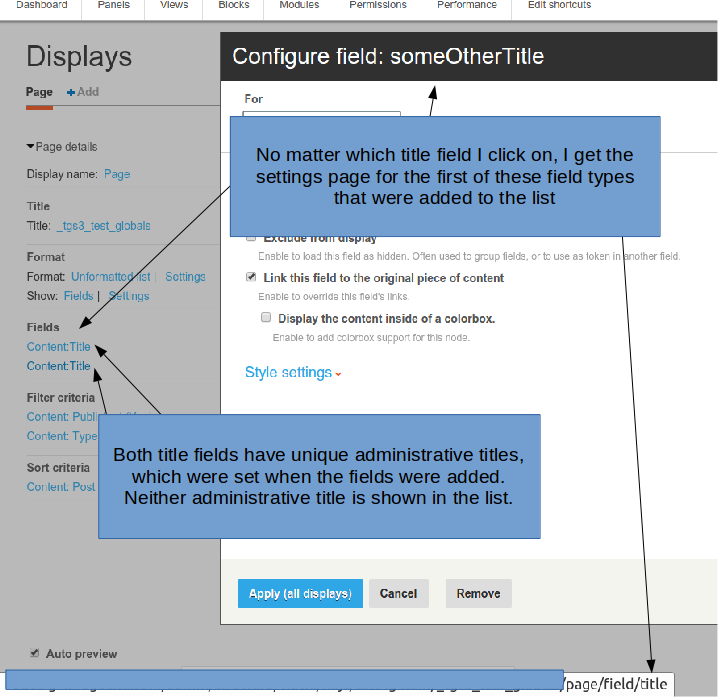
jweirather commentedSee attached photo: I've also tried creating a new view from scratch, and added to it two "content: title" fields, each with its own Administrative title. The administrative titles are not shown at all, and clicking on either (ie: to edit), takes me only to the details' modal for the first item in the list.
Just to reiterate, this makes the views UI nearly unusable, so I'm going to set this issue to "critical". I can't imagine I'm the only person this is happening to.
Comment #3
jweirather commentedUPDATE: After much troubleshooting, this appears to be related to a core update that occurred at the same time, from 7.34 to 7.36. The error persists in Views 3.8 and 3.10, but goes away when I roll back core to 7.34.
That update appears to break the views UI as illustrated by the previous posts in this thread. Updating the title.
Should this be moved/cross referenced to core?
Comment #4
jweirather commentedComment #5
jweirather commentedComment #6
jweirather commentedComment #7
jweirather commentedClosing this issue here. Please see this core thread. This actually appears to be related to the Ember theme. Rolling back to a previous version of Ember admin theme appears to solve the issue. Closing issue for now.