Problem/Motivation

Currently there is no UI. An appropriate one might be roughly parallel to the "Synchronize" form for staging changes from one environment to another (admin/config/development/configuration):

  • Divide list into sections, one for each type of extension (module [probably including install profile], theme).
  • In a table, list (in alphabetical order) extensions of the given type that have available updates. For each, offer a link to show all changes. This link would lead to the report provided by Configuration Update Manager for the given extension.
  • Below the list, have a "Safe changes only" checkbox, checked by default. Unchecking it brings up a warning and a red or otherwise warning-like button to apply unsafe changes.
  • If "Safe changes only" is checked, bOffer a form that lists all extensions that have available updates. utton says Apply changes. Click to apply all safe changes.

Proposed resolution

Remaining tasks

User interface changes

API changes

CommentFileSizeAuthor
#2 config_sync.png30.04 KBnedjo

Comments

  • nedjo committed 11ff1d2 on 8.x-1.x
    Issue #2429951 by nedjo: Add UI for managing configuration updates
    
nedjo’s picture

Issue summary: View changes
StatusFileSize
new30.04 KB

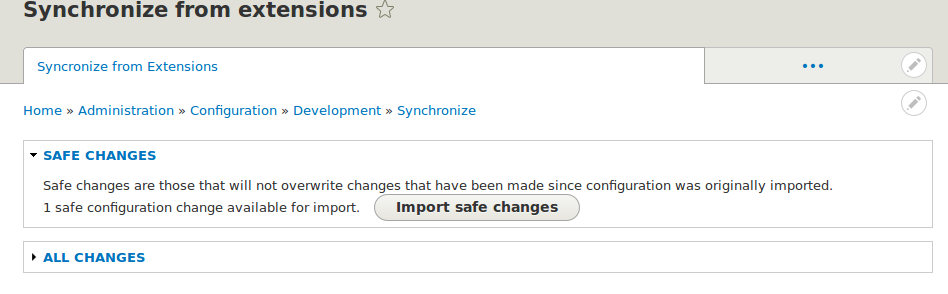
I've roughed in the most basic of UIs.

Screenshot showing UI for Configuration Synchronizer

At a minimum, needs to be batched.

Accessed at admin/config/development/configuration/sync-extensions.

nedjo’s picture

Version: » 8.x-1.x-dev
Status: Active » Fixed

Status: Fixed » Closed (fixed)

Automatically closed - issue fixed for 2 weeks with no activity.