

Closed (fixed)
Project:
Drupal core
Version:
8.0.x-dev
Component:
tour.module
Priority:
Normal
Category:
Bug report
Assigned:
Unassigned
Issue tags:
Reporter:
Created:
17 Jan 2015 at 15:14 UTC
Updated:
2 Feb 2015 at 11:24 UTC
Jump to comment: Most recent, Most recent file



Comments
Comment #1
vacho commentedThis problem is in tour module css.
Please review and validate this patch that solve the problem.
Comment #2
idebr commented@vacho Don't forget to update the issue status to 'Needs review' when you upload a patch :)
Comment #3
balagan commentedComment #4
balagan commentedI think @vacho got wrong selector, for me the enclosed patch works.
Comment #5
balagan commentedComment #6
idebr commented@balagan You are correct, the selector was off. The close-button is now on the correct side, but the padding from
.joyride-tip-guideand.joyride-content-wrapperis still missing RTL css. Let's add that while we're at it.Comment #7
balagan commentedOk, I am trying to do that.
Comment #8
balagan commentedI am not sure if I got .joyride-content-wrapper right. There are still RTL display errors on the dialog in the pager, and more interestingly the hebrew tour is of 4 pages, whereas same tour in English is 10 pages. I will check if an issue exists already.

Comment #9
balagan commentedComment #10
idebr commentedYes, looking good! Just a few small things:
There is no need for an additional line breaks. RTL theming should go as close as possible to the original selector to increase readability
An identical comment is two lines up. No need to repeat, so this line can be removed :)
Don't forget to reset the padding-right that applied in the LTR styling (eg. padding-right: 0;)
Comment #11
vacho commentedGood solutions...
but I answer. The x (Close icon) in the view is at upper right corner on all windows popup interfaces of view.
Then are all popus of view also incorrect?
Comment #12
balagan commentedI was working on this issue, and there it was correctly on left side for RTL languages, so I suppose that patch will solve it.
Comment #13
balagan commented@idebr: at 2. and 3. I had a feeling about the points you made, but I was unsure. Thanks for pointing them out. Hopefully I have fixed those.
Comment #14
balagan commentedComment #15
idebr commented@vacho The Views dialogs have the close button on the wrong side indeed. This is being fixed in #2396473: Add missing RTL rules to System CSS
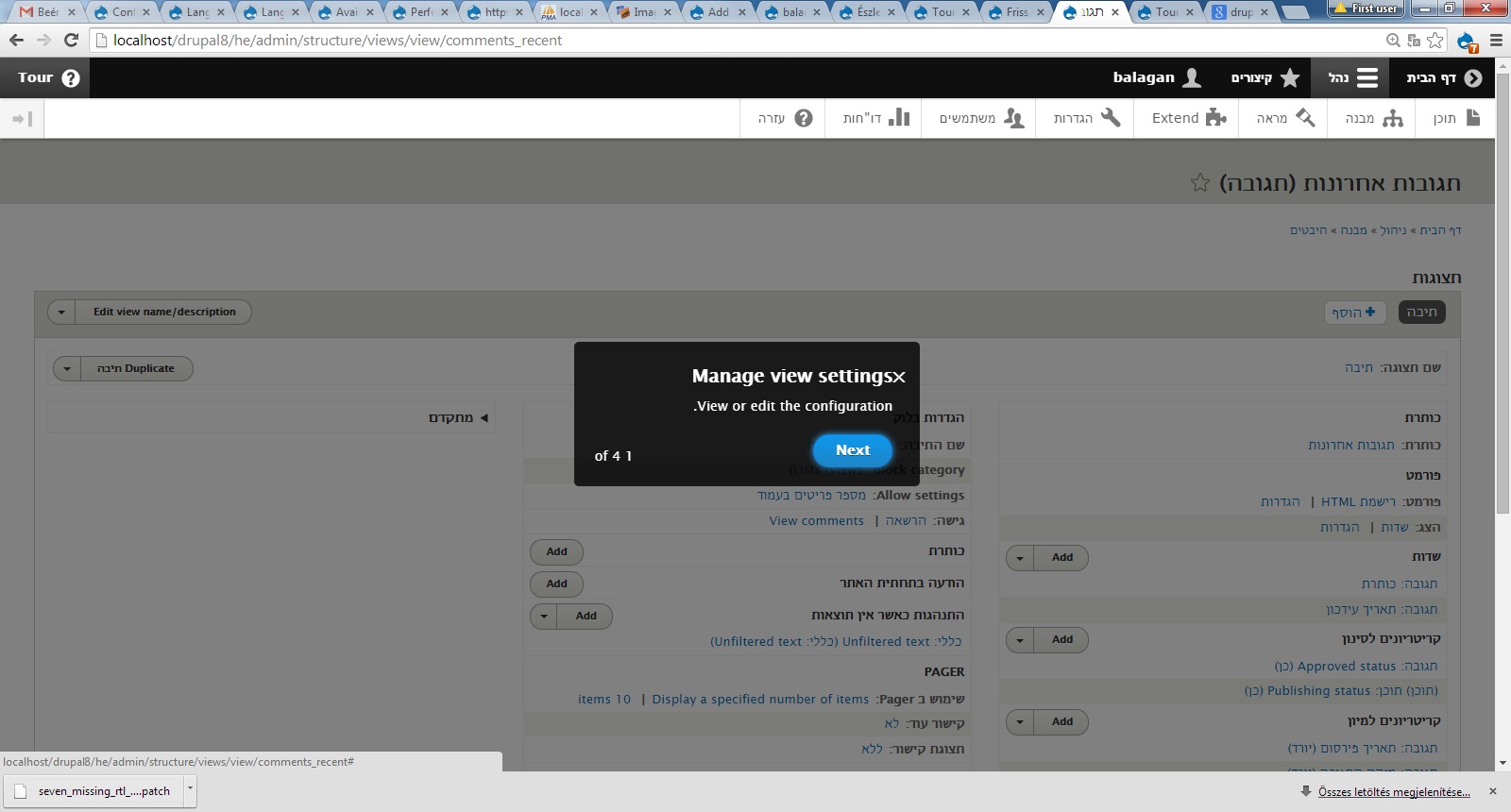
Patch looks good! Screenshot before:
Screenshot after:
Comment #16
yesct commentedNice collaboration on this issue.
What about the "pager"?
Should the word 'of' be between the numbers?
Seems like patch doing more than just the close button. So I think this needs a more accurate title and an issue summary update.
The browser plug in from http://dreditor.org has some buttons that might help for using the issue summary template and embedding screen shots.
Comment #17
balagan commentedI was also thinking about the pager, but I thought that is either not an issue or a different one. I will check it more thoroughly.
Comment #18
balagan commentedComment #19
balagan commentedI think the pager is moved by some JS code, don't see anything to do with styles, but I am no expert. Yesterday I saw some strange behaviour when displaying LTR text with RTL style, for example the sentence ending dots were moved to the other side, but sometimes to both the front and end of another sentence. I suppose the same code might be responsible for this. If I write letters to the beginning and end of the pager, it displays properly. Yesterday with Hojtsy Gabor agreed not to open issue for the dots, since we are displaying LTR text as RTL. This number- and dot-moving logic might be working properly, I have no idea.
Comment #20
balagan commentedOk, it is not JS, but normal RTL behaviour I guess: http://stackoverflow.com/questions/20798667/why-is-a-trailing-punctuatio...
Comment #21
balagan commentedComment #22
balagan commentedSo about the pager displaying "of 4 1" it is definitely normal css behaviour. I was playing on http://www.w3schools.com/cssref/playit.asp?filename=playcss_direction&pr..., changed the input text to "1 of 4", and got the same result. See screenshot. (Ok, I was lying, I wrote 4 of 50.)
Comment #23
balagan commentedComment #24
balagan commentedComment #25
idebr commentedI did some additional testing on the pager and it appears this behavior is the default behavior for RTL. Additional changes:
Comment #26
alexpottMissing
/* LTR */No need for additional blank line
Comment #27
balagan commentedI have corrected the changes according to the notes in #26, and since it has been RTBC before, I dare to change the status back again (after retesting again).
Comment #28
balagan commentedComment #29
idebr commentedI think you misplaced the /* LTR */ comment here. It should be on the LTR styling instead.
The removed linebreak looks good:)
Could you add an interdiff to make it easier for reviewers to check your changes between patches? There is a documentation page available here: https://www.drupal.org/documentation/git/interdiff
Comment #30
balagan commentedOMG, I am getting worse at this.:)
Comment #31
balagan commentedThis should be OK, hopefully.
Comment #32
balagan commentedComment #33
idebr commentedNice :). I added an interdiff with the last RTBC patch in #13 for easier reviewing
Comment #34
alexpottCommitted 17bf38b and pushed to 8.0.x. Thanks!
Thanks for adding the beta evaluation to the issue summary.