

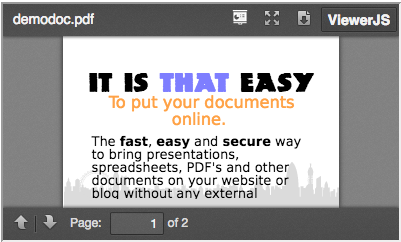
This module provide field formatter to display file or image using ViewerJS library. ViewerJS must be the easiest way to use presentations, spreadsheets, PDF's and other documents on your website or blog without any external dependencies. It can work offline, doesn't depend on any third party services or might be (perceived as) invasive to the privacy of your users.
Supported files : pdf, odt, odp, ods, fodt, jpg, jpeg, png, gif
Requirements:
Installation via Drush:
A Drush command is provided in the latest versions for easy installation of the ViewerJS plugin.
drush viewerjs-plugin
The command will download the plugin and unpack it in "sites/all/libraries".
It is possible to add another path as an option to the command, but not recommended unless you know what you are doing.
Installation:
- Download the ViewerJS library and extract it to sites/all/libraries/viewerjs (so that the viewer.js will be located at http://example.com/sites/all/libraries/viewerjs/viewer.js)
- Download and extract the ViewerJS module to /sites/all/modules.
Configuration:
- Go to your Structure > Content Types > [your-content-type] > Manage display;
- Create or use existing image or file field;
- Choose ViewerJs Default format and configure options.
Project information
 Seeking co-maintainer(s)
Maintainers are looking for help reviewing issues.- Project categories: Content display
 57 sites report using this module
- Created by mouhammed on , updated
 Stable releases for this project are covered by the security advisory policy.
There are currently no supported stable releases.


