

Postponed (maintainer needs more info)
Project:
Field Conditional States
Version:
7.x-2.1
Component:
Documentation
Priority:
Normal
Category:
Support request
Assigned:
Unassigned
Reporter:
Created:
30 Nov 2014 at 19:08 UTC
Updated:
1 Mar 2015 at 05:36 UTC
Jump to comment: Most recent, Most recent file

Comments
Comment #1
jj0914 commentedI also noticed that I only have following trigger value:
-Empty
-Filled
-Value is
Im missing checked/unchecked
Comment #2
Tobias Xy commentedHere it works as expected. In which tab did you create the state? (It should be "visible")
Do you have access to the database? It might help to see the contents of the field_conditional_states and field_conditional_state_groups tables.
Checked and unchecked are missing on purpose: They are only applicable to checkboxes, because normally you can't say which value of a list field should be the "checked" value and which the "unchecked" value.
Comment #3
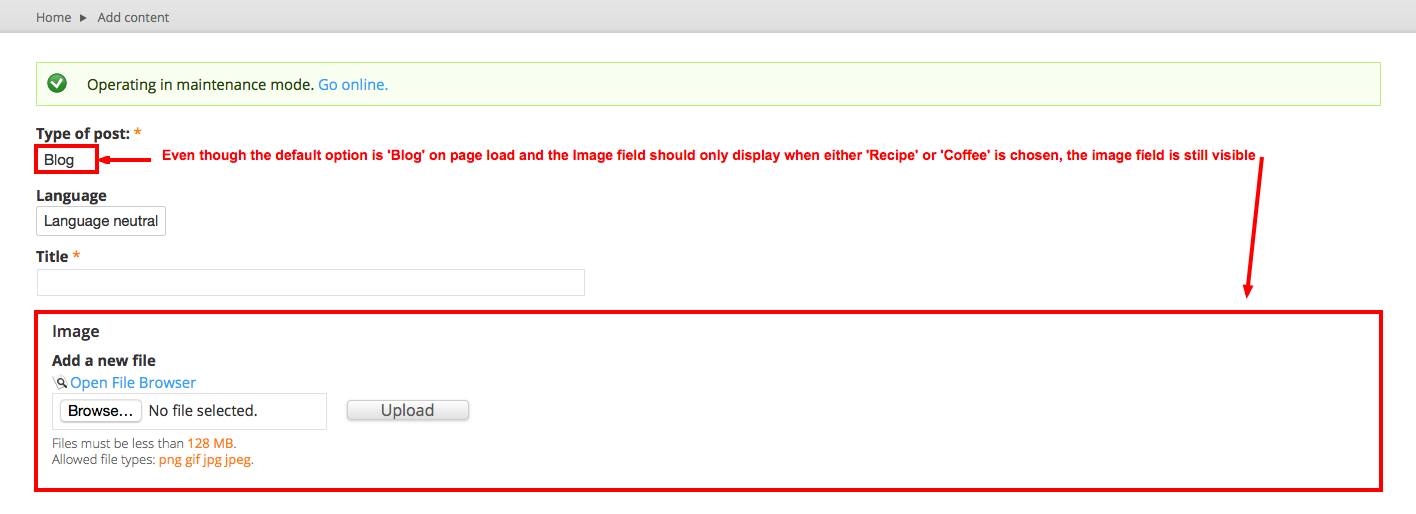
aseabrook commentedThere's an issue with select lists. When the node creation form loads, the target field is visible even though its 'Visible' conditional state is configured to be visible only when a specific option in the select list is chosen. For example, you have two fields:
There are 3 options in "Type of post":
The 'Blog' option is set as the default in the field settings.
The Image field's 'Visible' conditional state is configured so that when the "Type of post" field options 'Recipe' or 'Coffee' are chosen the Image field will be visible. So, since 'Blog' is set as the default option, the expected behavior when the node creation form is loaded is that the Image field should be hidden until either 'Recipe' or 'Coffee' is chosen...but it isn't. Added screenshot for maximum effect ;)