Requirements
Installation
For version 7.x-2.0 or above:
1 - First, install the mmenu module (standard Drupal way).
2 - Add plugin libraries [requires the "libraries" module].
2.1.1 - Downloads Mmenu library version 4.5 or above at
http://mmenu.frebsite.nl/download.php.
[Note: version 5.x may not work without modification, try v4.7.5 at https://github.com/BeSite/jQuery.mmenu/releases/tag/v4.7.5 ]
2.1.2 - Unzips the library files in the Drupal path
"/sites/all/libraries/mmenu/main".
2.1.3 - For example, the css file could be accessed in
"/sites/all/libraries/mmenu/main/src/css/jquery.mmenu.all.css".
2.2.1 - Downloads Hammer.js library version 2.0 or above at
https://github.com/hammerjs/hammer.js.
2.2.2 - Unzips the library files in the Drupal path
"/sites/all/libraries/mmenu/hammer".
2.2.3 - For example, the js file could be accessed in
"/sites/all/libraries/mmenu/hammer/hammer.min.js".
2.3.1 - Downloads jQuery plugin for the Hammer.js library version 2.0 or above
at https://github.com/EightMedia/jquery.hammer.js.
2.3.2 - Unzips the library files in the Drupal path
"/sites/all/libraries/mmenu/jquery.hammer".
2.3.3 - For example, the js file could be accessed in
"/sites/all/libraries/mmenu/jquery.hammer/jquery.hammer.js".
2.4.1 - Since mmenu v2.0, the icomoon data has been removed from the module.
But you can generate your own icons via https://icomoon.io/app,
or you can just download it from here
https://www.drupal.org/files/mmenu-icomoon.tar_.gz.
2.4.2 - Unzips the icomoon data in the Drupal path
"/sites/all/libraries/mmenu/icomoon".
2.4.3 - Copies the styles.css and renames to icomoon.css.
2.4.4 - For example, the css file could be accessd in
"/sites/all/libraries/mmenu/icomoon/icomoon.css".
This is the mmenu libraries files structure:

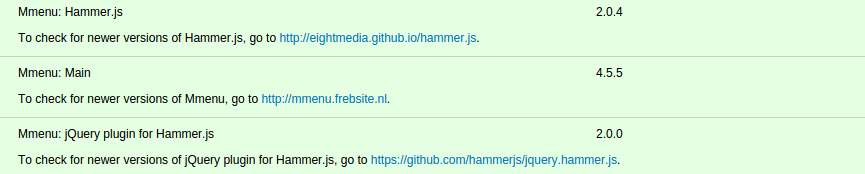
If the libraries are set up correctly, you will see something like this on the Drupal status report page at /admin/reports/status:
Configurations
There are four default mmenus. They are "Left menu", "Right menu", "Top menu", and "Bottom menu". They were disabled by default.
For example, to config the "Left menu":
- Enable the mmenu
- Assign blocks as contents to the sliding menu container.
- Config the mmenu options


