The panopoly_admin module provides a "Use Advanced Panels Plugins" configuration option that is disabled by default. It removes some "advanced" Panes from the "Add content" modal.
However, it's doing it in a kind of extreme way: by adding a required context (that can't be fulfilled) to the advanced panes. This can cause those Panes to break after saving a Panel that they exist on, as well as, show a weird and confusing UI if you try to edit the settings on those Panes.
This problem originally manifested itself with Panels Everywhere, because some of it's Panes are marked as "advanced" and if you save the page template (which you're going to do if you're using Panels Everywhere), it will suddenly break.
Instead of hiding these advanced panes in such an extreme way (ie. by adding a context), let's remove them in a hook_preprocess_X() function!
Steps to reproduce
There are two seperate issues when using Panels Everywhere:
Issue #1
- Do fresh install of Panopoly and install "Panels Everywhere" (don't change any settings, keeping the default of having "Use Advanced Panels Plugins" disabled)
- Edit the "Default site template" Page (path:
/admin/structure/pages/nojs/operation/site_template/handlers/site_template_panel_context/content)
- Go to the settings for the "Page Content" pane
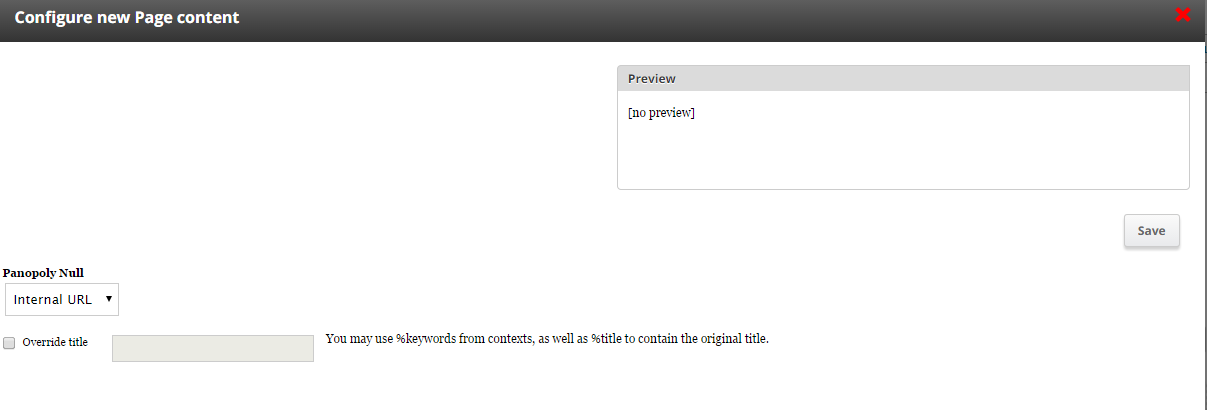
- I only get a select box with the label "Panopoly null", where I can choose whether the link should be internal or aliased.
Issue #2
- Save "Default site template" Page (from Issue #1 above), even without making any changes
- Visit a node page
- You'll see there is a headline (Dummy content) and just the last part of the url - and not the actual node view page (as expected)




Comments
Comment #1
dsnopekI'm able to recreate #1 - I also see the weird "Panopoly null" field. However, the pages actually work fine (point #2), until I save that Pane - then I see the correct title, but the node path rather than the actual content:
I think this is probably an issue with Panopoly Magic - since it's the module that messes with the Pane settings.
Comment #2
dsnopekActually, it turns out that it's Panopoly Admin that's causing the problems! Disabling it will allow you to edit the settings and then after saving and a couple cache clears the pages will start working. Still trying to narrow it down and come up with a patch.
Comment #3
dsnopekHere's the code in question:
I'm not entirely sure what the purpose of this is... It seems like it's trying to disable advanced panes? @populist: Can you shed some light on this? I think if nothing else, we should improve the UI of this and make it clear that this pane is disabled...
@lsolesen: Anyway, you should be able to fix this by going to Admin -> Panopoly -> Panopoly settings -> Panopoly Admin and changing "Use Advanced Panel Plugins" and setting it to "Enabled".
Comment #4
lsolesen commentedThough it is really strange, that I am allowed to choose URL and with that strange label :)
Comment #5
lsolesen commentedAnd the form is actually easier to understand after enabling advanced pane settings :)
Comment #6
shadcn commentedSame issue. #3 fixed it for me. Thanks.
Comment #7
dsnopekUpdated the title and issue summary for my plan to fix this in Panopoly.
Comment #8
dsnopekHere's an initial patch that fixes this for me! It still needs automated tests (and some more manual testing) before it'll be ready to commit.
Comment #9
dsnopekOh, and another note before I forget: the current patch will cause our preprocess function to run twice - it should only run once.
Comment #10
dsnopekOk! Here's some new patches that fix any known problems and add tests. I'm posting them here so I can pull them into Travis-CI to test there before committing.
Comment #11
lsolesen commentedIt is still just the strange Panopoly Null when putting the Page Element - Content on the page and when accessing the node it still show this on a node:
I did not enable the Advanced Panel Plugins - which was the original issue that panopoly makes it hard to use panels everywhere out of the box?
Comment #12
dsnopekHrm. That's really strange, because the patch removes the code that does that entirely. :-/ Can you try clearing the cache? Or maybe removing the Page Element - Content and then adding it again?
Comment #13
igorik commentedIs it safe to use Panopoly with Panels everywhere while I will enable Advanced panels plugins?
I never use Panopoly and I would like to try it (I heard so much positives about that! :)), and to use it with Panels everywhere.
So far I understand this issue - the problem is only when Advanced panels plugins are disabled? Except it, is Panopoly theme fully worked with Panels everywhere?
Thank you
Igor
Comment #14
dsnopekYes, we officially support using Panels Everywhere with Panopoly, so if something doesn't work - it's a bug! That said, not that many people use Panels Everywhere, so it doesn't get as much testing as other ways of laying out the page. But I believe that @lsolesen is successfully using Panels Everywhere and Panopoly.
So, the default theme with Panopoly is Responsive Bartik, but you usually need to use a more "cut down" theme with Panels Everywhere. If you look at the project page, there's a number of themes suggested:
https://www.drupal.org/project/panels_everywhere
I hope that helps!
Comment #15
lsolesen commentedI tried it again. I did not enable the advanced plugins. This is what I get out of the box.
Comment #16
dsnopek@lsolesen: That is really weird! Like I said, this patch literally removes the code that does the "Panopoly Null" thing, so I don't see how it's still present when you test it:
I'm going to try and find some other people to test it and see what they say. But if I can't recreate this, we might have to get on a Google Hangout or something so you can walk me through it...
Comment #17
mglamanI can't replicate anything, can I get more steps?
Why not do
in_array()and usearray_unshift()? I also haven't done some digging, but can't you disable a plugin through pre_render so there is no need to preprocess?Comment #18
dsnopek@mglaman: Thanks for giving it a try! I tried to improve the steps to reproduce under "Original summary" in the issue summary (now in a new "Steps to reproduce" section) while still maintaining the references to #1 and #2 in the comments. I hope this makes more sense!
Comment #19
dsnopekSo, I wrote this so long ago, I don't really remember if there is a reason it couldn't use
in_array()andarray_unshift(). :-) I just remember it has to be beforetemplate_preprocess_panels_add_content_modal()because it manipulates the$vars['categories']. In any case, I kinda like the way it's done in the patch because then it's clear exactly what we want our preprocess function to be before, rather than just putting it before everything.I don't think we can use
#pre_renderbecause this isn't a form.Comment #20
mglamanThanks dsnopek! I was able to reproduce, and the patch in #10 resolved it.
Here's a note on Page Manager + Panels + Ctools content types: The configuration once saved is cached until the content pane is edited and re-saved. There's a discussion on that issue in #2246893: Does not properly set pane subtype on content edit form submit. for fixing FPP UUIDs post-patch.
@lsolesen: can you try to edit the page, the content pane, save everything and refresh the page? I got this working without needing to adjust the Panopoly settings.
Comment #21
mglamanEr, accidentally set to Needs Work due to this, however I'm sure dsnopek wouldn't commit the hunk that jacked the changelog :)
Comment #22
dsnopek@mglaman: Thanks! Ah, yeah, the changelog cruft was probably a "needs reroll" that I missed along the line. Just in case, I'm going to update the patch.
Comment #23
lsolesen commented@dsnopek Hi. It seems that the strange behavior has gone with the latest patch here. (I think my last try my git editor has tricked me into thinking that the patch applied properly when it actually did not).
With deactivated "advanced panel plugins" I managed to use everything as expected, so I am happy :)
Comment #25
dsnopek@lsolesen: Awesome, I'm glad it's working!
@mglaman: Thanks again for testing!
I've just committed it. :-)