

Closed (cannot reproduce)
Project:
Gratis
Version:
7.x-1.4
Component:
Code
Priority:
Normal
Category:
Support request
Assigned:
Reporter:
Created:
21 Nov 2013 at 15:37 UTC
Updated:
26 Jun 2015 at 20:30 UTC
Jump to comment: Most recent, Most recent file



Comments
Comment #1
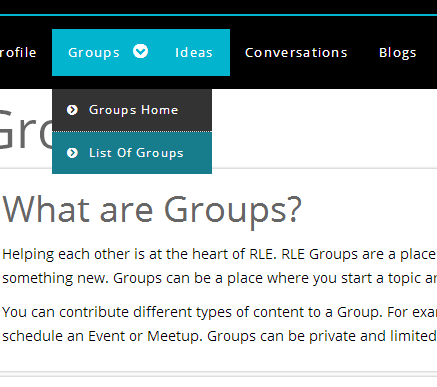
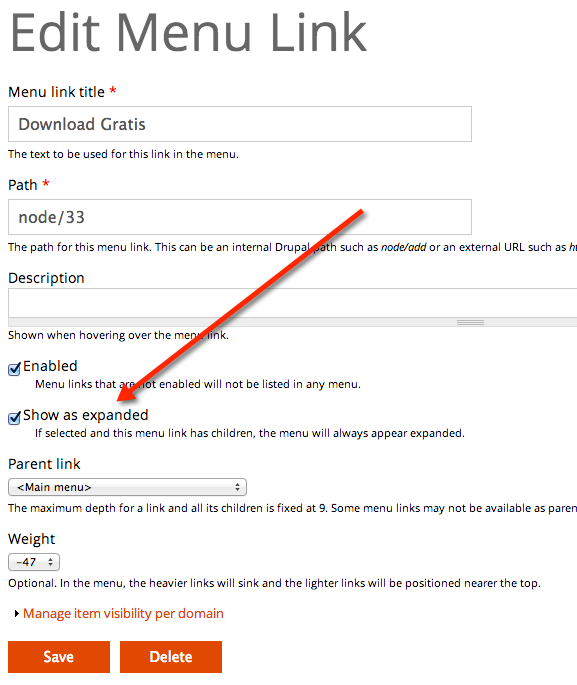
danny englanderHi, thanks for using Gratis! I thought I had this in the docs but I don't see it now. Be sure for your main top level menu items to check the box "show as expanded" in the menu UI. That should do it. There's also no need for jQuery update anymore. Here's a quick simplytest.me that I spun up: http://sb6668a0c47af0f9.s3.simplytest.me/
Also see my screen capture.
Comment #2
duckydan commentedThank you for responding so quick. I did read that and I did ensure everything was expanded. Other than at this screen shot, where else should I look?
Comment #3
danny englanderDid you actually create sub-menus? (drag and indent)

Comment #4
duckydan commentedSorry I am not being clear. I though anything under the "Main Menu" menu would show up in the drop-down at the top. Am I missing something? Shouldn't anything under "Main Menu" automatically show as an item in the stop-down when the window is narrow, as in a mobile device?
Comment #5
duckydan commentedAdvanced Aggregation breaks the menu, as far as I can tell. Once I disable that module, everything works as expected. I am thinking when it aggregates JavaScripts, it is trashing something form the theme. But, that's only a guess.
Thank you for your help. I will take another route for boosting my site's performance. Most of my sites are on my own Linodes, this one (not my decision) is on a mediocre host. Therefore, I was trying to help it's page load time with Advanced Aggregation module at https://drupal.org/project/advagg
What status should this be now? One of the "closed" ones, right?
Comment #6
danny englanderok well I think this is a valid issue then. I probably need to test the theme with Advanced agg so I can try to reproduce and possibly fix this. It could also be a setting in advanced agg as well that needs tweaking. You might have a look at Entity Cache, File cache and Boost for performance, I've had good luck with all those. I'm going to leave this open but I may not get to it for a while.
Comment #7
danny englanderI had a chance tonight to test out Advanced agg and had no issues at all, my site served up advanced agg compressed files fine. I played around with all the settings and at no point did I experience an issues. I can only guess that your server has any issue with compression which is common. You can comb through their issue queue and I saw where some people came up with some fixes for this type of thing. At any rate, I don't think this is an issue with Gratis so I am going to close this.
Comment #8
duckydan commentedThank you. This host I have to use for this project is really pretty poor. I should have moved the site to my Linode as a test but didn't think of it. I appreciate your efforts and time very much.
Comment #9
Anonymous (not verified) commentedThis problem is occuring on my test site. If I switch to bamboo theme the multi layer menu works normally. In gratis the drop down menu items work sporadically, if at all. Also, I have noted that if a drop down menu item is working, both it and the next horizontally displayed menu item are default highlighted in the alternate color, regardless of mouse position.
Comment #10
Anonymous (not verified) commentedComment #11
Anonymous (not verified) commentedForgot to mention that clicking show expanded does allow drop down menu items to appear, but they cannot be clicked, it is not possible to move the mouse over the dropped menu items. Also, this is not required on any other theme I have installed. My main menu has six main headings and two more layers of various drop downs, click each individual "expanded" option is not ideal.
Comment #12
Anonymous (not verified) commentedColor issue seems to no longer be occurring. Still cannot click on any drop down links.
Comment #13
danny englanderI spun up a test site on simplytest.me, created a bunch of menu items with "expanded" / child menus. I was not able to reproduce this, logged in, logged out and with cache / aggregation on and off.
It sounds like you may have a conflict with a third party module or some javascript, check your Firefox / Chrome console for errors as well as the Apache / server error log, that's often helpful as well.
Comment #14
danny englanderChanging status.
Comment #15
Anonymous (not verified) commentedThanks, will do. Just an FYI, I can now "see" the drop down menu items, I cannot click on them
Comment #16
Anonymous (not verified) commentedThere doesn't seem to be any obvious js errors or anything else showing up in the chrome dev console.
This problem is repeatable with the Gratis theme and the business bootstrap themes. Menus drop down, but cannot move the mouse over the dropdown items without them disappearing.
Bamboo works normally. I would desperately love to deploy gratis for this new site. I guess one option is to build superfish menus? Not ideal.
Comment #17
Anonymous (not verified) commentedHere is an image of the drop down. It almost appears as though the drop down list is created "behind" the solid black background while the main menu item in blue is "on top" of the black background. In any case, I found that if I right click on the drop down items, I can then move the mouse over them and select any of the items. This is not a viable work around, but might be helpful in troubleshooting the root cause.
Removed obvious modules such as menu icons but nothing seems to make any difference. Problem occurs on panel pages and nodes.
Comment #18
Anonymous (not verified) commentedNot sure if this might be related?
https://drupal.org/node/1437722
Comment #19
duckydan commentedHi. I realize this might be a long-shot, but I had a very similar issue that turned out to be my server did not support compressing caches. As soon as I turned off that option it was all good.
Comment #20
Anonymous (not verified) commentedThanks @duckydan. I tried disabling the drupal caching for js, etc but no joy. I am running a fairly complex caching architecture, including memcached, apc, etc. I don't think this is the issue as it not a problem with most other themes, including bamboo.
Comment #21
smptebars1 commentedI am having this same issue as well. and only with chrome. drudev.sihometheater.com
using the evolve theme. I notice, if I scroll down the page to a point where the sticky menu is activated, my dropdown work and are clickable but if I stay at the top of the page, they dropdown but I can not hover over them to click it.
Comment #22
danny englander@smptebars1 - The Evolve theme has nothing to do with Gratis so I think you might be in the wrong issue queue. Thanks.
Comment #23
smptebars1 commentedThanks @Danny. Even thou it is a different theme, we are both experiencing the same problem and I did not know if there was ever a solution for this problem on the Gratis theme. It may be the same solution for me. I'm working with the people that created Evolve. Just have my feelers out everywhere to see if anyone has had this similar issue.
Thanks