Updated: Comment #N
Problem/Motivation
To reproduce:
- Do a clean Drupal 8 install with Standard install profile.
- Go to Add Content (node/add)
- Choose Basic Page (end up on node/add/page)
- Type a title and body.
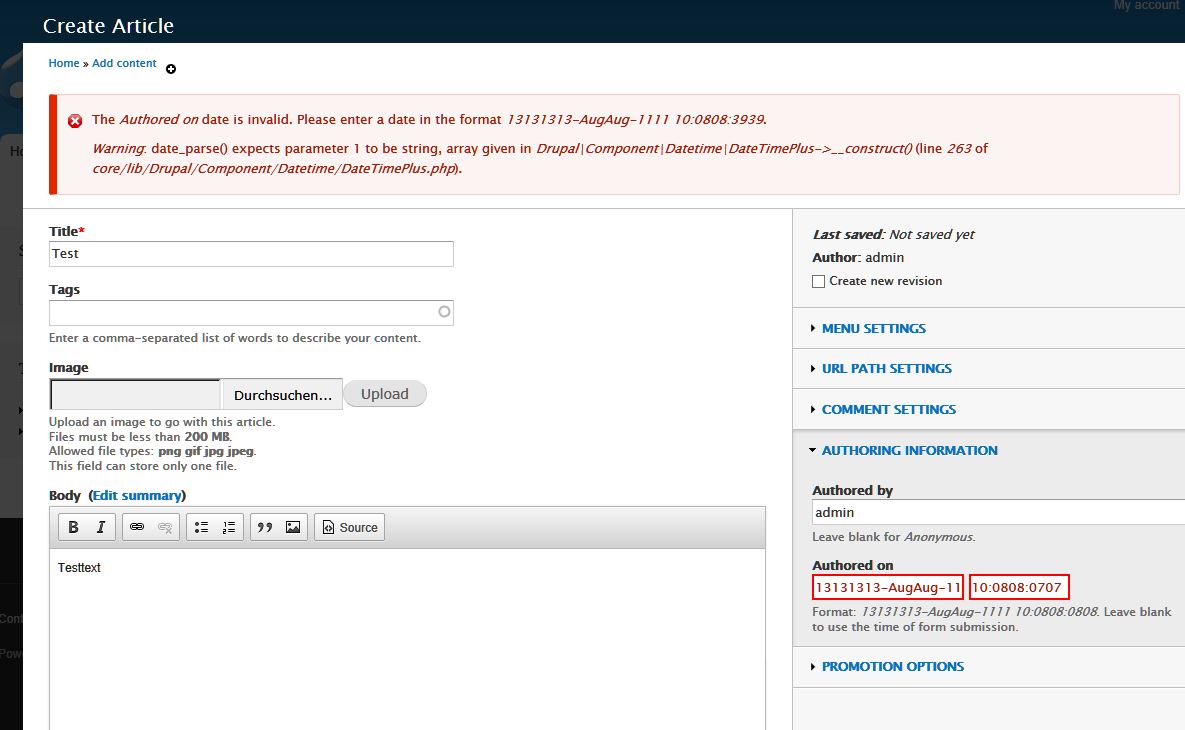
- Attempt to save. You will get an error message because the Authoring Information has an invalid date in it. See screenshot for what I am seeing. It looks like someone put YYYY-MM-DD in code as a date format somewhere, and then ran it through PHP's standard date formatting, so it turned Y into a two-digit year (repeated 4 times), etc. and the date in my field is: 13131313-JulJul-3131 time: 13:0707:1111 [the actual date was July 31, 2013, at 13:07:11].

- The error message is also totally bogus:
The Authored on date is invalid. Please enter a date in the format 13131313-JulJul-3131 13:0707:2525.
Proposed resolution
Fix the date format code for node authored date.
Remaining tasks
Find the problem and fix it.
User interface changes
The UI will work when creating a new node.
API changes
None.
None.



Comments
Comment #1
jhodgdonActually, based on the help text below the Authored field, this is coming from the datetime module's form alter, not the base node module form, so moving there.
Comment #2
jhodgdonI did a little debugging in datetime_form_node_form_alter().
When I printed out $format_type, $date_format, and $time_format, I ended up with:
Those are not good PHP date formats, and are certainly the cause of this problem.... Where are they coming from?
Comment #3
jhodgdonOK, these are coming from core/modules/system/config/system.date_format.html_date.yml:
So either that type of format shouldn't be in there, or the DateTime module is misusing it as a PHP date format somewhere. I'll now leave this for the maintainers of system.module and/or datetime.module to figure out what is going on.
Comment #4
jhodgdonComment #5
jhodgdonAs a note, I have the 'intl' PHP module installed on this machine. timplunkett says that is what the issue is about and it's probably a duplicate of
#2000384: php-intl module causes problems with Date and Time fields when editing Basic Page
Comment #6
Micha1111 commentedStill the same error with latest dev
attached screenshot
Comment #7
berdirYes, this is a duplicate of #2000384: php-intl module causes problems with Date and Time fields when editing Basic Page, which happens with specific php-intl versions. Please report your exact php and intl versions there.