

Closed (fixed)
Project:
Views (for Drupal 7)
Version:
7.x-3.7
Component:
Translations
Priority:
Normal
Category:
Support request
Assigned:
Unassigned
Reporter:
Created:
14 Jun 2013 at 20:54 UTC
Updated:
14 Mar 2019 at 00:44 UTC
Jump to comment: Most recent, Most recent file



Comments
Comment #1
kristen polTry typing in:
into the search text field and not filtering by the filter.
Comment #2
kristen polAlso, please note any other modules you have enabled including versions.
Comment #3
ghalenir commentedHere is the list of enabled modules that I got from Drush command line ( drush pm-list --status=enabled ) related to Multilingual and views let me know if I miss any module.
Multilanguage Translation overview Module 7.x-2.0-beta1
Multilingual - Entity Translation Module 7.x-1.0-beta2
Multilingual - Entity Translation Menu Module 7.x-1.0-beta2
Multilingual - Block languages (i18n_block) Module 7.x-1.8
Multilingual - Internationalization (i18n) Module 7.x-1.8
Multilingual - Menu translation (i18n_menu) Module 7.x-1.8
Multilingual - Multilingual content (i18n_node) Module 7.x-1.8
Multilingual - Multilingual select (i18n_select) Module 7.x-1.8
Multilingual - Path translation (i18n_path) Module 7.x-1.8
Multilingual - String translation (i18n_string) Module 7.x-1.8
Multilingual - Taxonomy translation (i18n_taxonomy) Module 7.x-1.8
Multilingual - Translation redirect (i18n_redirect) Module 7.x-1.8
Multilingual - Translation sets (i18n_translation) Module 7.x-1.8
Multilingual - Variable translation (i18n_variable) Module 7.x-1.8
Multilingual - Views translation (i18nviews) Module 7.x-3.x-dev
Variable Variable (variable) Module 7.x-2.2
Variable Variable realm (variable_realm) Module 7.x-2.2
Variable Variable store (variable_store) Module 7.x-2.2
Views Views (views) Module 7.x-3.7
Views Views Bulk Operations Module 7.x-3.0
Views Views Slideshow (views_slideshow) Module 7.x-3.0
Views Views Slideshow: Cycle Module 7.x-3.0
Views Views UI (views_ui) Module 7.x-3.7
Comment #4
kristen polWhy are you using both Entity Translation and Content Translation. You need to pick one or the other for nodes. Which are you using for nodes?
Comment #5
ghalenir commentedI would like to use node translation because of the GUI but how do I translate blocks, menus and taxonomy without using entity translation. Can you list out the modules to be enabled for node translation only.
Comment #6
kristen polYou get a GUI with Entity Translation for nodes too, so I'm not understanding the problem there... unless you are talking about some other GUI that I don't know about ;)
You can use:
* Content Translation for nodes
* Internationalization and submodules (for blocks, taxonomy terms, menus, etc.)
or
* Entity Translation for nodes
* Internationalization and submodules (for blocks, taxonomy terms, menus, etc.)
Note that you *can* use Entity Translation for taxonomy terms but, you need to test your use cases, because months ago I ran into issue with this when using the taxonomy terms as views filters (it didn't use the translations) so I reverted to using the i18n_taxonomy module.
Entity Translation is not used for blocks or menus because those aren't entities in D7.
Hope that helps.
Comment #7
ghalenir commentedI liked the user experience and User Interface for Node Translation approach that's why I say Good GUI.
I deleted my entity translation module and trying to stick with only content translation but this page says that content translation is replaced by entity translation https://drupal.org/project/Translation.
I am using bean module and each bean works as separate content type where I have added field collection and another fields and I using Block reference Field to reference those bean blocks and views blocks. How do I translate bean block modules. I just saw an option to translate block title not the block content.
If possible please list out the modules url required for node translation approach.
Comment #8
kristen polWell, I'm still not sure what you mean by good GUI of Content Translation (core) vs Entity Translation (contrib). The UI is nearly identical. The difference is that Content Translation saves different nodes and Entity Translation uses one.
You might want to watch my talk from DrupalCon:
http://www.youtube.com/watch?v=0JXK7YzjlnI
?
Comment #9
kristen polp.s. If you are doing stuff with Bean, you will need Entity Translation if you want your bean block fields translated.
Comment #10
ghalenir commentedYes, I want all my bean block to be translated so I am changing my approach and going with Entity Translation. I had to uninstall all the translation related module and re-install because I was following both Entity Translation and Node Translation approach before. If I don't do this my translation doesn't work at all. Now the problem is after I uninstalled all the translation related module all my translation is gone and original content is saved as body['und'] instead of body['en'] or body['es']. Let me know if I am wrong.
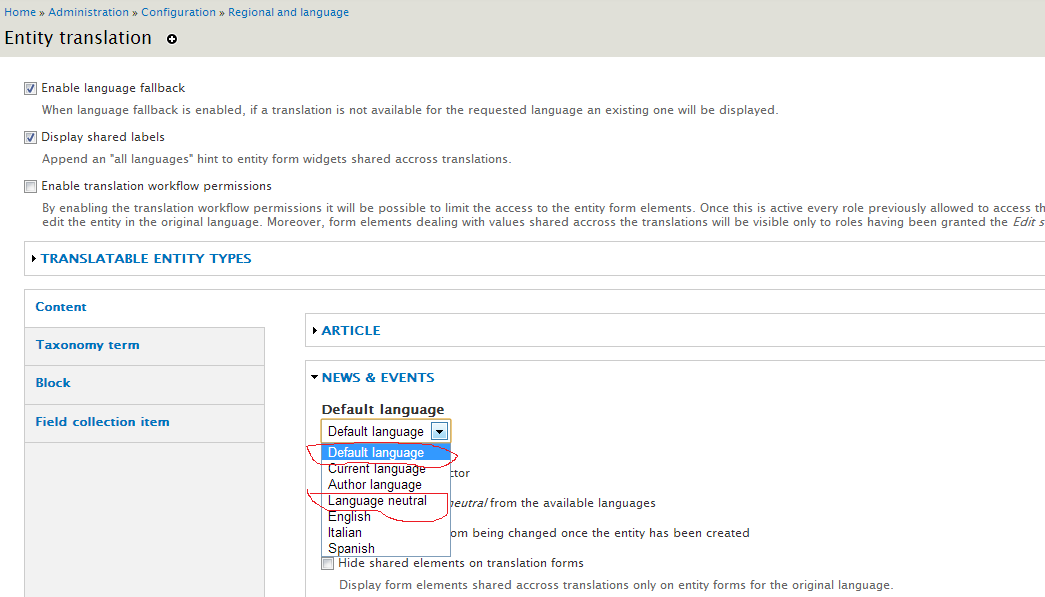
I have all my content (around 200 nodes) already live without any translation. I found that After I re-enabled and re-configured my content type and Entity Translation Setting I didn't see "Translate" option for my old contents but I got "Translate" option for my new content. So is that mean should I re-create all my content again with "Default Language" setting ? or there is any other solution so that I can just change the Entity Translation setting and translating my old content using "Entity Translation"
Should I choose "Language Neutral" or "Default Language" in order to keep my old content and just translated them. Does it make any difference I choose any of those or they are same. Its so confusing when we see both option (Node Translation and Entity Translation) in same package and not knowing which to enable or disable if we follow any particular approach.
Comment #11
ghalenir commentedSorry I forgot to attach the screen.
Comment #12
kristen polUnfortunately I have noticed that *switching* a content type from using core Content Translation to contrib Entity Translation made things a bit wonky for existing nodes when we tried this last November in a test environment.
Have you tried both disabling *and* uninstalling Content Translation? I'm wondering if that will put those nodes back into a sane state first. Otherwise, you might need to manually set the language for all of the nodes. It sounds like they are all the same language, so that shouldn't be too hard. Unfortunately the Language Assignment module was broken last time I checked. But you should be able to use Views Bulk Operations to set the language for all of them back to what they were originally.
Note that "Language Neutral" means that the content shouldn't be translated (the translate tab won't show up). You can set the content type up to default to the default language if that is the language you will be typically creating content in first.
Comment #13
sboudetm commentedHi and thanks Kristen Pol.
You need write language, select and configure with the option Current user's language.
Comment #14
fawwad.nirvana commented@Kristen Pol
Same issue i am facing.
Comment #15
Sumit kumar commentedHi @Kristen Pol,
Same issue i am facing.
views did not show the language filter
Comment #16
chamilsanjeewa commentedI have have the same issue :(
Comment #17
Jeffrey Zhou commentedPlease try the following steps, it worked for me on one of my sites.
Inside the Views Edit screen --> click on "Add" in Filter Criteria --> Search for and add "Content: Language" --> Check "Is one of" for Operator and check "Current user's language" for Language --> Click "Apply (all display) "
Comment #18
chansionjoe commentedsub same issue
Comment #19
sonugoyalmca2006@yahoo.com commented#4 comment work for me , Thank You!
Comment #20
mustanggb commentedMultiple answers.