When new displays are created in the Views UI, either using the add display button or the "clone as" feature, they initially appear in the correct order (newest last). However, as soon as the view is saved, the displays are reordered. Perhaps the position isn't being set for new displays?
-
I started with 8.x standard:
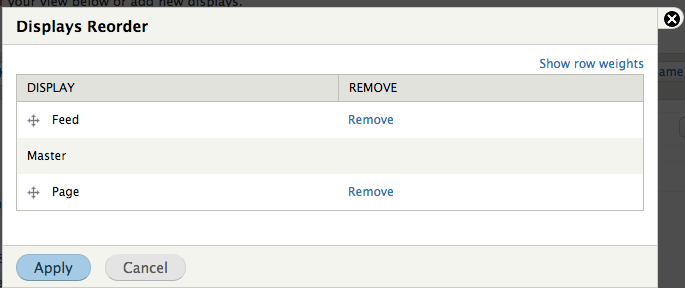
-
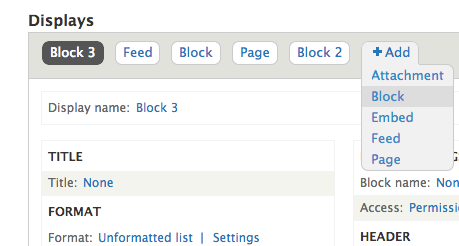
I added some new block displays.
-
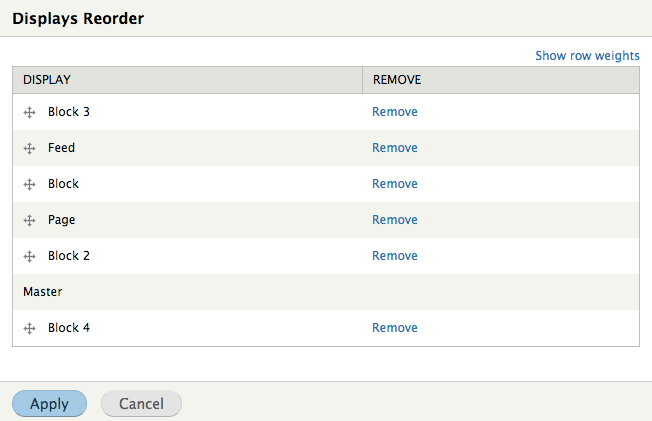
Each time, the unsaved display appeared in the correct position in the UI, and opening the modal dialog (without making any changes) would also show the correct order.

-
But after saving the view (without having done anything other than add a new display) the displays would be reordered, with the newest floating to the top.


Positions in the saved config entity at the same time (note that the order here bears no relationship to the order in the UI, despite that it is exactly the view being used):
display:
  block_3:
    position: ''
  feed_1:
    position: ''
  block_1:
    position: ''
  page_1:
    position: {  }
  block_2:
    position: {  }
  default:
    position: {  }
  block_4:
    position: ''
It appears that, unless you use the reorder dialog, position is stored as an empty string.
-
If I use the reorder dialog, non-empty weights are saved, but the displays are still listed in the wrong order:
display:
  block_4:
    position: '6'
  block_3:
    position: '5'
  block_1:
    position: '2'
  feed_1:
    position: '3'
  default:
    position: '0'
  page_1:
    position: '1'
  block_2:
    position: '4'
-
And, if I add yet another display to the view, it still floats to the top after saving.

This time, the displays were finally reordered by position in the file, only after saving twice after the reorder:
display:
  block_5:
    position: ''
  default:
    position: '0'
  page_1:
    position: '1'
  block_1:
    position: '2'
  feed_1:
    position: '3'
  block_2:
    position: '4'
  block_3:
    position: '5'
  block_4:
    position: '6'
The underlying problem appears to be that new displays are created with an empty position, which also results in haphazard file ordering on save. Maybe newly created displays should always have the weight of last visible display + 1?








Comments
Comment #1
xjmComment #2
xjmComment #3
xjmComment #3.0
xjmUpdated issue summary.
Comment #3.1
xjmUpdated issue summary.
Comment #3.2
xjmUpdated issue summary.
Comment #3.3
xjmUpdated issue summary.
Comment #3.4
xjmUpdated issue summary.
Comment #4
xjm@damiankloip thinks that #1968020: Convert ReorderDisplays to use table rendering and remove theme function will probably fix this.
Comment #5
damiankloip commentedYep, I think that issue will complete half of the puzzle. When the form is used to reorder, that will fix it. In here we probably just need to fix the fact that the default order is saved as an array if it doesn't have one. We need to give it one. I think it's the config system to blame - I have a feeling a NULL value somehow gets saved as an array.
Comment #6
dawehnerI think the addDisplay method should just set a proper default value. That's all what we need.
This count() method should do it, but we could also make it a bit more secure, by finding the max position. Any thoughts?
Comment #7
damiankloip commentedI think we just need to also add this weight to the tabs when they are rendered, then the new weights will be reflected in the UI straight away. As the other ordering will only be invoked during save.
We need to wait on #1968020: Convert ReorderDisplays to use table rendering and remove theme function before you can actually re order displays.
Comment #8
damiankloip commentedComment #9
dawehnerLet's do it.
Comment #10
damiankloip commentedNew tests look good to me.
Comment #11
alexpottCommitted 5dff3de and pushed to 8.x. Thanks!
Comment #12.0
(not verified) commentedUpdated issue summary.