Closed (fixed)
Project:
Lightbox2
Version:
5.x-2.1
Component:
Javascript
Priority:
Critical
Category:
Bug report
Assigned:
Reporter:
Created:
31 Oct 2007 at 13:01 UTC
Updated:
6 Jan 2008 at 21:21 UTC
Jump to comment: Most recent file


Hello,
I recently discovered Lightbox, great and nice module, and ideal for a art gallery web I'm developing.
I have drupal 5.2, and Lightbox V2 5.x-2.1, with the jQuery Update and the jquery.js copied to /misc, all done. But I have the next behaviour:
- I have a some views in the web, which gave me lists of thumbnails of images, wich use Lightbox to view them. All ok.
- When I visit a page, I can click on thumbnail, and Lightbox works fine.
- If then I go to another page in the website, and return to the previous one (with the thumbnails), and click on a thumbnail.... CRASH!!! Lightbox don't work, it shows me the .jpg direct on the navigator, with no html. (if you press F5 in the page with thumbnails, then the lightbox works again).
You can test this on an artist page for example: http://www.espailluisribas.com/node/28 , then go to another website page, return to http://www.espailluisribas.com/node/28 and then lightbox don't work.
It don't happens in firefox. As I testes, only en IE6 and IE7, and looks something about the explorer cache, or javascript not loading if the page is alredy in the explorer cache, so if I configure IE cache options to refresh the page every time its visited, the error don't occur.
I'm googling about this error, and searching in Lightbox Issues, but can't find a solution.
HELP PLEASE!!!
thx!
| Comment | File | Size | Author |
|---|---|---|---|
| #11 | LightboxError.jpg | 70.48 KB | jjlowe |
| #3 | lightbox2_188154.patch | 1.16 KB | stella |

Comments
Comment #1
stella commentedAre you using any of the caching options on the Performance settings page (admin/settings/performance)? If so, does disabling them fix the issue?
I presume you're using the automatic image detection option for generating the lightbox for those images. Does the same thing happen for images that have 'rel="lightbox"' manually added?
Could you try the latest dev release? It's stable, but there are a couple of fixes in there that might help.
Cheers,
Stella
Comment #2
llribas commentedHi Stella,
thx for your rapid response.
- Caching options on the Performance settings are disabled.
- I just tried the dev version, and same malfuction happens.
I'm going now to try a rel="lightbox" manually added, but this is not a solution for me.
But why this happens with IE and not with firefox?!?!?!? do you have some clue about???
Thx!
Lluís
Comment #3
stella commentedThe adding of 'rel="lightbox"' would just help narrow down where the problem could be occurring. It's not a solution as not having to add the rel is a feature of lightbox.
Anyway try the attached patch. I can't reproduce the problem on my test site so I can't guarantee it will work.
Cheers,
Stella
Comment #4
llribas commentedHello Stella,
I'm going to try the patch, but the problems occurs also in your personal website "stellapowerdesign".
You can try. Use IE6 or IE7, with the default option in Tools -> Internet Options -> Temporal files -> configuration -> Automatic, and the problem I described occurs. if you go to one gallerie, open one image, then go to another gallerie, return to the previous gallerie, and try to open an image... crash!
Comment #5
stella commentedMy website, http://www.stellapowerdesign.net, is actually still running the old prototype/scriptaculous version. I just haven't had time to upgrade it yet, but it will be done shortly. It's interesting to note that it was always a problem with lightbox, not just the new jquery version.
Perhaps, if you have time, you could check if it happens for you on the original huddletogether.com lightbox.
I hope to have more time to look at this issue during the week, so please bear with me.
Cheers,
Stella
Comment #6
llribas commentedOk.
I found this faq on the official site of Lightbox 2, maybe is a hint for you:
It doesn't work at all. The image opens up in a new page. What's wrong?
This is commonly caused by a conflict between scripts. Check your body tag and look for an onload attribute. Example:
<body onload="MM_preloadImages(‘/images/menu_on.gif’)…;">A quick fix to this problem is to append the initLightbox() to the onload attribute as so:
<body onload="MM_preloadImages(‘/images/menu_on.gif’)…;initLightbox()">thx!
Comment #7
stella commentedHmmm I don't think that's the issue because from looking at your website you don't have any "onload" attribute to your body tag.
Did you try the patch I provided? If so, how did you get on?
Also, did adding "rel=lightbox" help fix the problem?
Cheers,
Stella
Comment #8
jjlowe commentedI tried the patch and the new module and it doesn't work for me in IE6 or IE7.
Comment #9
jjlowe commentedI added onLoad="initLightbox();" to my body tag. Now it fails in Firefox (crashes) but works in IE6 and IE7.
Comment #10
stella commentedWhat's the error given in the Firefox Error Console (under Tools menu)? And do you have any other onLoad parameters in your body tag?
Did you clear your cache after adding the patch? It was a patch for the javascript file (non lite version) and so the cache would need to be cleared before testing.
Cheers,
Stella
Comment #11
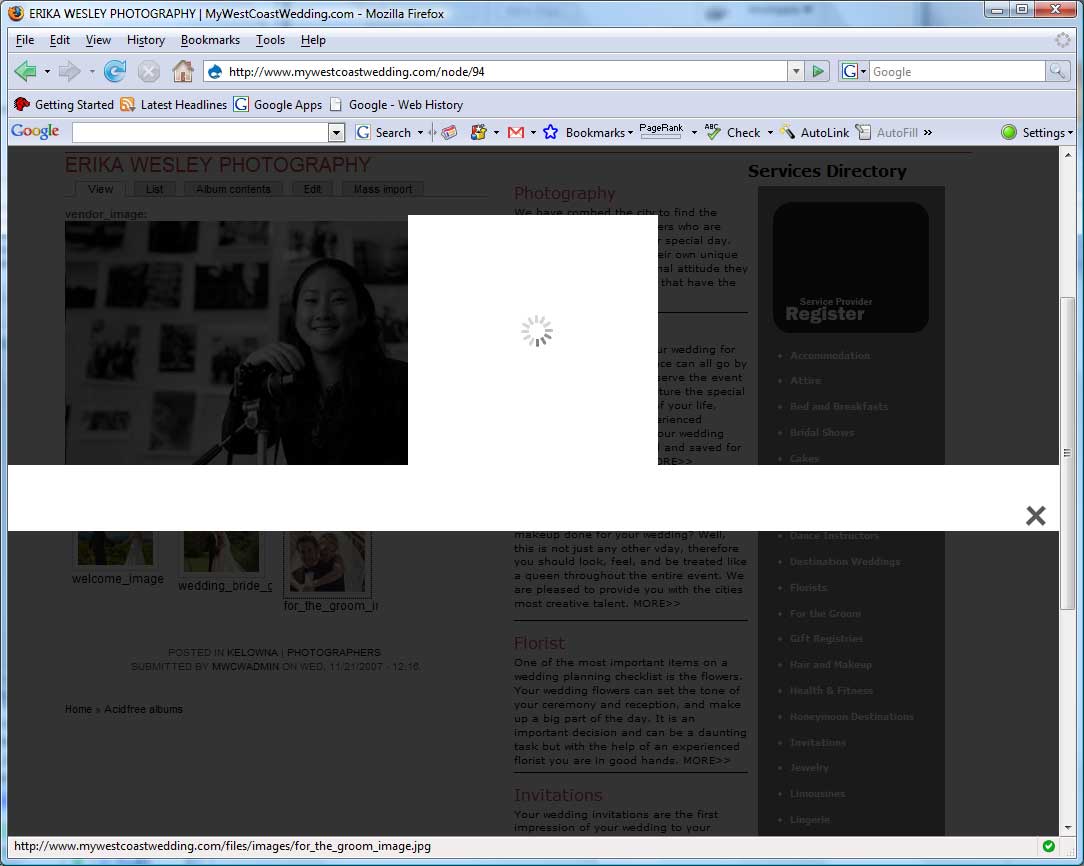
jjlowe commentedI don't get an error in the error console. I have attached a screen capture of what I see. The wait icon in the centre spins but the image is not displayed. I am able to click on the X to close the lightbox view and continue using the application.
I don`t have any other onLoad parameters in the body tag.
I have cleared the cache. I get the same behavior with and without the patch.
Comment #12
stella commentedOk well remove the onload call you added, as that was just a hack anyway. Please try the latest dev version (26th Nov) as it includes some fixes for other issues which I think may help with this one.
Cheers,
Stella
Comment #13
jjlowe commentedI tried the dev version lightbox2-5.x-2.x-dev and it's working with IE6, IE7 and Firefox.
Thanks.
John
Comment #14
llribas commentedNice!!! for me works fine too! (lightbox2-5.x-2.x-dev)
thanks!
Lluís
Comment #15
jjlowe commentedWhile it seemed to work in Firefox on a test image, it does not work in Firefox (2.0.0.11) now when displaying a page with multiple images. The link to the image is not being rendered as a link. When I look at the page source in Firefox the link is present, but I am not able to click it in the browser window.
Works great in IE6 and IE7.
Here is link as example green-heron-design.com/node/152
John
Comment #16
jjlowe commentedHere is link as example http://green-heron-design.com/node/152
Works in IE6 and IE7
Doesn't work in Firefox 2.00.11
john
Comment #17
stella commentedjohnlowe: you have a number of html errors in relation to closing a tags. See http://validator.w3.org/check?verbose=1&uri=http%3A%2F%2Fgreen-heron-des... for a full report. You'll need to fix these before I can investigate the issue any further. The errors for line 109 in particular would need to be fixed.
Cheers,
Stella
Comment #18
wahlau commentedi can confirm i had the same problem - in a drupal image gallery, first page no problem, second page also works, go back to first page then i get the big image instead of the lightbox2 effect.
switching from stable to lightbox2-5.x-2.x-dev seems to solve the problem for both IE6 and IE7. so thanks and well done!
Comment #19
stella commentedA new version will be released next week after more people have had a chance to test it.
Cheers,
Stella
Comment #20
(not verified) commentedAutomatically closed -- issue fixed for two weeks with no activity.
Comment #21
stella commentedReleased in Lightbox V2 5.x-2.2.
Cheers,
Stella
Comment #22
jjlowe commentedSorry but I've been busy with other projects for the last 2 weeks. I'm still having the same problem, links are not rendering in Firefox 2, in IE 7 no image display just the rotating wait image.
The page validates.
http://custom-forms.com/dcf/node/152
Comment #23
jjlowe commentedSorry but I've been busy with other projects for the last 2 weeks. I'm still having the same problem, links are not rendering in Firefox 2, in IE 7 no image display just the rotating wait image.
The page validates.
http://custom-forms.com/dcf/node/152
Comment #24
stella commentedPlease use the latest release (5.x-2.2). The version you are using is still using the obsolete lightningload.js file and old versions of the other javascript files.
Cheers,
Stella
Comment #25
jjlowe commentedI'm using 5.x-2.2. Still the same. I see some validation errors in the CSS but don't think that's the issue. I have moved the install, new URI is http://custom-forms.com/node/152. I'll be upgrading to Drupal 5.5 today.
URI : http://custom-forms.com/sites/all/modules/lightbox2/css/lightbox.css
28 #loading Parse Error - *left: 0%;
34 Parse Error - : 25%; width: 100%; text-align: center; line-height: 0; } #hoverNav
112 #overlay Parse Error - opacity=60)
113 #overlay Property -moz-opacity doesn't exist : 0.6
114 #overlay Property opacity doesn't exist : 0.6
Cheers,
John
Comment #26
jjlowe commentedLet me clarify, this URI (custom-forms.com/node/152) working in IE6 & IE7, working in Opera 9.24, not working in Firefox 2 or 3(beta 1).
Cheers (and Happy Holidays!)
John
Comment #27
jjlowe commentedStella, I've discovered that this is not a LightBox2 problem. Even with Lighbox2 disabled the links don't work in Firefox but do work in IE. This is puzzling, but not LightBox2. Any ideas outside the LightBox2 zone?
Cheers,
John
Comment #28
stella commentedI'm afraid I've no idea what the problem could be. The html validates in the w3c validator, so I'm not sure what the problem is. I'd try out some other validators, e.g. the CSS one, and perhaps install the Firefox Firebug plugin to see if it can identify any issues with the site. Perhaps also try switching themes?
I'm marking this issue as fixed since the problem with lightbox2 has been resolved and released.
Cheers,
Stella
Comment #29
jjlowe commentedI found my problem and I'm happy to say that the lightbox2 is working for my page in all browsers. Strange bug; the
Thanks,
John
Comment #30
(not verified) commentedAutomatically closed -- issue fixed for two weeks with no activity.