When adding images, it's important to include alternate text, primarily to be spoken by assistive technology. I'm glad to see Drupal/ELMS has this built in as a requirement. It's also just as important to be concise, for normal pictures. A normal picture would be something like a family pet. Good, concise alt text could be alt='our family pet'.
However, this unnecessarily limits including alt text in images that represent mathematical equations. Something as simple as the ubiquitous quadratic formula comes in at 99 characters, when described in plain English. It's only 44 characters when using LaTeX as the alt text.
It doesn't take long before even using LaTeX, you've exceeded the arbitrary* 100-character limit. Take this not-too-complicated summation expression, for example. It's 125 characters when coded as LaTeX.
*I believe the 100-character restriction is only somewhat based on WCAG/508 guidelines, but nowhere in those guidelines is the 100-character suggestion reasonably interpreted as a hard limit to be used in all situations. It's merely a suggestion, to promote concise explanations. Such concise explanations can't always be employed when describing mathematical formulas or processes.
Please re-consider this, and either remove the 100-character alt text restriction, or provide an options setting that's perhaps a checkbox that's checked by default -- for the 100-character restriction -- but which would allow the site owner to uncheck if need be, for situations such as I've outlined.
Thanks


Comments
Comment #1
btopro commentedumm... can you take a screenshot of where this is occurring? I don't have any restrictions in my code but the contributed Accessible content module may be what's triggering this.
Comment #2
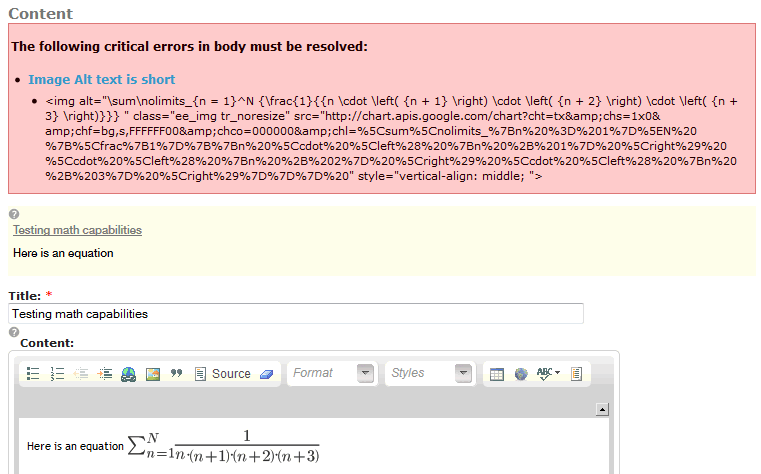
afwings commentedSure. I'm using the Google Chart API to generate equation images on the fly from the LaTeX for the equation. (Actually MathType does this automatically, with the ELMS "translator", which isn't in a publicly-available version of MathType yet.) So this is how I generated the code for the equation you see in the shot, but when it's happening is as I'm writing content and after I either publish or preview the post. In the screen shot, I got the error after clicking Preview.
Actually the error message is opposite of its intent. It's not that the "Image Alt text is short"; it's too long. Here's a shot:
I also created a short screencast showing the whole process: http://screencast.com/t/iufOCy3ah6. The full text of the error is cut off in the video, but here's the error page: http://demo.elms.psu.edu/experiment_sandbox_631/content/image-alt-text-s.... You may have to log in with userID/password id/id.
Comment #3
btopro commentedI hope your not doing this in the demo site and building courses there as that gets reset and is purly for demonstration purposes.
That is an issue in the Accessible content module (which is providing the feedback on accessibility). You can disable this from blocking submission by going to admin/content/node-type/page and unchecking the option to stop page submission in the settings found there.
Comment #4
afwings commentedAbout the demo site, I was just using that as a sandbox. Thanks for the tip on changing the page settings. Looks like that will take care of this issue.
Comment #5
btopro commentedGlad to hear!