

Closed (duplicate)
Project:
Views (for Drupal 7)
Version:
7.x-3.7
Component:
exposed filters
Priority:
Major
Category:
Bug report
Assigned:
Unassigned
Issue tags:
Reporter:
Created:
31 Aug 2012 at 06:17 UTC
Updated:
9 May 2018 at 11:40 UTC
Jump to comment: Most recent, Most recent file

Comments
Comment #1
dagmarTagging
Comment #2
jehu commentedsubscribe.
Same problem here.
Comment #3
blackandcode commentedFor me filters are compleatly broken. Select boxes don't work. This is very good option but It has A LOT OF BAGS.
Comment #4
dagmar@blackandcode: Please help us to fix the issue, I personally worked a lot of days (I mean, almost 2 years) for free to provide this feature, your comment is not helping.
Please follow the the Views issue submission guidelines.
Comment #5
KuroNeko commentedsubscribe
Comment #6
chartmann commentedsubscribe
Comment #7
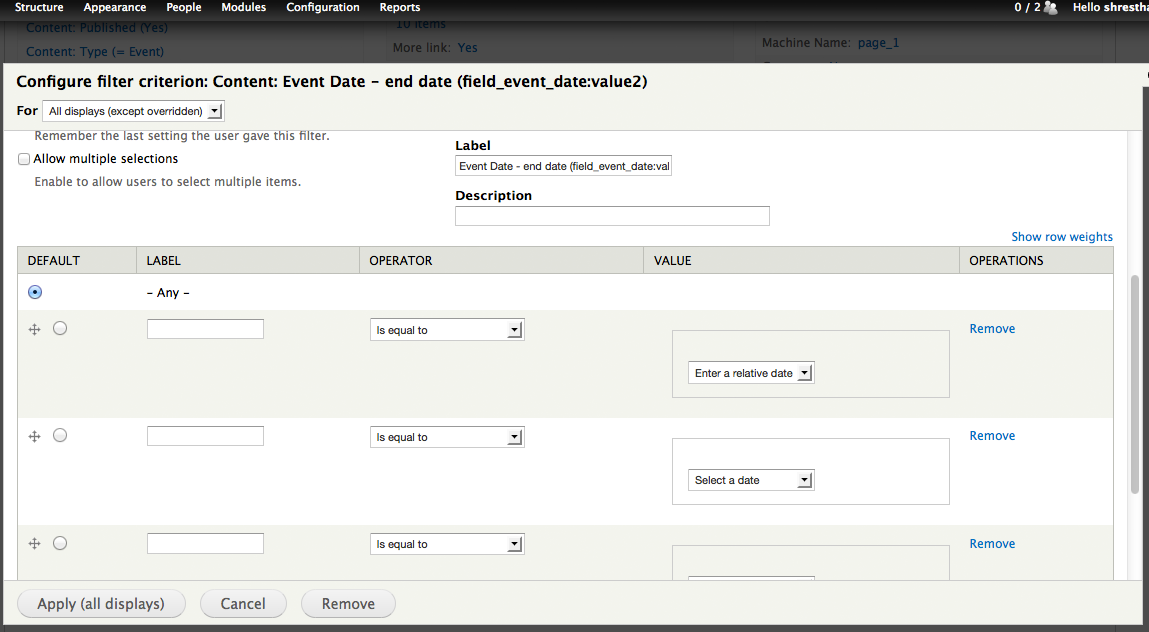
dave kopecekFirst, this is a wicked-cool addition. Many thanks to all involved. I'm having issues with grouped date filters as well. I'm using Views 7.x-3.5 and Date Views 7.x-2.6. In this test case I'm trying to create an exposed grouped filter on a node->posted field. Here's what I've been able to determine.
There are a couple ways that a date filter can be created:
Once the field has been selected, dates can be entered in a machine readable format "2012-01-01 00:00:00" or in offset format "-1 day".
My goal is to get the #1 "offset" method working. This opens up all kinds of reporting options. If anybody has any experience mucking around in the belly of the date widget and has any hints I'll follow up on them.
Comment #8
dave kopecekFollowup to #7. I created a view with 3 date filters in a group. Here's an export of the group section:
All three date value types are correctly saved in the views definition, however when filter is recalled in the views UI "TEST-OFFSET" type->'offset' does not get recalled:
The first radio button valued "date" is incorrectly checked.
Comment #9
dave kopecekFollowup to #8 - For those of you playing along at home:
I think the UI issue above is caused in views_handler_filter.inc at either 951 or 959. Looks like there's no provision for radio buttons. I'm guessing something similar is affecting the actual filter as well.
Comment #10
okeedoak commentedI'm having the same problem with date fields as described in #7 specifically point 3. I did notice that if you remove all the table rows from inside of grouped filters and then add one back that the input box(s) for the date does show up. But the filter won't save. Three errors appear, one for each of the removed rows: "The title is required if value for this item is defined."
Comment #11
emilekott commentedI had the problems described above when adding a grouped date filter for the post date field
It had 3 values:
Within 1 day (greater than -1 day)
Within 3 days (greater than -3 days)
Within 7 days (greater than -7 days)
It didn't work as expected.
I then enabled the Date API and Date Views Modules and it worked as expected.
Is this just a dependency issue?
Comment #12
okeedoak commentedThose two modules were already on when I experienced my issues.
Comment #13
emilekott commentedI can confirm that although this now works on one view, it is broken as before on another view on the same site.
Comment #14
Mediaworks commentedi am having the same issue. the relative fields box does not show when using a group filter for a date. i also get the same effect as above when i remove them all and add a new option. it will show then but as soon as i save or do anything else it reverts back.
Comment #15
mikkelwf commentedSame problem here
Comment #16
djween commentedI hope I am posting this 'fix' in the right issue.
The following is for those having issues with exposed grouped filters where offset option is not saving.
It is not working for me either but here is how I made it work...
1. first with single filter, select the offset radio button
2. save it (click apply)
3. go back in to the filter
4. now select grouped filter
5. the offset radio buttons should be marked now
6. when you save the filter (click apply) it should stick now!
I don't think this is intended behavior but it works for me for now.
Comment #17
szt commentedYes, for a temporary workaround I confirm #16.
You cannot set the radiobuttons for the groupped filters, because it inherits the simple filter's settings for all the options.
So all of the options inherits the same settings, and you can't mix it.
Set to major, because it's a really unusable function at this state (you never check a Save button if it really saved the settings).
Comment #18
jlyon commented#16 allowed me to save the grouped filter options, however, no matter what I select the WHERE clause in the SQL that is generated only uses the values for the first option.
For example, I have the following group_items:
No matter which option I select (Under 18 or 18+), the SQL code that is generated is for the Under 18 option (the first one):
I am using views-7.x-3.5 and date-7.x-2.6 (for date_views).
Comment #19
jlyon commentedUpdate to #18: Changing the operator from Is Between to Is Greater than and Is Less Than seems to work. This solves my issue for now, however the filters are still broken if you want to use the In Between operator.
Comment #20
supradhan commentedHi,
Is there any solution or workaround? I am having strange problem. I can select 'Select a date' or 'Relative date' option but there is no option to put relative date or select date from.
Screen shot
Comment #21
Sk8erPeter commented@CIsSharp : your screenshot can not be seen (403 Forbidden). Why don't you upload it here?
Comment #22
Jason Dean commented@CIsSharp: no there is no solution, only the possible workarounds suggested above (#16 #19).
The inability to select a date or relative date is exactly the problem. Right now, I don't think you can rely on using Views grouped filters with date field.
Comment #23
dagmarCould somebody confirm that if this problem is only related to fields provided by 'Date' module or also happens with core date values?
Comment #24
tchurch commented#16 only works for date fields that are part of core because the "offset" radio button isn't an option for date module related fields.
I tried with the "Content: Post date" field (a core field) and it seemed to work (although my date ranges didn't show a result but I expected that).
It's only a problem for date module related dates.
Comment #25
dawehnerIt seems to be that the date module then sadly has to fix some of it's handlers?
Comment #26
tchurch commentedI will raise an issue with them and refer to this one and see what they say.
Comment #27
tchurch commented#1876168: Exposed grouped filter for date not working
Comment #28
supradhan commented@Sk8erPeter: I have attached in this post.
@pushka: Thanks for you help. Can you tell me where to put the code of #18. I mean in any hooks or...?
Thank you.
Comment #29
kclarkson commentedI too am confirming the same issue as @ClsSharp.
I am not given an option to enter a relative date.
Comment #30
gaxze commentedThe relative date is being hidden.
Even if I manually unhide this - I'm unable to save my values.
Comment #31
ydahiIt seems that most of us are trying to build an age-based filter. After doing some looking around I found two possible alternatives:
1. using the computed field module to calculate the age as described in http://drupal.org/node/420932 (for nodes) and here (for user profiles).
2. using the birthdays module
Still would like to see this work natively with views and date.
Comment #32
kclarkson commentedYes I hope this goes into views for sure :)
Comment #33
dagmarI'm quite sure this belongs to date module.
Comment #34
aenaon commentedsubscribe
Comment #35
windmaomao commented+1, i have the same issue as #28, i wonder why the field is hidden ?
Comment #36
windmaomao commentedsimilar like #18, if i change the view to include group options, it still doesn't work on on the front-end.
Comment #37
kclarkson commentedCan anyone confirm whether this is a date module issue or if this a views group filter issue ?
Comment #38
alinouman commentedsubscribing same issue. Thanks # 19. You solved the problem little bit.
Comment #39
xcel commented#16 allowed me to do what I want in both views preview and front-end.
Thank to the forum users !
Comment #40
kclarkson commentedIt appears as though we still need a solution that will fix the error.
The issue workaround in 16 still does not help you if you need a Previous or Upcoming Events filter.
Comment #41
noahadler commentedSubscribing. Using Chrome developer tools to show the hidden fields ("jQuery('.form-type-date-select').show()" in the console) lets me enter dates and save them, but the affect of changing the filter when looking at the view is absolutely nothing.
The relevant saved code, from views export:
Comment #42
sinn commentedIt is date's issue.
Patch on the http://drupal.org/node/1876168#comment-7234206 fixes exposed group filter on a front end.
Comment #43
sawtell commentedI'm having issues with group filters when using taxonomy terms so I don't think it's limited to date fields. Behaviour is correct when selecting single filter.
Comment #44
spessex commentedI appear to be having the same problem when exposing filters for content post date. It just doesn't appear to work for me. It just gives a blank result.
I have the following:
Views
7.x-3.5
Date Views
7.x-2.6
Date
7.x-2.6
Comment #45
Wtower commentedThe problem is with core date values. I experience the same issue and I am not using the Date module whatsoever.
Workarounds #16 and #19 were good but unfortunately not enough for my case. What I've done is that I ended up creating separate blocks with pre-defined date filters (not exposed). I needed 4 of them anyway (last day, last week, last month, all). I turned them all on for the specific pages I needed it, and then I used jQuery to attach them to a specific div in the page, and to create a set of buttons to hide/show the appropriate view block. If anyone is interested I can post the jQuery code.
Comment #46
xcession commentedI too am having problems using the 'offset' method when doing an exposed, grouped filter.
I want to allow users to choose by posts from 'last week', 'last month', 'last year' but use of values such as "-7 days" just results in the pertinent part of the query reading:
...which is clearly useless as every unix timestamp is by definition greater than -86400!
I've tried alternative values like "CURRENT_TIMESTAMP() -7 days", "NOW() -7 days" etc, but nothing works.
Comment #47
xcession commentedSolved my problem
I've discovered that #16 solves the problem of offset dates too, not just the issue of keeping the right radio button checked.
If you're having trouble creating an exposed Group Filter with offset dates, for example: Content from: 'last week', 'last month', 'last year' you first have to create a Single Filter in which you specify just one of those dates from the group. It doesn't matter which, say "last week" or in other words, greater than or equal to the offset date "-7days". Save everything. Then change the filter to be Grouped. The UI will duplicate the one filter value you just input into the first 3 groups of fields. Change them as appropriate and you'll find it's fixed.
Not only will the radio button "An offset from the current time..." remained checked as #16 suggests, but the offset dates will also work where previously they didn't.
Comment #48
supradhan commentedHi xcession,
Will this work with Date module? I am not succeeding to achieve the result. :-( I am not even seeing radio button as mentioned in 1st step of #16. (1. first with single filter, select the offset radio button)
Comment #49
jakraska commentedThe workaround posted in #16 also fixed the issue for me where it was not saving the 'offset' value type when using grouped filters
Comment #50
Exploratus commentedThese solutions do not work with date field module fields, only core fields.
Comment #51
no sssweat commentednot working with 7.x-3.7
I get an error on my site saying,
Comment #52
Exploratus commentedIt would really be great if this was resolved. It's impossible to use group filters with a date field, which really limits many of my search options.
Comment #53
hefox commentedAdding
$handler->display->display_options['filters']['created']['group'] = 1;
to my view export and refreshing (default, non-overriden) fixed my issue
Comment #54
NIKS_Artreaktor commented$handler->display->display_options['filters']['created']['group'] = 1;
it is universal ?
or I have to write it for individual field?
Comment #55
hefox commentedIndividual filter, 'created' was the field I was using
Comment #56
Exploratus commentedWill #53 only work with core fields, or with date fields as well?
Comment #57
kyuubi commentedHas anyone got a fix, that will affect date fields? All of the listed ones here and on the Date queue don't work for me.
Comment #58
bradjones1This filter is provided by date module - there's work underway over there on #1876168: Exposed grouped filter for date not working
Comment #59
gmariia commentedDears, I have tried all methods mentioned above for my drupal7, views 3 and date module, but nothing works so far... Are there any fresh ideas or custom modules to solve the issue? I just need to filter content by grouped filter options this week, this month, this year, so simple that is just stupid to stuck with it... I would really appreciate any help!!!
Comment #60
dodlhuat commentedI'm looking for the exact same solution as gmariia.
Comment #61
blazey commentedHey, you might want to take a look at https://www.drupal.org/node/1876168#comment-9430357.
Comment #62
fbela commentedhey, i use datepopup on my views i want to exposed filter date created is greater than or equal /is less than or equal... "is greater than equal work fine, but 'is less than or equal' not working display like 'is less than'
any suggestion thanks