

Closed (cannot reproduce)
Project:
CKEditor 4 - WYSIWYG HTML editor
Version:
7.x-1.12
Component:
Code
Priority:
Normal
Category:
Bug report
Assigned:
Unassigned
Reporter:
Created:
22 Jul 2012 at 15:21 UTC
Updated:
28 Jan 2019 at 00:52 UTC
Jump to comment: Most recent, Most recent file


Comments
Comment #1
dczepierga commentedDoes it advanced forum support text formats?
If not it would be problem, because CKEditor module is depend of text format support.
Greetings
Comment #2
dczepierga commentedComment #3
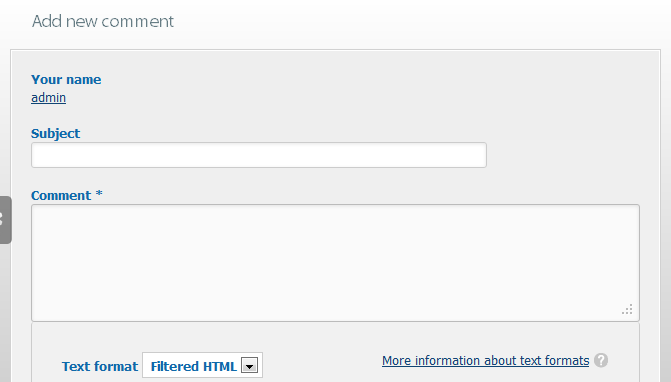
ITMonkey commentedI'm seeing this also, Advanced Forum uses comment fields on a standard content type and it's the comments which don't show CKEditor, the original node (Forum Topic) works fine. Attached is a screenshot showing the format selector and plain comment field. The comments aren't showing CKEditor on any content type regardless of AF, but I'm not sure whether this problem only manifests when the AF module is enabled.
Comment #4
ITMonkey commentedI have disabled Advanced Forum and the comments still don't show CKEditor.
Comment #5
ITMonkey commentedFirebug is showing the following error:
TypeError: Drupal.settings.ckeditor is undefined
window.CKEDITOR_BASEPATH = Drupal.settings.ckeditor.editor_path;
Comment #6
mkesicki commentedWhich version of CKEditor library do you use ?
Where did you store CKEditor library ?
Please check admin status report page if you have any errors there.
Do you have aggregation of JS, CSS files enabled ?
What theme do you use ? Is it standard or custom one ?
Please check in Firebug Net tab if you have any missing/error request.
Comment #7
ITMonkey commentedJS and CSS are both aggregated
Version CKEditor 3.6.5 - stored in sites/all/libraries
(I seem to remember it not working when installed at sites/all/modules/ckeditor/ckeditor)
Theme TouchPro (Arctica/Tundra subtheme) with Skinr
Comments do show CKEditor when using another theme.
Not sure (yet) if this is theme specific or something to do with Skinr.
Comment #8
mkesicki commented@ITMonkey,
please check Aggregate ckeditor.js in Global profile configuration page in Advanced settings section. Make sure you have this option disabled (default setting).
As I understand with other (default) theme CKEditor shows in comments but not shows Arctica/Tundra subtheme with Skinr module .
Does comments work fine with Skinr module and other (default) theme ?
Please check in Firebug or similar tool if you have any missing/bad request .
Comment #9
Chad_Dupuis commentedGlad to see I'm not the only one with this problem (I'm using dev of ckeditor, ckeditor 4.1, jquery_update)
I'm having the same problem, but not just in comment fields - also in node creations within the arctica/tundra/lumi theme with skinr installed: I get Uncaught TypeError: Cannot read property 'editor_path' of undefined js_yzBDOe_b-GNJd0MAHHEETIwvdMGADCKsJsgOvB4jnMs.js:1732
Standard theme works fine...
Just can't see the difference besides some js conflict...
Comment #10
wwalc commentedThe last comment was reported as a separate issue here: #1913682: Ckeditor does not show up in theme - undefined editor path?. Aggregate ckeditor.js set to Disabled should help.
Comment #11
tonovcp commentedI solved my problem, that was theme related, using this module https://www.drupal.org/project/commentsblock