Closed (fixed)
Project:
Webform Multiple File Upload
Version:
7.x-1.x-dev
Component:
User interface
Priority:
Minor
Category:
Feature request
Assigned:
Reporter:
Created:
15 Mar 2012 at 17:57 UTC
Updated:
5 Apr 2012 at 10:30 UTC


Hi,
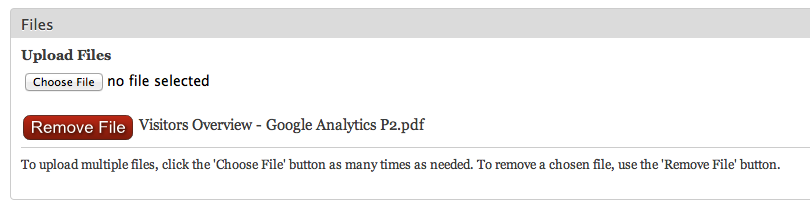
Looking at the results of adding a file, I think the 'x' to remove the file is a bit hard for users to see or understand. To fix this, I implemented a CSS image replacement call like...
a.MultiFile-remove {
  content: url(/sites/all/themes/bartik_essp/images/remove_file2.png);
  overflow: hidden;
  vertical-align: middle;
}
div.MultiFile-label {
  padding: 5px 0px;
  border-bottom: 1px solid #ccc;
}
div.MultiFile-wrap {
  padding-bottom: 7px;
}
Where the PNG file is an image I created. Here is a screen grab - I may need to fiddle with the image - text alignment. Also added a little padding to separate the divs.
I'm wondering if this could be added to the module or perhaps noted in the documentation as a solution to the issue.
Thanks, Eric
| Comment | File | Size | Author |
|---|---|---|---|
| multifile.png | 22.72 KB | aitala |

Comments
Comment #1
attiks commentedI prefer replacing the x with text t('Remove') and make the icon optional
Comment #2
jelle_sThe text is now replaced with t('Remove') and has the class MultiFile-remove (and thus can be themed with css)