

Closed (fixed)
Project:
Link
Version:
7.x-1.x-dev
Component:
User interface
Priority:
Normal
Category:
Bug report
Assigned:
Unassigned
Issue tags:
Reporter:
Created:
12 Dec 2011 at 16:33 UTC
Updated:
2 Aug 2012 at 01:00 UTC
Jump to comment: Most recent file





Comments
Comment #1
rahul.shindeComment #2
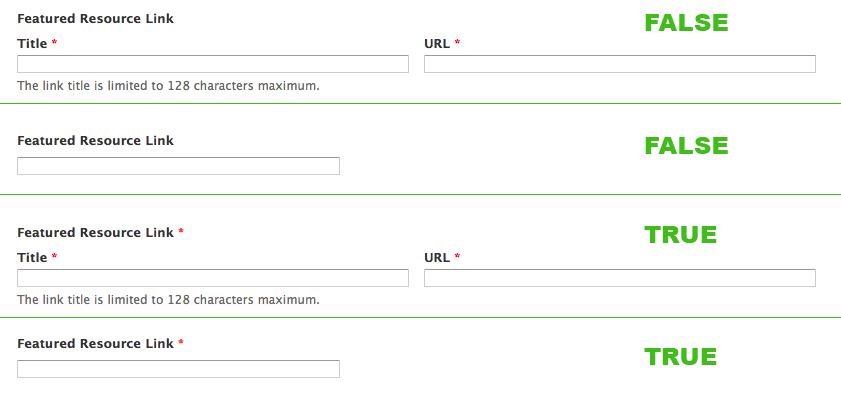
notmike commentedI'm not much of a coder, but I can document. The red asterisk is disabled on line 683 of link.module to avoid a third red asterisk on the parent label if both Title and URL are present. The problem is that if there is no Title, and URL is required. There is no red asterisk at all.
683
$element['#required'] = FALSE; // davereids patch from jan 2011In my attached screenshot (red-asterisk.png), "Featured Resource Link" is my parent label. Line 683 is set to FALSE for the first two examples, but TRUE for the second two.
Comment #3
dqdHm, seems to become a funny WTF issue in repeat and belongs to this issues:
#1038444: Extra required indicator
#1217396: "multiple-value" & "required" breaks input/save and produces error: "At least one title or URL must be entered."
please use needs work status only for issues with included and reviewed but failed patches, which still need to get optimization.
But thanks for the report. ++
Comment #4
dqdand from the 7.x-1.x-dev point of view you rather refer to this line (680) I guess:
and this one at 710:
Comment #5
ASMBL commentedAny word if this was included in the dev snapshot of 2012-Mar-01?
Comment #6
dqd@ DDO : this needs deeper dipping and a patch. Feel free to try your skills on it ;)
Comment #7
dqdComment #8
ASMBL commentedThanks for the reply. I'll investigate.
Comment #9
wooody commentedsame problem with dev version. any way to fix it?
Comment #10
dcmouyard commentedThis is an accessibility issue. This field should be rendered like required text fields in core.
Here's what markup should look like:
Comment #11
grndlvl commentedI checked this a couple of time, but could def. use another eye.
Basically this patch only sets the encapsulating element required attribute to FALSE only when there are multiple elements or a title field. Which, in turn displays the asterisks per the image in comment #2.
I have attached a patch for both 7.x-1.x and 7.x-1.0.
Comment #12
grndlvl commentedComment #13
alexanderpas commentedworks perfectly.
Comment #14
jcfiala commentedI've pushed this into git - will be included in next release (7.x-1.1)
Comment #15
veeraprasadd commented@ #11
Attached patch works fine. Thank you.
Comment #17
brightbold@grndlvl — Thanks for taking the time to patch 1.0 as well. I just deployed it and it works beautifully.