Closed (fixed)
Project:
Acquia Prosper
Version:
6.x-1.1
Component:
Miscellaneous
Priority:
Normal
Category:
Support request
Assigned:
Unassigned
Reporter:
Created:
29 Oct 2011 at 10:50 UTC
Updated:
12 Nov 2011 at 16:00 UTC


(1) I want to make the product description text float to the top, so it's aligned with the top of the image. Web Developer Toolbar says this is styled by .content clearfix but I can't seem to find this class in the style sheets - see screenshot entitled "content clearfix query.jpg". (The product node layout is set by a content template.)
(2) I've added some properties to image_attach.css to put a border around the image but for some reason there is some extra padding at the bottom of the image (see screenshot entitled "image border query.jpg"). I've used the same stylings for the border as I used in another theme, and there the border is equally spaced around the image. I confirm I've tried this on a few images on Acquia Prosper with the same result, and there isn't any white space at the bottom of the images themselves :)
| Comment | File | Size | Author |
|---|---|---|---|
| image border query.jpg | 68.36 KB | thoughtcat | |
| content clearfix query.jpg | 75.12 KB | thoughtcat |

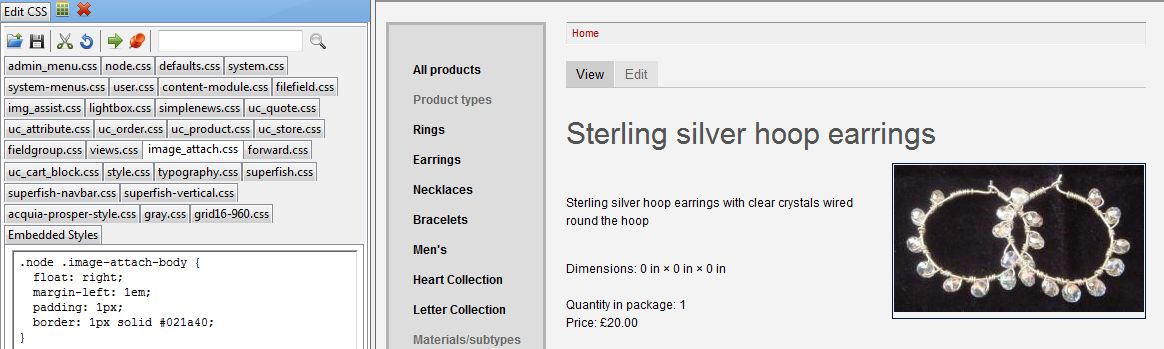

Comments
Comment #1
sheena_d commented1. Just because a div with a certain class exists does not mean there is any CSS associated with it. Theme Developer isn't really that great for troubleshooting CSS, it's better to help determine which Drupal template files or theme functions are affecting an element's output. I would suggest looking into the Firebug plugin for Firefox to help with your CSS troubleshooting.
2. You are applying that border to a div that is wrapping your image. Since images are inline HTML elements, they include line height, which is the extra space you are seeing inside of your border. The border needs to either be placed directly on the actual img tag, or the img needs to be set to display as a block element.