
Sample TAC configuration: Topic writer
Last updated on
30 April 2025
Scenario
- The website is the same news site as in the previous example.
- There are topic writers who author content in certain topics. (Their content is later edited by the editors from the previous example.)
Taxonomy configuration
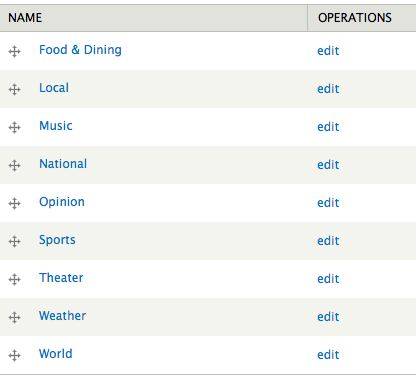
Create a "Topic" vocabulary at admin/structure/taxonomy. Add terms for each news topic.
Role configuration
Create a role for each topic. In this example, we will configure access for the Music writer. (You would repeat this for the other topics.)

Grant the Music writer the following permissions:
- Article: Create new content
- Article: Edit own content

Content type configuration
Add a "Topic" term reference field to the core article content type, using the "Topic" vocabulary.

TAC configuration
Anonymous user role
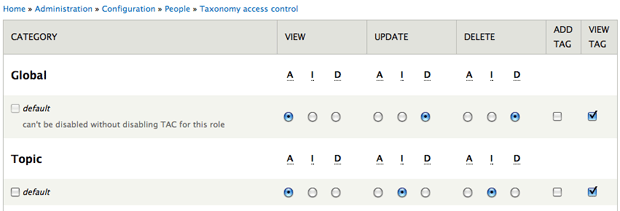
For the "Topic" vocabulary default, set:
- View: Allow
- Update: Ignore
- Delete: Ignore
- Create: Unchecked
- List: Checked
Authenticated user
Same configuration as the anonymous user role.
Music writer role
For the "Topic" vocabulary default, set:
- View: Allow
- Update: Ignore
- Delete: Ignore
- Create: Checked
- List: Checked

Help improve this page
Page status: Not set
You can:
You can:
- Log in, click Edit, and edit this page
- Log in, click Discuss, update the Page status value, and suggest an improvement
- Log in and create a Documentation issue with your suggestion
