Closed (fixed)
Project:
Image javascript crop
Version:
7.x-1.0-rc3
Component:
Javascript
Priority:
Major
Category:
Bug report
Assigned:
Unassigned
Reporter:
Created:
6 Oct 2011 at 15:31 UTC
Updated:
21 Nov 2011 at 11:00 UTC


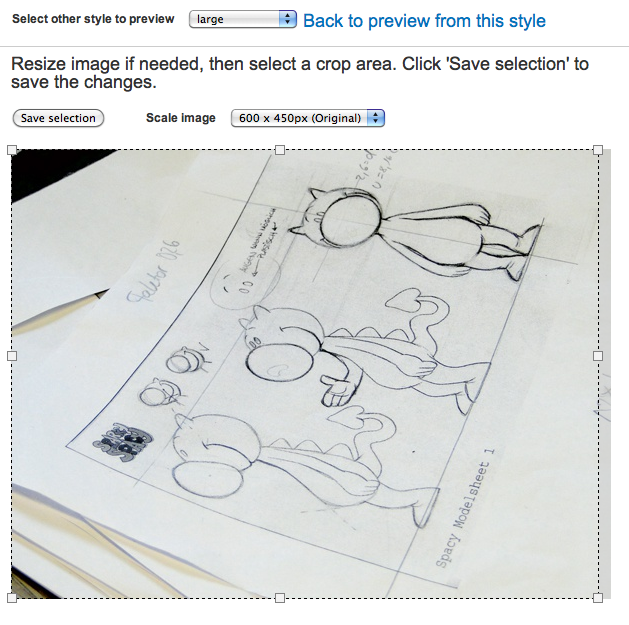
While editing a style, I cannot crop the image correctly - I cannot select the whole image size. There are always about 10px missing on the right size.
see attachment.
| Comment | File | Size | Author |
|---|---|---|---|
| crop.png | 390.73 KB | anonym-developer |

Comments
Comment #1
nils.destoop commentedWhat are the crop settings you are using? Maybe it's the aspect ratio.
Comment #2
anonym-developer commentede.g.
Javascript crop Width: 100, Height: 100, resizable, don't crop if region is not setwhen I start to edit the style, and the cropping area is bigger than the image, the cropping area fits 100% the image area. if I start to drag or resize the cropping area, it jumps 14px away from the right border.
firefox, chrome, safari, all the same.
Comment #3
anonym-developer commentedI found the problem. it is the following line in the css file:
Any padding or margin from the left side of the popup-window will be subtracted from the available image-crop-size. the drag is referring to the absolute position, not to the relative position form the
#imagecrop-crop-wrapperComment #4
nils.destoop commentedI moved the css to an extra wrapper. Can you check if this fixed the issue for you? I can't, because i didn't have the issue.
Comment #5
anonym-developer commentedis working!