

 Come together with the global Drupal community in Rotterdam, 28 Sept – 1 Oct 2026. Sessions, contribution, connection, and Early Bird savings until 8 June.
Hi, when I am viewing an availability calendar the legend is not showing. Can you please advise how I can enable this?
thanks
Chris
| Comment | File | Size | Author |
|---|---|---|---|
| #9 | availability key.png | 10.09 KB | realwahl |

Comments
Comment #1
fietserwinIt is not yet built in. I'm in doubt about how to provide it. As a field so you can place it into your page at the position you want, or as a block so you can put it anywhere on the page. Or both.
How would you use it?
Comment #2
chris.wood commentedI think I would probably favour the block so that I could position it in the left side bar. But I suppose if you provide both methods this would allow flexibility in the design.
Comment #3
fietserwinI guess you're right. We're going for how it currently is: offer both ways.
Comment #4
fietserwinI added the "Availability Key" block back in and committed it. To place this block in between the fields of the entity, use the Block reference module.
Note: it looks like this module can be used to make the booking formlet a block as well. This because it remains a strange field: no storage, and only display. And if you want to place the formlet outside the main content you have to resort to some coding in your theme.
Comment #6
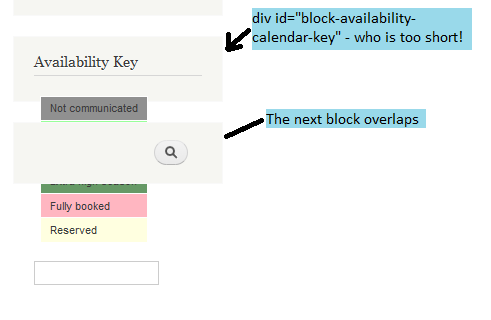
realwahl commentedI am new to Drupal but not so new to web programming. I started a new project and using Drupal & Availability Calendar on it. When setting the "Availability Key", I noticed a small bug: the background color (set by div id="block-availability-calendar-key") was much shorter then the key table, looking strange and causing the block under it to display incorrectly.
I checked the code and managed to fix it by changing in the file availability_calendar.theme.inc, the line 350, from:
to
Can somebody please include it (or a similar fix to this problem) in the next release?
Probably this is not the right way to announce this fix... but I am new to Drupal and already having so much problems understanding it's logic. I am afraid that, if I don't announce it like this, I will forget to do it, so please accept my apologies.
Comment #7
fietserwinPlease create a new issue the next time, your story does not look like it is connected to the original issue.
Can you post a screendump as I don't understand how a (background-)color can be shorter ...
Comment #8
fietserwinComment #9
realwahl commentedOh, sorry, the div (that has that background color) is too short! I attached the print screen.
Comment #10
fietserwinOK, now I See. This is because the key table is floated and thus the surrounding div does not get the height form the table.
The float comes from the fact that the key table also gets class cal-month (besides cal-key). I considered this to be an error and already committed a change to that on October 24. If you don't want to use the dev version, style the div yourself or wait a few days for 7.x-3.1 which is on its way.
Comment #11
realwahl commentedThank you!
Comment #12
fietserwinOops, should have been set to fixed instead of active.