

Closed (fixed)
Project:
DrupalChat
Version:
6.x-2.x-dev
Component:
Code
Priority:
Critical
Category:
Bug report
Assigned:
Unassigned
Reporter:
Created:
12 Sep 2011 at 16:28 UTC
Updated:
9 Mar 2012 at 09:05 UTC
Jump to comment: Most recent file

Comments
Comment #1
zhongguo999999 commentedIf you embedded the ad code which have IFrame framework(eg. Google AdSense), the IE will be slow when you enable the long polling.
I would ask you to help solve the problem. Thank you!
Comment #2
zhongguo999999 commentedSo I wondered: might we be able to find some agent or trigger that might close the Drupalchat manually in the chat page(not in the admin/settings/drupalchat) when the IE is getting slower or we don't want use the Drupalchat sometimes.
Comment #3
darklrd commentedWhich version of IE are you using?
Comment #4
zhongguo999999 commentedIE version: IE8
Something similar appears to have happened at ie 6 or ie 7.
If I close the long polling in Drupalchat, everything has returned to normal(the IE isn't slow).
So I wondered: Maybe it is a good idea that a button is placed in the subpanel with the JS. You can close the Drupalchat manually using the subpanel button to prevent the IE getting slow when you click the page links. You can open the Drupalchat manually when you want to chat. In other words, might we be able to add a close/open button in the chat page using the js.
An advantage of placing a button whit js is that the client does not communicate with the server when you close the Drupalchat manually and reduces the amount of data transferred.
Comment #5
darklrd commentedI am not able to reproduce this issue. Could you please provide step by step instruction to reproduce this issue along with screenshots. Thanks.
Comment #6
zhongguo999999 commentedOK.
1. Enable the Long Polling in admin/settings/drupalchat.
2. Open the IE and chat.
3. Click a link on the page and then click another link on the page.
Note: The link is not the link in chat subpanel.
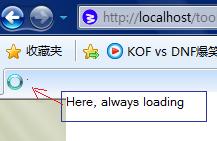
4. You will find the IE is getting slow and you don't open any page when you click the link in the page(out of the chat subpanel). And you find that IE is loading for long time.
I guess that it caused by blocking issues.
Note: My site have IFrame framework.
Comment #7
zhongguo999999 commentedComment #8
darklrd commentedDoes this happen when you click on a hyperlink to navigate to some other page, after you have chatted using DrupalChat for sometime?
Comment #9
zhongguo999999 commentedIf you select the Normal AJAX everything is OK.
But If you select the Long Polling, this happen when you click on a hyperlink to navigate to some other page.
Long Polling might have had problems. E.g. the same message repeating, IE getting slow, etc.
Comment #10
darklrd commentedLong polling is working now.
Comment #12
zhongguo999999 commentedI finally figured out the reason for that, because I open multiple Windows(or tags) with drupalchat!
Comment #13
zhongguo999999 commented