

Closed (fixed)
Project:
ThemeKey
Version:
7.x-2.x-dev
Component:
Code / API
Priority:
Normal
Category:
Support request
Assigned:
Reporter:
Created:
18 Jul 2011 at 20:40 UTC
Updated:
19 Sep 2013 at 06:58 UTC
Jump to comment: Most recent file


Comments
Comment #1
chrispooh commentedAfter i installed the themekey debug, i see this:
ThemeKey Debug Messages
Theme switching to custom theme "theme1" did not work because theme has been set to "theme2" by another module.
Match: "node:type = termek >>>theme1"
Switching theme to theme1.
I don't understand this. What sort of modules could be incompatible with themekey?
Comment #2
mkalkbrennerIt seems like another module switched the theme or initialized the theme already.
But it seems like this module implements something wrong, because if it switches the theme like it should be by implementing hook_custom_theme(), ThemeKey Debug will detect this.
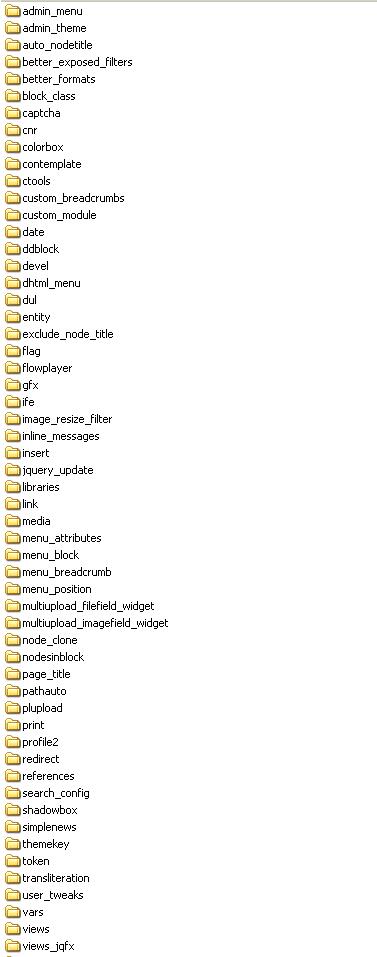
Could you post a list of your modules?
Comment #3
chrispooh commentedThank you for fast reply. I attached the list of my modules.
Comment #4
chrispooh commentedI tried to search for custom_theme() string, but i found just in themekey and in administration theme. I disabled this module, empty the cache but the problem is the same.
Comment #5
mkalkbrennerLike I already pointed out, the module causing the trouble does not implement hook_custom_theme(). Otherwise ThemeKey would already name the module.
The list of modules is too long to review all the source code. Are you able to patch your core to generate the debug output? If you can I will provide you a patch that will help us finding the cause.
Comment #6
chrispooh commentedOh, can you help me with the patch?
Comment #7
chrispooh commentedI did a total dump with this:
Is there any information, we can use? Can you help me on skype? I have to finish with this webpage on this week, and this is the only problem on it. Of course i can donate the module, if we can find the bug today or tomorrow.
My skype is hunrun.com. I will be there after 21:30.
Comment #8
mkalkbrennerI'm very busy at the moment. Check drupal_theme_initialize() in theme.inc. What are the values of $theme and $custom_theme in lines 83, 87 and 88?
Comment #9
chrispooh commentedTheme: theme1
Custom theme: Null
Comment #10
chrispooh commentedSorry, it is the correct:
Theme: theme2
Custom theme: Null
So i see the default theme value in Theme, and Null in custom theme.
It is interesting, that it not works just on this node type, it is working on other node types.
Comment #11
chrispooh commentedDo You have any idea?
Comment #12
chrispooh commentedThere is no solution for this problem?
Comment #13
mkalkbrennerSorry for the delay.
It looks really strange. How did you create that node type? Is it provided by a module?
Comment #14
chrispooh commentedYes, it is very strange. I tried to solve the problem, but i couldn't find.
It is a normal node type, i made it the default way.
Is it can be problem to use another template file to it? I override the default node.tpl.php file.
Comment #15
mkalkbrennerNo. That's a normal feature.
I hope to find some time to create some more Debug Code.
Comment #16
chrispooh commentedIs there any solution?
Comment #17
mkalkbrennerDo you have to reload every time or only the first time?
What happens to anonymous users?
Comment #18
chrispooh commentedI have to reload just in first time.
For anonymous user is the same. First it is not good, but after refresh the page is ok.
Comment #19
adriaanm commentedI have exactly the same issue.
I've searched my webroot for files that implement hook_custom_theme. I got 2 results:
- admin_theme.module
- themekey.module
The administration theme module is turned off. Page caching for anonymous users is off.
I have a match on a specific page, but themekey can't switch to the custom theme because my theme has been set by another module. When i refresh once, themekey switches correctly. From then on, it always switches correctly until i clear all my caches.
Comment #20
adriaanm commentedI tried to narrow down the issue by disabling every module and enabling them one by one.
I discovered the issue disappears when disabling the Redirect module (7.x-1.0-beta3, http://drupal.org/project/redirect). I'm not sure about the reason why ThemeKey fails to switch to the custom theme when Redirect is enabled.
@ mkalkbrenner, can you try to install the redirect module and see if you can reproduce the issue?
@ chrispooh, it seems like you also have the redirect module installed. Can you disable it, try again and post your findings?
Comment #21
mkalkbrennerAt least system.module implements hook_custom_theme() as well.
Currently I'm not able to judge if the issue is caused by ThemeKey + Drupal Core or by any other contrib module.
Is anybody able to help me finding the cause by turning of one module after the other until the problem disappears or if the issue still exists when only ThemeKey remains?
Another starting point will be if someone having this problem could sent me a database snapshot to enable me to reproduce the issue.
Comment #22
mkalkbrennerA typical race condition. You posted your findings in #20 during I wrote #21 ;-)
Thanks for your findings. I will have a look at the Redirect module. Any special configuration in the Redirect module?
Comment #23
adriaanm commentedGreat :-)
I have about 80 301-redirects configured for old paths of a previous website.
My settings in the Redirect module:
Comment #24
mkalkbrennerComment #25
BenK commentedSubscribing
Comment #26
chrispooh commentedIs there any solution?
Comment #27
mkalkbrennerI'm very busy at the moment. I hope to find some time next week ...
Comment #28
chrispooh commentedHi, is there any solution?
Comment #29
mkalkbrennerI'm not able to reproduce this issue using drupal 7.9, redirect 7.x-1.0-beta3 and themekey 7.x-2.x-dev. In other words it works.
If anyone has this issue using these versions it would help me to gain access to this system or to get a database dump.
Comment #30
chrispooh commentedDid you set the cache?
Comment #31
mkalkbrennerI turned on and off page caching and block caching. Switching the theme on node types works well for anonymous and logged in users, even at the first request after flushing the caches.
I also tried to create various redirect rules. So if the issue still exists at your system with themekey 7.x-2.x-dev and the latest core and redirect 7.x-1.0-beta3, we have to find the difference in our settings that causes the trouble.
What do you think about installing a fresh drupal 7.9 and the two modules and configure this setup until the error occurs? (That's what I've tried.)
Comment #32
mkalkbrennerComment #33
mlncn commentedHi mkalkbrenner, your attentiveness and guidance on this thread has been fantastic.
1. I can confirm it is a problem with Redirect module-- did you set up a redirect for one of the node pages you tested?
2. Redirect module causes this problem for any implementation of hook_custom_theme().
Thanks, and i'll post an issue in Redirect's queue also. UPDATE: Here's the link to that issue: #1370964: Redirect interferes with hook_custom_theme
Comment #34
btopro commentedseems like if themekey is the first thing to get access to changing the theme then it's happy (similar to node access control modules conflicting)
db_query("UPDATE {system} SET weight = -10 WHERE name = 'themekey'");
worked in D6, similar thing where it's weighted negatively will help here mayhaps?
Comment #35
mkalkbrennerPlease have a look at #1370964: Redirect interferes with hook_custom_theme.
I leave this ticket open until real issue is fixed.
Comment #36
mkalkbrennerComment #37
mkalkbrennerI ran into the same issue now, but Redirect is not installed!
The strange thing is that this issue also happens sometimes, when the core triggers the administration theme!
So maybe it's a core issue ...
Comment #38
mkalkbrennerNow I'm convinced that this issue is not related to ThemeKey or Redirect.
Started debugging core ...
Comment #39
mkalkbrennersee #1858946: Document that it's not allowed to trigger theme functions in hook_entity_info_alter()
Comment #40
stephit commentedThis may or may not be related to the specific issue in this topic, but I was having a similar problem in my theme switching using a jQuery mobile theme. Changing the following jQuery theme settings solved it (and note, I had also set the Themekey weight as in post #34):
AJAX Enabled (ajaxEnabled) - FALSE
Link Binding Enabled (linkBindingEnabled) - TRUE
Hash Listening Enabled (hashListeningEnabled) - FALSE
Push State Enabled (pushStateEnabled) - FALSE
Hope that helps someone.
Comment #41
mkalkbrennerI close this issue. The remaining task is mentioned in #39.
Comment #42
mkalkbrennersee #2086335: Bootstrap issue with theme initialization causes hook_custom_theme() never to be invoked