

 The 2026 Drupal Business Survey is open. Your response will help shape the future of the Drupal business ecosystem.
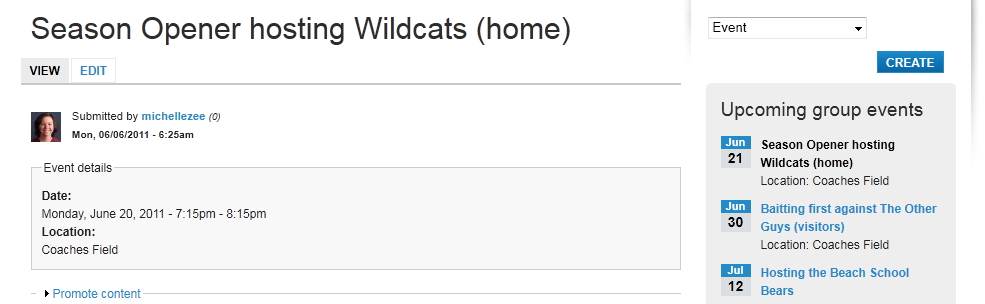
I see there has been a previous issue for the date being off by 1 day, but this is a different issue. The date does appear correctly as entered in the node view and on the calendar display. But the new date block in Commons 1.6 is off by one day. You can see in the attached screenshot that the date in the node is correct - June 20, but in the Upcoming Group events block in the right sidebar, the little date block shows June 21 for this event.
This seems to be happening for all events entered after updating my site to 1.6 (from 1.5). Previously entered events appear correct.
Date settings are set with Monday as the first day of the week. Site's timezone is America/Los Angeles, user-configured timezones are disabled. The Commons Event feature is at its default settings. Please advise - thanks!
| Comment | File | Size | Author |
|---|---|---|---|
| #32 | dateblock-1180080-32.patch | 601 bytes | lightsurge |
| #27 | dateblock3-1180080-27.patch | 1.08 KB | lightsurge |
| #24 | dateblock2-1180080-22.patch | 1.05 KB | lightsurge |
| #23 | dateblock-1180080-22.patch | 956 bytes | lightsurge |
| #17 | date-issue.jpg | 64.56 KB | annknauth |



Comments
Comment #1
mstef commentedCertainly looks like an issue to me. Thanks for the report - I'll look into it.
Comment #2
mstef commentedBug confirmed, and at first glance, I have no clue why it's happening. The weirdest part is that it doesn't happen on the global events page.
Any ideas?
Comment #3
notasheep commentedI'm getting this too. It seems it's happened before, but the solutions they came up with last year aren't working now. (Namely, changing the settings at admin/settings/date-time so that Monday is the first day of the week)
See: http://commons.acquia.com/discussion/calendar-day
This is a very annoying bug. Let's fix it quick!
Comment #4
mstef commentedSeems this has been fixed in the upcoming 2.0-beta.
I'll test again afterwards.
Comment #6
dwongu commentedThis still appears to be an issue in 2.0 GA. Changing the first day of the week didn't fix it. (See attached...)
This sort of makes the events calendar useless for our purposes. Does anybody have a fix?
Thanks!
Comment #7
Crom commentedsubscribing - same issue here.
Comment #8
lightsurge commentedMy guess would be that the problem is related to the server clock... sorry if I'm speaking the obvious.
Probably it's not compensating for a timezone mismatch quite right... Views is sending the 'Default' display format of the date to the views-view-field--field-date-value.tpl.php template, which doesn't seem right unless I'm misunderstanding how Views sends fields to the template... because when reconverted by php to a universal time, it will use the server clock timezone, and then when it converts again to the date needed for the template, it will display it as if the date is within the server timezone.... If that makes sense, sorry, always long-winded.
It's fine for me, probably because my server timezone matches the website's.
Comment #9
lightsurge commentedSo anyway a new custom date format maybe needs adding with an 'e' in it somewhere for php to recognise? Then adjust the View to use it.
Edit: Although actually, why do that, can just have 'c'.
Comment #10
lightsurge commentedComment #11
mroswell commentedOddly: display differs in Chrome and Firefox. Correct dates in Chrome, and incorrect in Firefox. Hostgator support says on his end dates are the same--the correct dates.
UPDATE. When accessed through IP, or proxy site, dates displayed correctly. When accessed through domain name, one day forward, in Firefox.
Comment #12
lightsurge commentedDid you try adding a new date format with 'c'?
At the moment, as far as I understand it, the views template is using this sort of data when calling a strtotime php: [aliases] => Array ( 9 November, 2011 - 14:00 - 16:30 ...
No timezone data. So we'll end up with this happening:
So we lose a day.
If we create a new date format 'Full' wih php time string 'c' and get the block view to use this instead, the views template will use this [aliases] => Array ( 2011-11-09T14:00:00+00:00
So strtotime would be able to do its job properly.
From your description perhaps you're having a different problem... but it might be worth eliminating this first?
Comment #13
mroswell commentedMy dates are in datestamp format. @lightsurge, I'm appreciative of your note. But I don't know what it means to use php time string "c."
I see (c?) this documentation: http://php.net/manual/en/function.date-format.php
But I'm simply not sure what to do. First question: How do I determine the various timezones above. support had said there was something in php.ini, but I don't see it.
Here are more docs
http://us.php.net/manual/en/function.date-default-timezone-get.php
But I guess my three steps, if I could figure out how to do them are:
1. Determine the server timezone
2. Determine user timezone
3. Implement @lightsurge suggestion, including appropriate date format
Can you guide me further in these three steps?
In the past I've been successful using datestamp date format for this level of theming (separately extracting month, date, and day). Perhaps I should use date or datetime in cck?
Margie
Comment #14
lightsurge commentedNot nearly as complicated as that. But rather than getting into this you do have the option of waiting for a more automated fix... But here are the steps anyway
If this works, you can then alter the other event blocks in the same way, or you could wait for automated fix.
Comment #15
lightsurge commentedSo long as your server has the correct date/time for some timezone or other, you shouldn't need to do anything with your server.
Comment #16
lightsurge commentedMissed a step out in #13, just added.
Comment #17
annknauth commentedI'm having the same problem. All timezone settings are set for Chicago: server, php.ini and commons.
I still get the date block off by a day when the time of the event is 6pm or later.
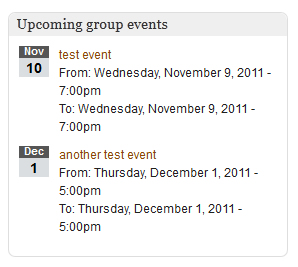
I modified the view to specifically show the date from and date to. Please see the attached photo.
The first event is at 7pm and shows the wrong date. The second event is at 5pm and shows the correct date.
I tried adding a format 'c' and using that. Nothing changed.
Any help would be greatly appreciated!
Comment #18
lightsurge commentedSome timezone bizarreness but not sure what... considering Chicago is exactly 6 hours behind GMT.
Perhaps I was misunderstanding PHPs dealing with time, and that when the views template receives the date, 1) it uses the $data value without timezone (ignoring the alias you provided with a full timezone), and 2) as well as that, rather than assuming the server timezone, it assumes GMT.
Perhaps something like this is happening:
Which would explain why I'm having no problems. If this is the case, views-view-field--field-date-value.tpl.php needs rethinking. There are other ways of formatting dates in this way (could create separate fields in Views for month and day in the same way you added the full time with 'c', that way never bothering with strtotime function).
Comment #19
lightsurge commentedI might be wrong, but I think Views formats a date and sends it to a template intending it to be viewed by the current user, not to be re-calculated, so it should be Views that takes care of calculating the date rather than manipulating it with strtotime in the template?
Well, that's my guess why these problems are cropping up.
Comment #20
annknauth commentedAny suggestions for a work around? I'm new to commons and drupal with limited programming skills.
Comment #21
ezra-g commentedI'm setting this to active since there's no patch to review here.
Comment #22
lightsurge commented@annknauth
You could try altering views-view-field--field-date-value.tpl.php in your Commons Roots theme folder with below changes:
The views field templates seem really weird, not totally sure this will work. Dates are stored in the database as UTC, and the timezone data gets added later.
But from my troubleshooting it seems like php functions like strtotime are run immediately on raw data in the field template, whereas drupal functions like format_date are run later?
So for a date of 11 November 2011, running
print format_date(strtotime($row->{$field->field_alias}), 'custom', 'U')in the template would return 1321000080.Whereas, running
print strtotime(format_date(strtotime($row->{$field->field_alias}))with the same date won't return anything.So it's possible by using the php 'date' function rather than the drupal 'format_date' function, we're printing the date field before timezone info gets added?
Comment #23
lightsurge commentedPatch with changes from #22 attached.
Comment #24
lightsurge commentedMissed a bit... this should fix. I tested it with Chicago time with an event after 6pm.
Comment #25
annknauth commented@lightsurge
Thank you!
I updated with the patch and thought I was good but it seems I'm still missing something.
I'll keep troubleshooting.
Comment #26
annknauth commentedThis is interesting. It trips now at 10pm or later. Events starting at 9:59pm or earlier show the correct date. Fortunately, we shouldn't have any events that start that late, so the dates should all be accurate. But, why would 10pm cause it to show the next day?
Comment #27
lightsurge commented@annknauth
How very odd. My server is set to GMT/UTC, php.ini default timezone unset, my commons test environment set to Chicago on user and default...
...And I get exactly the same behaviour as you... anything after 10pm shifts to the next day. Which makes absolutely no sense at all (where on earth is it getting a 2 hour offset from?!).
Anyway, setting the default php timezone to UTC seems to fix it.
With below patch, event of Sat, 19 Nov 2011 23:59 displays as Sat, 19 Nov 2011 23:59:00 -0600 when drupal timezone set to Chicago, reverting to GMT in drupal gives Sun, 20 Nov 2011 05:59:00 +0000... so all looks well.
Comment #28
annknauth commented@lightsurge
All looks good! Thank you for all your help!
Comment #29
gregglesYes, we should use format_date instead of date() to get awareness of Drupal's timezones.
I didn't apply this, but it makes sense(TM).
Comment #30
ezra-g commentedCommitted - Thanks, lightsurge! http://drupalcode.org/project/commons.git/commit/abd17f8
Comment #31
hankvanzile commentedHello, I'm not sure this bug is fixed in all cases. I've tried all the various solutions above and I'm still not getting the dateblock showing the correct date for an event that's listed as 7:00 - 9:30 PM. I am in the time zone America/Vancouver and have updated my php.ini file so that date.timezone = UTC. I'm running 6.x.2.4 at the moment, applied the patch above, tried the instructions for setting up another date format - even went so far as to pull down just the commons_roots theme from 6.x.2.5. None of it is working for me.
Any help would be greatly appreciated.
Comment #32
lightsurge commentedI couldn't replicate this on my test site with site timezone set as America/Vancouver, and user timezone set as America/Vancouver. Event posted as 20/02/2012 19:00 - 21:30 appears in dateblock as the correct date.
Have you tried clearing your caches at admin/settings/performance after applying?
Having said that, I have just noticed an error in my patch, unnecessary call to format_date(). But I don't think that'll have affected you, it's more just duplication (can't remember what I was messing about with there, perhaps it was some kind of intentional, illogical genius that I should trust in... but that's doubtful!)
So patch attached (adjusting version... patch won't apply to 2.4 without also patch in #27).
Comment #33
lightsurge commentedComment #34
hankvanzile commentedSorry for the delay, but yes, I clear my caches regularly (since the site is still in development). I just added a new event and the date is off on that by one day, as well. How can I help further test this?
Comment #35
hankvanzile commentedApplying the patch to a 6.x-2.5 code base, as opposed to a 6.x-2.4 one (which is what I tried last time) appears to have done the trick. Thank you for your help!
Comment #36
lightsurge commentedMarking as RTBC
Comment #37
ezra-g commentedAdding to the list of 2.6 issues to triage.
Comment #38
ezra-g commented@lightsurge et al:
I want to make sure I understand the justification for using strtotime() and ignoring Drupal's timezone handling via format_date() - The reason for using field_alias is that it will use the time in the timezone of the event, rather than the user/site-specific time, correct?
Comment #39
lightsurge commentedThink field_alias here is just the time as stored in the database, which is UTC.
This particular call to format_date, which should be unnecessary, lingered after I tried to use format_date once to get timezone conversion for the timestamp, so I could then use date() to make the date portions, rather than using format_date 3 times... for some reason I think this didn't work.
Comment #40
ezra-g commentedI committed this yesterday and didn't update this issue. Thanks!
http://drupalcode.org/project/commons.git/commit/0c60da2d82e3f80a3505622...