

Closed (fixed)
Project:
Views (for Drupal 7)
Version:
7.x-3.x-dev
Component:
Code
Priority:
Normal
Category:
Task
Assigned:
Unassigned
Reporter:
Created:
14 Apr 2011 at 16:49 UTC
Updated:
15 Sep 2016 at 03:12 UTC
Jump to comment: Most recent

Comments
Comment #1
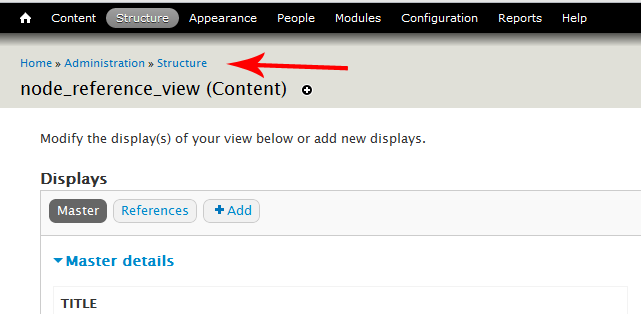
merlinofchaos commentedThere seems to be a bug in the core menu system that I can't figure out.
Fresh installs have the breadcrumb correct, but some upgraded systems do not and no amount of menu rebuilding seems to get it right. I'd hoped that deleting the contents of menu_router and menu_links would do it, but there's something else not right.
I guess I'm going to have to get deep into menu's guts to figure out what's wrong.
Comment #2
jcarlson34 commentedYour mention of the menu_links tables sent me to a potential fix.
On fresh installs, the admin/structure/views/view/% entry in the 'link_path' field of the 'menu_links' table has a 'depth' field of 4 and its own plid number in the 'p4' field.
On upgrades, the admin/structure/views/view/% entry has a depth of 3 and has a 0 entry for the p4 field.
After changing the older install's depth to 4, adding the plid, and clearing Drupal's cache, the Views breadcrumb link came back again.
Comment #3
jcarlson34 commentedChanging the status of this issue to 'needs review'.
Comment #4
merlinofchaos commented'needs review' would indicate there's a patch to test. There is no patch here.
So while investigating this, the site that I have that was exhibiting this behavior stopped exhibiting it partway through. Eventually a menu rebuild set it right.
Naturally I didn't keep a database that exhibits the behavior, so now I can't recreate the problem. :/
Comment #5
merlinofchaos commentedOk, losing that database might've been a good thing. It got me thinking about how this might've happened in the first place, and I figured it out. I sucessfully recreated an install in this condition.
Knowing that led me to a fix, which is an update function that will remove the condition. The latest CTools -dev fixes the code that causes the condition.
Comment #6
jcarlson34 commentedmerlin you rock. thanks for the fix!
Comment #8
prossel commentedHad the same problem. Comment #2 lead me to the solution, but I also had the wrong plid for many of the "admin/structure/views..." entries. By comparing with a fresh install, I have been able to understand which one related to which one and fix them manually.
Easy way to view only the relevant rows:
Then verify each plid value. It should point to the mlid whose link_path matches the parent folder of the link_path field.
Comment #9
mmlmitchell commentedI understand this issue to be a persistent problem with 7.X core. 5 years on, it still lurks. The suggested solutions in #2 and #8 dissolve when the database is updated (drush updb). I know I have fixed this issue on previous sites, but the solution eludes me now. Any advice?