The scheduler allows rule sets to be executed once, at a predetermined time. Rules can be executed periodically (every day, every week, etc) by adding an action to the rule set that schedules itself to re-execute. But supporting the ability to schedule a set to execute periodically via the scheduler, without having to re-schedule itself, would make it much easier to use and maintain. This would be a nice UX improvement.
Original issue:
I setup a rule set and schedule it to run +1 hour, but the scheduler only runs it once. How can I make it recurrent to run every hour and not only once??


Comments
Comment #1
fagoJust re-schedule the set from the set itself.
Comment #3
sylvaticus commentedhmm... I think the original post was how to automatically schedule the rule every hour..
Comment #4
fagoyes, add an action to the set that schedules itself. But well, I think supporting that directly in the schedule action would make it much easier to use and maintain, so this would be a nice UX improvement.
Comment #5
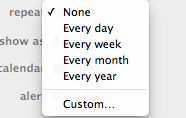
mitchell commentedWould this UI element work?
Comment #6
qasimzee commentedEven if we schedule the component itself in its action, it schedules itself when executed manually but it does not schedule itself if executed using cron.
Comment #7
qasimzee commentedmy bad, it was not working when I was executing the rules_scheduler cron job using Elysia cron. Now working fine
Comment #8
tr commentedI edited the issue summary to reflect that that this is now a feature request, and to describe the desired feature.
Comment #9
tr commentedMoving to D8 as there doesn't seem to be any community interest for implementing this new feature.
If this is going to be done, it should be done in D8 first then backported to D7 if there is sufficient participation from the community.
Postponing until Rules Scheduler is ported to D8.