

 The 2026 Drupal Business Survey is open. Your response will help shape the future of the Drupal business ecosystem.
Problem/Motivation
In Drupal >= 10.4.x a refactoring of the Claro dialogue stylesheet has been performed. Issue https://www.drupal.org/project/drupal/issues/3303546
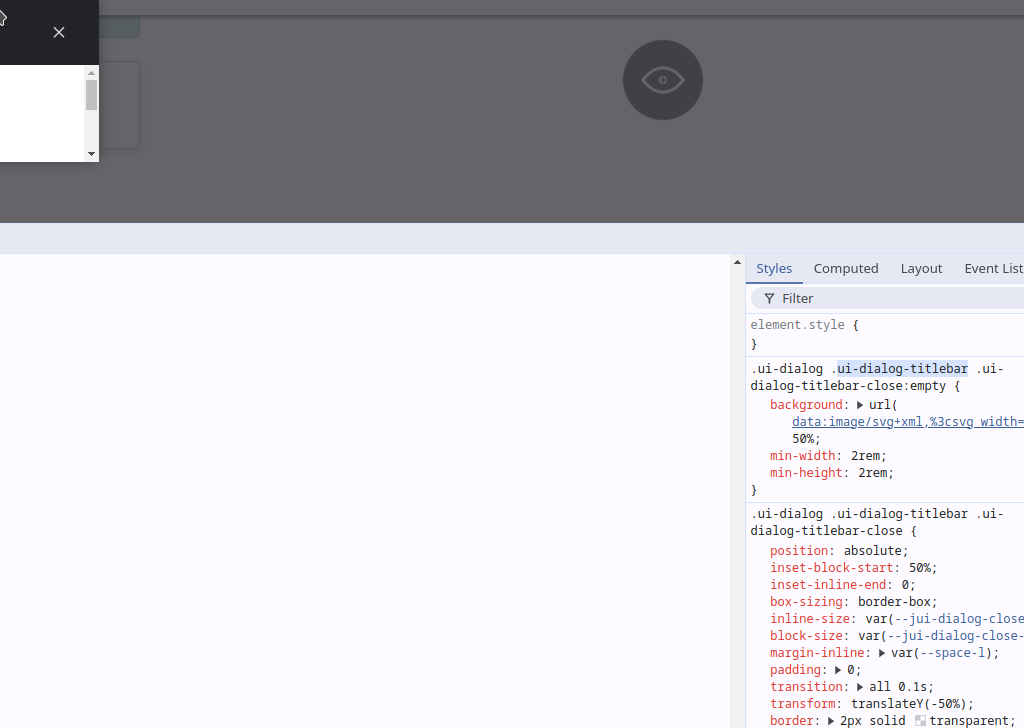
One of these changes affects the close dialogue button, which does not display the X correctly.
The change is as follows:
- Drupal 10.3.x -> .ui-dialog .ui-dialog-titlebar-close {.....
- Drupal 10.4.x -> .ui-dialog .ui-dialog-titlebar .ui-dialog-titlebar-close {.....
It is suggested to change .ui-dialog .ui-dialog-titlebar-close:empty {.... to .ui-dialog .ui-dialog-titlebar .ui-dialog-titlebar-close:empty {....
Making this change correctly displays the close button
| Comment | File | Size | Author |
|---|---|---|---|
| #4 | close after.png | 62.62 KB | bryan toapanta |
| close.png | 14.32 KB | bryan toapanta |
Issue fork vlsuite-3501461
 Show commands
Start within a Git clone of the project using the version control instructions.
Or, if you do not have SSH keys set up on git.drupalcode.org:
 changes

Comments
Comment #3
bryan toapanta commentedComment #4
bryan toapanta commentedAfter applying the changes the button is displayed correctly.
Comment #6
alejandro cabarcos commented@Bryan I think is a good idea to keep both selectors for compatibility. I've updated the merge request
Comment #7
alejandro cabarcos commentedComment #8
crzdev commentedGreat, thanks! Integrated!
Comment #10
crzdev commented