



This project is not covered by Drupal’s security advisory policy.
UI Auto Translate provides automatic translation of Drupal interface strings using the DeepL API. This module seamlessly integrates with Drupal's translation system to help site builders quickly translate their interface into multiple languages with just a few clicks.
Features
- One-click translation of all untranslated interface strings
- Integration with both DeepL Free and Pro API
- Real-time translation progress indicator with visual feedback
- Character usage tracking and monitoring
- Connection testing before configuration
- Secure API key storage
- User-friendly interface integrated into Drupal's existing translation system
- Support for all languages available through DeepL
Post-Installation
After installing the module, follow these steps:
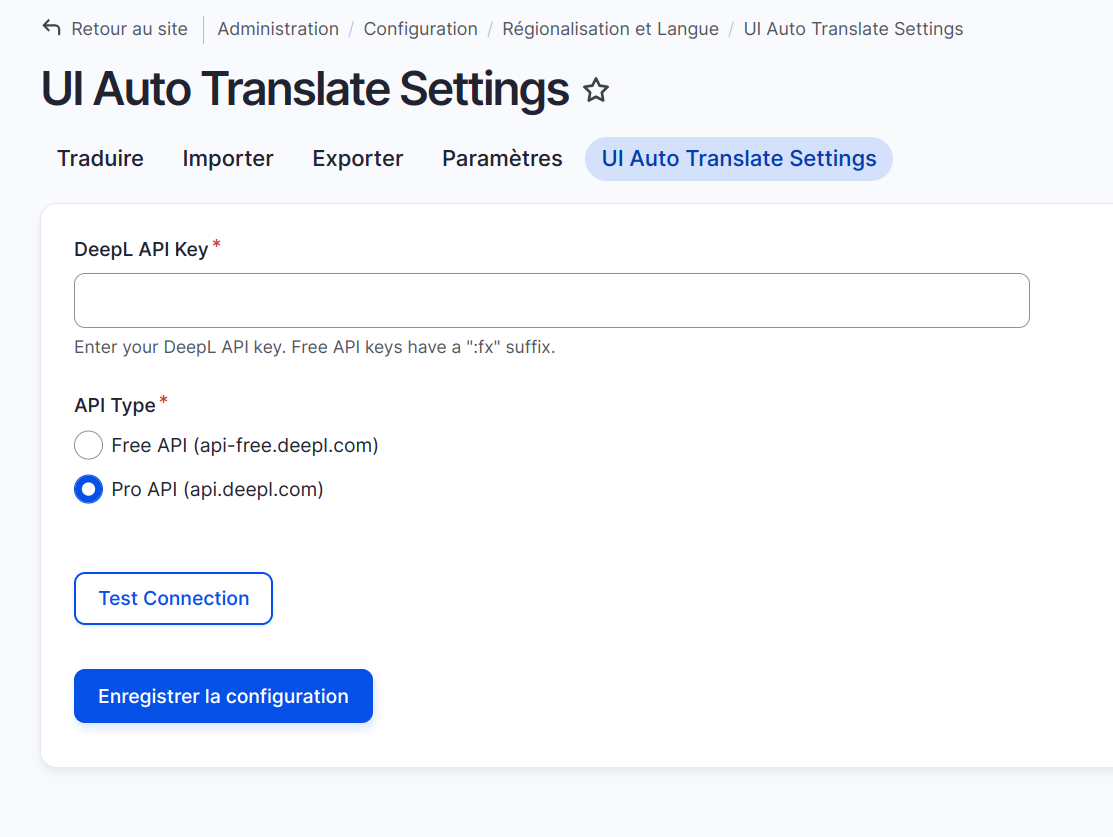
- Navigate to Administration » Configuration » Regional and language » UI Auto Translate Settings (/admin/config/regional/ui-auto-translate)
- Enter your DeepL API key
- Select your API type (Free or Pro)
- Test the connection and save the configuration
To use the module:
- Go to Administration » Configuration » Regional and language » User interface translation
- Use the new "Translate All" button to automatically translate untranslated strings
- Monitor the translation progress through the visual indicator
Additional Requirements
- Drupal ^10
- PHP ^8.1
- DeepL API key (Free or Pro version)
- Configured languages in Drupal that match DeepL's supported languages
Supporting this Module
This module is maintained by Vivien BARBEAU.
Currently, we do not have a formal support system in place, but you can:
- Submit issues on the project page
- Submit merge request on Gitlab
- Contact the maintainer for professional support
Project information
 Unsupported
Not supported (i.e. abandoned), and no longer being developed. Learn more about dealing with unsupported (abandoned) projects- Obsolete
Use of this project is deprecated. - Project categories: Multilingual
- Ecosystem: Local Translator, DeepL, TMGMT DeepL Integration
- Created by lifelifeone on , updated
 This project is not covered by the security advisory policy.
Use at your own risk! It may have publicly disclosed vulnerabilities.

