

 Come together with the global Drupal community in Rotterdam, 28 Sept – 1 Oct 2026. Sessions, contribution, connection, and Early Bird savings until 8 June.
I'm using the Smart Date widget with a regular Date Range field. I would like to use Smart Date Recur features also, but that seems to require changing the field, not just the widget. Is there an upgrade path?
Related: My initial understanding was that everything was stored the same as Date Range stores. Is that not the case for Smart Date Recur? (We currently have code that relies on each occurrence being its own item not a formula.)
Thank you!
| Comment | File | Size | Author |
|---|---|---|---|
| #19 | correct_smart_date.png | 38.53 KB | sseto |
| #17 | multiple_items_smart_date.png | 80.55 KB | sseto |
| #15 | old-core-date.png | 381.1 KB | sseto |
| #15 | smart_date_table.png | 445.48 KB | sseto |
| #10 | date.png | 23.09 KB | sseto |



Comments
Comment #2
mandclu commentedI adapted the code provided by @cameronprince in #3173933: Converting from Core Date fields into a general-purpose drush command that may be of some use, in the attached patch.
The structure looks like:
drush smart_date:migrate workshop field_whenny field_core_daterangeIn the above example, "workshop" is the content type, "field_whenny" is the destination Smart Date field, and "field_core_daterange" is probably self evident lol. If you had separate fields for the start and end you could just pass them in as two parameters.
There are other parameters and options available, but hopefully that's enough to get you started. There's additional documentation in the drush command's annotation.
Not that the above currently only works with single value fields.
Comment #3
mandclu commentedComment #5
mandclu commentedSince we're not at a stable release yet anyway for the 3.2.x branch, decided to merge this in. Feel free to reopen if issues are encountered.
@mlncn I realize I didn't answer part of your question:
Smart Date Recur does indeed store each instance as its own field delta, to simplify building views, etc. You mention the core Date Range field, which stores the start and end dates as strings. Smart Date fields store the start and end values as timestamps, which are much more efficient for doing things like comparisons to see whether a set of dates begin or end in the future.
Comment #6
sseto commentedHi mandclu! I want to say thank you for creating and comitting this new patch!
I have an issue, and I'm not sure if I'm doing the drush command correct. Hope you can let me know if I'm doing it wrong or not.
Here are the steps I did:
I do see my new smart_date field in my nodes, but it's still empty.
Am I missing something?
*EDIT*
I ran it again and I got this error:
SQLSTATE[23000]: Integrity constraint violation: 1062 Duplicate entry '112-0-0-en' for key 'PRIMARY': INSERT INTO {node__fiel
d_schedules_date} (bundle, deleted, entity_id, revision_id, langcode, delta, field_schedules_date_value, field_schedules_date
_end_value, field_schedules_date_duration, field_schedules_date_rrule, field_schedules_date_rrule_index, field_schedules_date
_timezone) VALUES (:db_insert_placeholder_0, :db_insert_placeholder_1, :db_insert_placeholder_2, :db_insert_placeholder_3, :d
b_insert_placeholder_4, :db_insert_placeholder_5, :db_insert_placeholder_6, :db_insert_placeholder_7, :db_insert_placeholder_
8, :db_insert_placeholder_9, :db_insert_placeholder_10, :db_insert_placeholder_11); Array
(
[:db_insert_placeholder_0] => rec_class
[:db_insert_placeholder_1] => 0
[:db_insert_placeholder_2] => 112
[:db_insert_placeholder_3] => 112
[:db_insert_placeholder_4] => en
[:db_insert_placeholder_5] => 0
[:db_insert_placeholder_6] => 1435593600
[:db_insert_placeholder_7] => 1435593600
[:db_insert_placeholder_8] => 0
[:db_insert_placeholder_9] =>
[:db_insert_placeholder_10] =>
[:db_insert_placeholder_11] =>
)
In Statement.php line 59:
SQLSTATE[23000]: Integrity constraint violation: 1062 Duplicate entry '112-0-0-en' for key 'PRIMARY'
I TRUNCATED my TABLE node_field_schedules_date and re-ran the Drush command and I didn't get the error anymore. So it looks like I got my data migrated into my new TABLE, but I just don't see it in my nodes/content.
---------
Thanks!
Comment #7
mandclu commentedThanks for the feedback! I'm wondering if maybe the drush script should save each entity as the data gets updated. If you resave your rec_class nodes, do the field_schedules_date values appear?
Also, I plan to create documentation for the drush script. Is there any particular information you wish you had known at the start?
Comment #8
sseto commentedI resaved a few of my rec_class nodes and my field_schedules_date values didn't appear :(
Your documentation in #2 was very clear. I'm not sure what the patch does, but I know it did migrate my core date values to my new smart_date table.
Thanks for such amazing work!
Comment #9
mandclu commentedStrange, I've tested this a few times now and every time the new values are visible when I refresh the display of the nodes. Is it possible you don't have your field_schedules_date configured to display?
Comment #10
sseto commentedI checked my manage display and I see that it's enabled.
Do you think it's because my nodes have multiple dates? I attached an image of one of my nodes for example. All my dates start only on Thursdays for the entire month of April.
Do you think I might have to manually update it?
thanks!
Comment #11
mandclu commentedThere was previously an issue where only the first date would get migrated, but that was fixed in #3208202: Drush Migration Script: Only the first value in a field is migrated. Still, you should have seen at least the first values migrated into field_schedules_date. If you're not seeing any at all, there could be another issue. I will confess that I had been testing with date range fields instead of a datetime, so it is also possible that something in the logic that's meant to handle single values is off.
Are you seeing any errors logged?
I will also say that if all your values are meant to follow that kind of weekly pattern, you might find it easier to enable Smart Date Recur and make a single repeating value.
Comment #12
sseto commentedI'm not seeing any errors when I ran the Drush command or in my dblog.
most of my dates are mainly weekly pattern so I did enable Smart Date Recur before running the Drush command. It looks like I might have to go into each node and update it manually.
Comment #13
mandclu commentedI did think of one other possibility. Hold off making manual changes while I get some new code committed.
Comment #14
mandclu commentedI just committed some additional fixes for the drush script in #3208273: Drush Migration Script: Incorrect logic for datetime (non-range) fields. Can you try again with the dev release?
Also, I thought of one other potential issue: If using a single value and not passing in a default duration value to the drush script, it would use a duration of zero, so that the migrated Smart Date value will output the same as the source. That said, Smart Date fields don't allow a zero duration by default, so it's possible that the values aren't being saved because they don't validate. Did you say you can see the migrated values in the database, though?
Comment #15
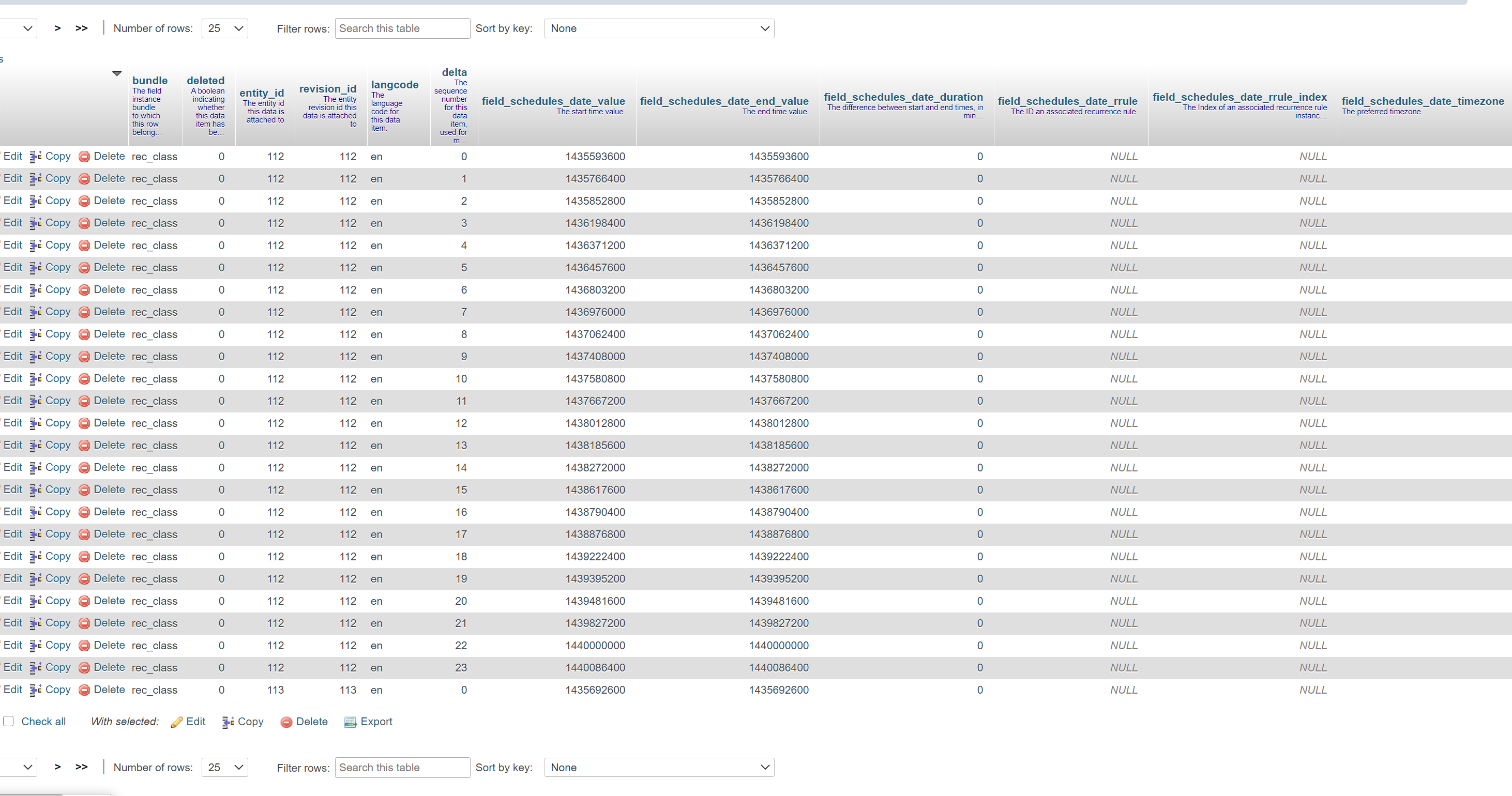
sseto commentedHey mandclu! I installed the new dev release and ran the Drush command. My new smart_date field didn't get filled in with the migrated fields. I checked my TABLE field_schedules_date (smart_date TABLE) and it actually got migrated with more rows. It actually has a few more rows than my Core Date Table lol. I attached 2 images comparing the 2 tables.
Thanks for helping me out :)
Comment #16
mandclu commentedBased on the screen captures, those look like a 1:1 mapping. One thing I did notice from your screen captures is that the source field uses a langcode of "und" where the migration script defaults to "en".
One thing to confirm: if you add the
--clearflag when you run the drush command, it will remove any existing values in the destination field. Are you using that? if not, that could explain why you have more values in field_schedules_date.Also, try running the script with
--langcode=undto see if that helps. Maybe the script should look for an existing langcode value and default to that.Comment #17
sseto commentedHey hey! It's sort of works now! My smart_date field got populated, but it's populating multiple items to match the core dates. See attached image.
I ran `drush smart_date:migrate rec_class field_schedules_date field_rec_date --langcode=und --clear`
Comment #18
mandclu commentedProgress! What makes you say it's populating multiple items?
Comment #19
sseto commentedI meant that it didn't automatically amalgamate everything into one field like the attached image, but I'm asking way too much. I think what you did is amazing! I think after migrating to smart_fields, any future dates going forward can start using smart_date instead.
Thank you so much!!
Comment #20
mandclu commentedThanks for all your detailed feedback! It was very helpful in making the drush script better.