

 Come together with the global Drupal community in Rotterdam, 28 Sept – 1 Oct 2026. Sessions, contribution, connection, and Early Bird savings until 8 June.
After I enabled this module, I always get recaptcha module working when I am logged out of my site. But whenever I submit the form, I get the error:
"There was an error during validation of your form submission, please try to reload the page and submit form again."
Is it because I am not logged in and the key is not verified from the configuration or is it something else? I have tried multiple time and yes I have inserted the keys correctly.
| Comment | File | Size | Author |
|---|---|---|---|
| #16 | 3092703-template-agnostic-16.patch | 1.05 KB | sokru |
| #15 | Inkeddblogerrorcode_LI.jpg | 417.7 KB | priya sundharam |
| #15 | InkedErrorValidation_LI.jpg | 905.02 KB | priya sundharam |
| #15 | recaptchainvisiblewidget.PNG | 36.97 KB | priya sundharam |
| #15 | recaptcha_handler.PNG | 46.9 KB | priya sundharam |



Comments
Comment #2
sandboxplHi @jestinijames ,
the module provide a permission called "bypass simple_recaptcha" :
https://git.drupalcode.org/project/simple_recaptcha/blob/8.x-1.x/simple_...
Could you check that permission? In most cases you can just set that permission for all authenticated roles, so reCAPTCHA code won't execute fore logged in user.
If this won't solve the problem could you give me following info?
- what type of reCAPTCHA do you use: v2 or v3?
- which form do you want to secure? user login / node form / webform?
Comment #3
sandboxplComment #4
jestinijames commentedHI sandboxpl, the main issue is that it is not working on forms, I attach the recaptcha.
When I inspected the element, I see that the recaptcha elements are attached to the form I require. (It is a modal popup form)
But the value for 'simple_recaptcha_token' is empty. So I am wondering if it is not able to fetch key values because the user is not logged in. Else I am not sure why I keep getting the above error.
To answer your questions:
- what type of reCAPTCHA do you use: v2 or v3?
I used v3 invisible and added the keys.
- which form do you want to secure? user login / node form / webform?
It is a modal form or a popup form that opens up on a button click. I noticed that the recaptcha tokens are attached. Just not sure if the key exchange is happening or now.
Update: I just checked the js (simple_recaptcha_v3.js) which is being called for the form. and the token value is not getting filled.
I also checked to see if grecaptcha.ready(function() {}); is working and I get that function doesn't exist.
Comment #5
sandboxpl@jestinijames I saw your comment on my email , but for some reason it's not showing up here (I'll try to figure out what's happening later),
anyway, here's validation callback for all reCAPTCHA secured forms:
https://git.drupalcode.org/project/simple_recaptcha/blob/8.x-1.x/src/Sim...
as you can see in code, form error is being set after the key exchange is happening, so you should be able to see some api response in dblog report, dblog entry should contain error from API response which you can compare with:
https://developers.google.com/recaptcha/docs/verify#error_code_reference
Comment #6
jestinijames commentedHi @sandboxpl. I have made some progress. I realized that the error
"There was an error during validation of your form submission, please try to reload the page and submit form again"
is appearing because the recaptcha.js is not being loaded at the beginning. When I inspected the element, I saw the below error.
Refused to load the script 'https://www.gstatic.com/recaptcha/releases/75nbHAdFrusJCwoMVGTXoHoM/reca...' because it violates the following Content Security Policy directive: "script-src 'self' 'unsafe-inline' 'unsafe-eval'
Do you know how to correct or fix it?
Comment #7
sandboxplHey @jestinijames ,
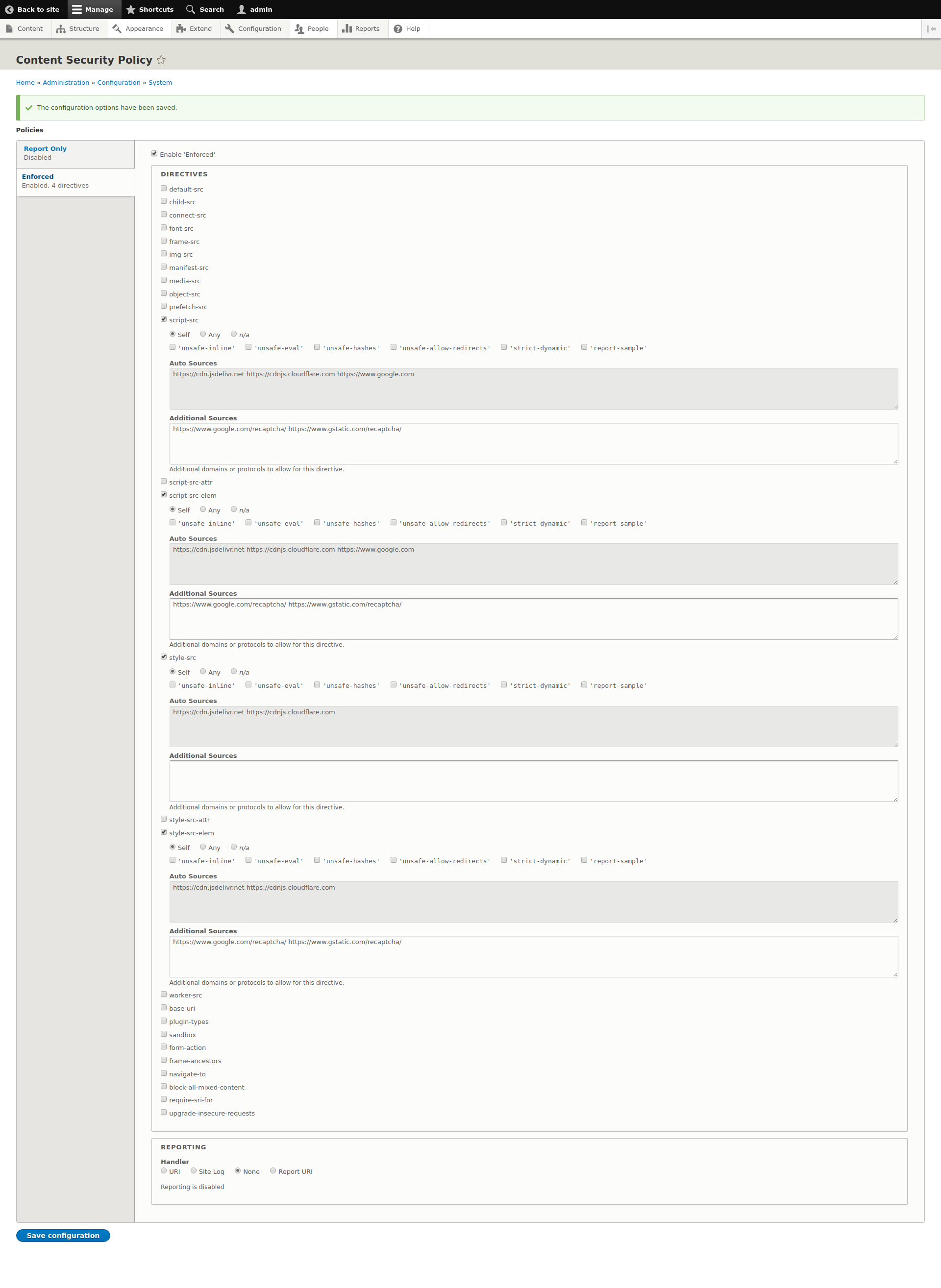
this looks like reCAPTCHA script is violating CSP policy on your website, are you using CSP module maybe? https://www.drupal.org/project/csp
I've been able to reproduce the error with that module enabled, to fix this I had to follow this doc:
https://developers.google.com/recaptcha/docs/faq#im-getting-an-uncaught-...
So in CSP settings I've configured additional sources recommended by recaptcha docs , see attached screenshot
Comment #8
jestinijames commentedHi @sandboxpl. Thank you for your solution. It has helped me move forward. Unfortunately, the key I used for the domain does not work. When I submit, I get:
Error: Invalid site key or not loaded in api.js: CORRECT_SITE_KEY (This has the correct site key)
Comment #9
priya sundharam commentedHi Sandboxpl,
I was searching for reCaptcha v3 module for Drupal 8. Unfortunately, its not there for drupal 8. But Simple reCaptcha module provides the feature to implement v2(invisible recaptcha), so i have enabled and configured by reviewing the following article.
https://www.drupal.org/project/simple_recaptcha
1. Installed using composer
2. Generated api keys(Site and Secret key) & configured same in the following url admin/config/services/simple_recaptcha
3. Configured webform id in the following url
admin/config/services/simple_recaptcha
Tried by adding recaptcha handler to the webform in the following url
/admin/structure/webform/manage/{webform}/handlers
Invisible captcha widget is rendering in the form, but always getting the following error while submitting the form,
There was an error during validation of your form submission, please try to reload the page and submit form again.
Did i miss anything here?
Clarification Needed: When I configure for invisible captcha, score value configuration is appearing. Here, what is the connection between score value and invisible captcha. Can you please clarify me here?
Score value configuration is for V3 google reCaptcha and Invisible captcha will come under V2 google recaptcha
Comment #10
sandboxplRe #8:
@jestinijames this is usually happening when keys are in conflict, f.e. trying to call reCAPTCHA v3 functions with v2 keys or other way around, please make sure that you're reCAPTCHA type in settings (admin/config/services/simple_recaptcha) is matching with used keys, then clear the cache. This is quite important as library is dynamic and for v3 the required "?render" part is being added on cache rebuild:
https://git.drupalcode.org/project/simple_recaptcha/blob/8.x-1.x/simple_...
If your configuration is fine, please provide me steps to reproduce configuration of your modal forms and I'll try to debug it on my side
Re #9:
@Priya Sundharam when you configure protection for webform, there's no need to configure it twice. Please remove webform form ID from admin/config/services/simple_recaptcha and leave webform handler configured only. Then test out the form again, if it fails, please check what's going on in browser's console and dblog page, every failed submission leaves dblog entry with error code.
Regarding reCAPTCHA score, this is needed for reCAPTCHA v3 (invisible), you configure desired score from 0 to 100, which will be compared with reCATPCHA response. If reCAPTCHA response contains lower score, form submission will be blocked, plese check following page:
https://developers.google.com/recaptcha/docs/v3#interpreting_the_score
Comment #11
priya sundharam commentedHi Sandboxpl,
Thanks for the message.
As you said I have configured for reCaptcha v3 (invisible). Invisible capcha widget is rendering but still getting the same error.
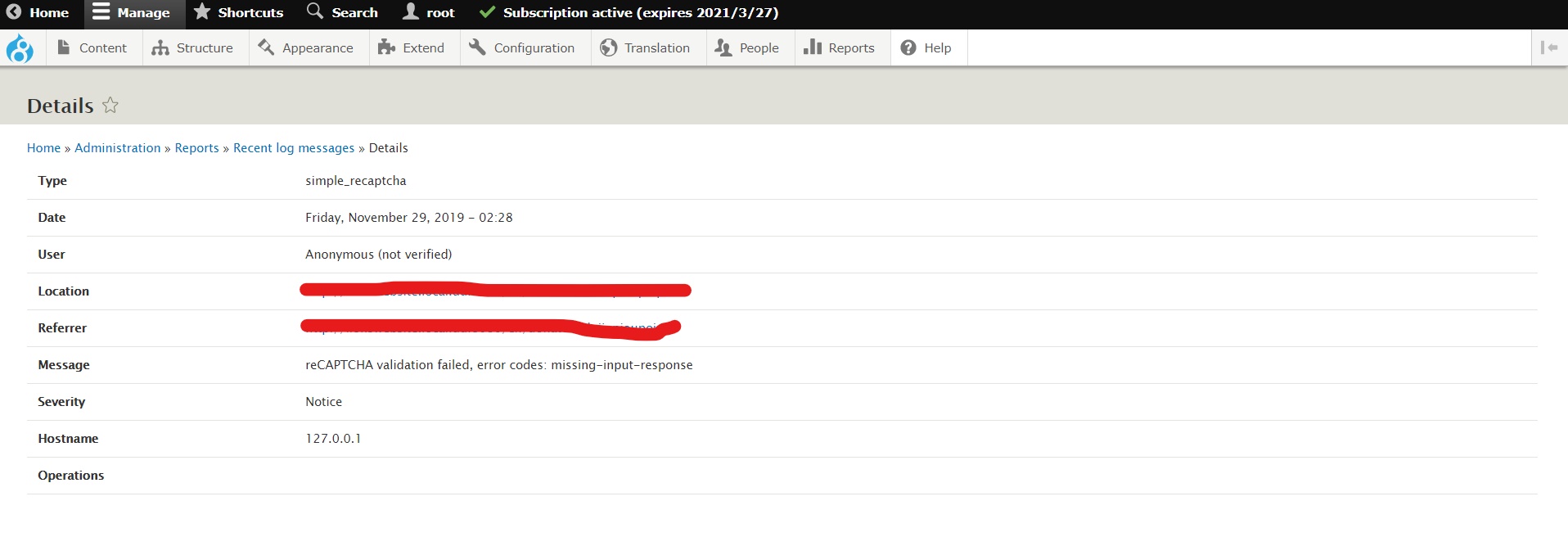
In browser's console, I'm not getting any error related to captcha and in dblog page i'm getting the following error message.
reCAPTCHA validation failed, error codes: missing-input-response
Apart from configuration, do i need to do anything to make this work?
Thanks,
Priya Sundharam
Comment #12
sandboxplHi @Priya Sundharam,
can you provide me an YAML export of your webform so I can try it out ?
You can do it at /admin/config/development/configuration/single/export
Comment #13
priya sundharam commentedHi Sandboxpl,
Thanks for your message.
below is the yaml export of my webform.
Comment #14
sandboxpl@Priya Sundharam , it works for me, please check following screenshots and make sure that you've got same settings:
1. Key settings in google reCAPTCHA admin (https://www.google.com/recaptcha/admin/) should like like this: https://imgur.com/fhQ7eUW
please pay attention to reCAPTCHA type and Domains
2. Simple reCAPTCHA config (/admin/config/services/simple_recaptcha): https://imgur.com/gjfQUWd
3. Webform handler (/admin/structure/webform/manage/donation/handlers): https://imgur.com/EkYbYzH
Also, please check for any erros in browser's console when you submit your webform,
missing-input-response error is occurring when validation is trying to verify empty response ( https://developers.google.com/recaptcha/docs/verify )
This is handled with JS so any JS-ish error can have impact on that
Comment #15
priya sundharam commentedHi Sandboxpl,
I am also having the same configuration settings but always getting the same error. I've also reviewd all the links which you have shared. Please find screenshots of my recaptcha v3 configuration settings and let me know if anything needs to be done.
Comment #16
sokru commentedI also had this on V2, found out it works on Seven and Bartik, but not on a custom theme. This is because simple_recaptcha javascript assumes that form submit button is not wrapped on a div element. I attached an a patch that gives more flexibility to template structure, should work with both V2 and V3.
Please review.
Comment #18
sandboxpl@sokru nice catch! This indeed could break the flow, and leave hidden token element empty resulting with validation error.
I've tested the patch with one of my custom project where I've got webforms themed a little, and I was able to reproduce same issue and fix it with your patch, I've committed fix to dev already.
@Priya Sundharam could you retest your webforms with patch #16 or dev version of the module? I would be nice to see it this fixes your problem as well
Comment #19
usmanjutt84I just disable ajax submission from webform then it works fine.
Comment #20
sandboxpl@usmanjutt84
this issue is active in #3083022
Comment #22
sandboxplI've added info about CSP policy to the troubleshooting guide in README file: https://git.drupalcode.org/project/simple_recaptcha
In #3083022 I've added support for AJAX forms and bunch of fixes and improvements.
I'm closing this issue for now, please check new code , or new release of the module which will arrive soon.
Thanks for the feedback every1 !
Comment #24
harshitasHi Sandboxpl,
i am getting this issue "reCAPTCHA validation failed, error codes: invalid-input-response" in error-log when submitting webform. i am verifying captcha code, but sitll form is not submitting.
i added simple_recaptcha_webform in handler.
Comment #25
joshua.boltz commentedI am seeing the same issue as @harshita1490. I have a form that submits via Ajax, does some things with the form data, and that all works. But after it does it's thing, if I go to another page or reload the current page, I see the "reCAPTCHA validation failed, error codes: invalid-input-response" error.